Accounting Software With Best Invoicing Features in 2026: 9 Tools Compared
By ToolNimba Editorial Team November 18, 2026 8 min read
We did not test these tools hands-on. Picks are based on vendor documentation and public information. Read our editorial policy and disclosure.

- Top pick
 QuickBooks Online
Small businesses that need full accounting
Starting price$38 per monthCheck out QuickBooks OnlineRead our review - Runner-up
 FreshBooks
Freelancers and service businesses
Starting price$23 per monthCheck out FreshBooksRead our review - Also great
 Xero
Teams that need unlimited users
Starting price$27 per monthCheck out XeroRead our review
How we researched this
We compared official pricing and feature pages, app store listings, privacy policies and public user reviews. Prices change, so check the provider's site before you pay.
Key takeaways
- QuickBooks Online is our pick for most small businesses because invoicing connects directly to accounting, reporting, and tax preparation.
- FreshBooks is the friendliest choice for service businesses that live on invoices and billable time.
- Xero suits teams that need unlimited users and clean multi-currency invoicing without per-seat fees.
- Wave and Zoho Invoice are strong free starting points for very small businesses with simple invoicing needs.
- Payment processing fees and plan limits matter as much as the monthly price, so check both before you switch.
Quick comparison
| Name | Best for | Starting price | Free plan | |
|---|---|---|---|---|
| QuickBooks Online | Small businesses that need full accounting | $38 per month | No | Visit |
| FreshBooks | Freelancers and service businesses | $23 per month | No | Visit |
| Xero | Teams that need unlimited users | $27 per month | No | Visit |
 Zoho Books | Budget-conscious businesses | Free | Yes | Visit |
 Wave | Solo owners starting out | Free | Yes | Visit |
 Square Invoices | Fast payment collection | Free | Yes | Visit |
 Stripe Invoicing | Online businesses and subscriptions | See website | No | Visit |
 Zoho Invoice | Free standalone invoicing | Free | Yes | Visit |
 Sage Accounting | Established businesses that want a known brand | See website | No | Visit |
The best accounting software with invoicing features
Good invoicing is more than a pretty template. The best accounting software with invoicing features lets you send a professional invoice in minutes, accept payment online, chase late payers automatically, and see at a glance who owes you money. We compared official pricing and feature pages to find tools that do that well.
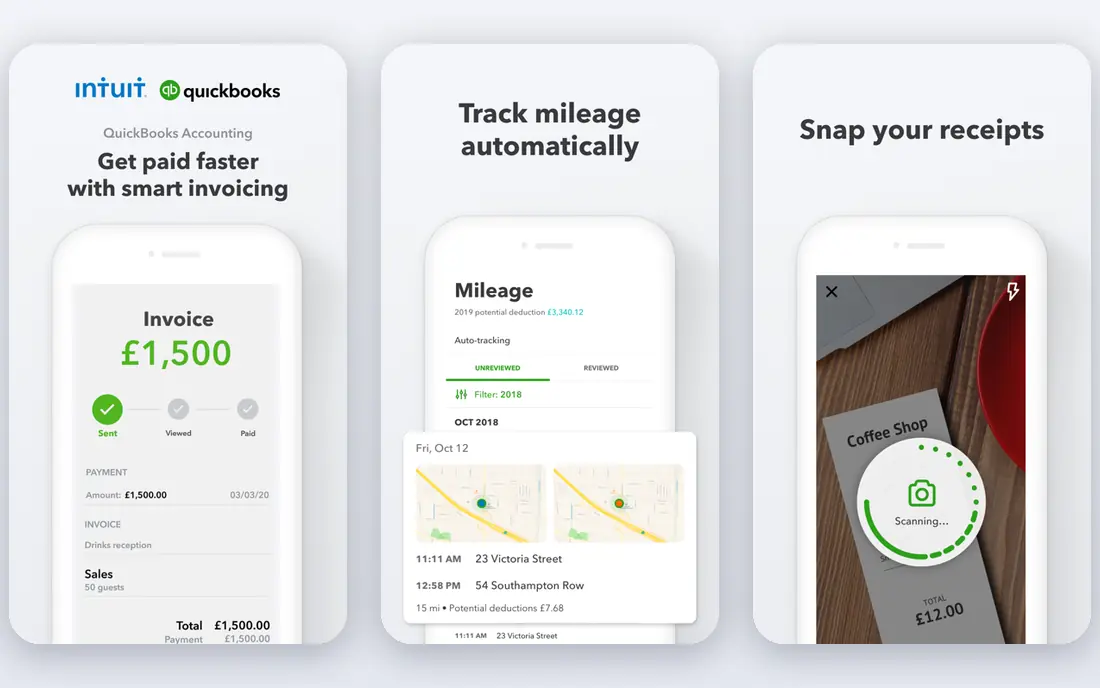
QuickBooks Online is the default for a reason. When you send an invoice, the sale, tax, customer balance, and reports update together, so month-end work is far less painful. Recurring invoices, payment reminders, progress invoicing, and online payment links are all part of the core workflow, not bolted-on extras.
The downside is cost and complexity. A very small freelancer may not need inventory, payroll add-ons, or deep reporting. For a growing business with an accountant, though, QuickBooks is often the easiest choice, because most accountants already know it well.
- Invoicing tied to full bookkeeping
- Wide accountant support
- Strong reporting
- Higher price than simpler tools
- Learning curve for new users
FreshBooks is built around getting paid for services. Creating an invoice from tracked time or an estimate takes minutes, and automatic reminders take over the awkward job of chasing late payments. Clients can pay online, and the dashboard shows outstanding invoices clearly.
It is less deep than QuickBooks for inventory or complex accounting, and lower plans limit billable clients. If your business is mainly services and time, that trade is worth it. FreshBooks feels faster for daily invoicing than a full accounting suite.
- Clean invoicing and estimates
- Automatic payment reminders
- Time tracking included
- Lighter pure accounting depth
- Client limits on lower plans
Xero is a strong pick when several people need access. Unlimited users remove the per-seat tax that makes other tools expensive as a team grows. Invoicing is clean, with recurring invoices, online payments, reminders, and quote-to-invoice conversion built in.
The lowest plan caps invoices and bills, so a busy business should check limits before subscribing. For a team that values collaboration and clear pricing, Xero is often the best balance of power and cost.
- Unlimited users on every plan
- Strong bank feeds
- Good multi-currency support
- Invoice and bill limits on the lowest plan
- Payroll needs an add-on in the US
Zoho Books punches above its price. The free plan suits businesses under a revenue threshold, and paid plans add workflow automation, client portals, recurring invoices, and payment reminders. For a business already using Zoho CRM or Zoho Inventory, the connection is a clear bonus.
Outside the Zoho system, integrations are still solid, but the experience is smoothest for Zoho users. If cost is the main barrier, Zoho Books is the first free option we would test before paying for a bigger suite.
- Real free plan for small businesses
- Strong automation
- Wide Zoho integrations
- Best value inside the Zoho system
- Some features need higher plans
Wave is the simplest free start in this list. You can create and send unlimited invoices, accept payments, and track income and expenses without a monthly fee. For a side business or a new freelancer, that removes the risk of paying for software before income is steady.
The limits show up as you grow. Wave is built for the US and Canada, and some features, such as payroll, cost extra. Still, for a solo owner who mainly needs clean invoices and basic books, Wave is hard to beat on value.
- Free invoicing and accounting
- Easy setup
- Good for very small businesses
- US and Canada focus
- Payroll and bank feeds need paid plans
Square Invoices suits businesses that sell in person as well as online. Invoices, estimates, contracts, and payment links work together, and customers can pay by card quickly. Deposits and milestone payments help service businesses get paid in stages rather than waiting until the end.
It is not a replacement for full double-entry accounting on its own. Pair it with accounting software if you need detailed reports and tax preparation. As a payment-first invoicing tool, though, Square is fast and reliable.
- Free invoicing
- Easy card payments
- Deposits and milestone billing
- Not a full accounting system
- Best for businesses already using Square
Stripe Invoicing is built for businesses that bill online. It handles one-off invoices, subscriptions, prorations, tax calculation, and reminders, with payment support across many countries and methods. Developers can also automate invoicing through the Stripe platform.
The catch is the fee model. Stripe charges a percentage on paid invoices rather than a flat monthly fee, so high-volume businesses should model total cost. For a software, agency, or online service business, Stripe is often the most flexible invoicing engine available.
- Strong recurring billing
- Global payment support
- Detailed invoice customization
- Per-invoice fees apply
- Less friendly for offline or paper-based billing
Zoho Invoice is different from Zoho Books: it is invoicing only, and it is free. That makes it ideal for a freelancer who needs professional invoices, estimates, recurring billing, and a client portal, but who tracks accounting elsewhere or with an accountant.
If you later need full books, you will need to move to Zoho Books or another accounting tool. As a starting point, though, Zoho Invoice gives small businesses polished invoicing without a subscription, which is rare.
- Completely free invoicing tool
- Recurring invoices
- Client portal included
- No full accounting
- Separate tool if you later need books
Sage Accounting covers invoicing, expenses, bank reconciliation, and reporting in one system. It suits businesses that want a long-established vendor and a clear path from basic accounting to payroll and more advanced tools as they grow.
The interface is less modern than FreshBooks or Xero, and pricing should be checked on the vendor site for your region. For a business that values stability and accountant support over flash, Sage remains a credible choice.
- Solid invoicing and accounting
- Cash flow tools
- Accountant network
- Pricing varies by plan and region
- Interface feels more traditional
How we picked these
We compared official pricing and feature pages, app store listings, and public reviews, focusing on invoicing first: templates, recurring billing, payment links, reminders, estimates, and customer balances. We favored tools where invoicing connects to real accounting, not just a standalone invoice maker, and we noted free plans and fee models where they change the true cost. We did not claim hands-on testing.
What to check before you buy
Start with how you actually get paid. If clients pay by card online, payment links and processing fees matter most. If clients pay by bank transfer on terms, reminders, aging reports, and recurring invoices matter more. Match the tool to that payment pattern, not to a feature list.
Next, check plan limits. Count monthly invoices, billable clients, and users, and ask what happens when you exceed them. A cheap plan that forces an upgrade in month three is not cheap. Also confirm whether payroll, inventory, or multi-currency support is included or an add-on.
Finally, test the client experience. Send yourself a test invoice and pay it. If the payment page is confusing, clients will delay payment. A clean client portal and clear payment options often do more for cash flow than any single accounting feature.
Sources
Frequently asked questions
What is the best accounting software with invoicing features?
QuickBooks Online is our top all-round pick, because invoicing, accounting, and reporting work together. FreshBooks is better for pure service invoicing, while Xero is better for teams that need unlimited users.
What is the best invoicing feature in accounting software?
Automatic payment reminders and online payment links have the biggest effect on cash flow. Recurring invoices come next for retainer and subscription businesses, because they remove monthly manual work.
Is there free accounting software with invoicing?
Yes. Wave offers free invoicing and accounting, Zoho Books has a free plan for smaller businesses, and Zoho Invoice is free for invoicing alone. Check revenue limits and paid add-ons before relying on a free plan long term.
Can accounting software send recurring invoices?
Most tools on this list can, including QuickBooks Online, FreshBooks, Xero, Zoho Books, and Stripe Invoicing. Set the schedule, payment terms, and reminder rules once, then review the sent invoices each month.
Does invoicing software charge for payments?
Many tools are free to send invoices but charge processing fees when a client pays by card. Square and Stripe use percentage-based fees, while other tools add payment processing as a separate service. Always check the payment fee, not just the subscription price.
Should I use invoicing software or full accounting software?
Use full accounting software if you need bank reconciliation, tax reports, payroll, or inventory. Use standalone invoicing if you only need to bill clients and your accountant handles the books. Many small businesses start with invoicing and move to full accounting as they grow.