Best Journal App in 2026: 9 Apps Compared
By ToolNimba Editorial Team October 30, 2026 8 min read

- Top pick
 Day One
Polished all-round journaling
Starting priceFreeCheck out Day OneRead our review - Runner-up
 Apple Journal
Free built-in journaling on Apple devices
Starting priceFreeCheck out Apple JournalRead our review - Also great
 Journey
Cross-platform journaling
Starting priceFreeCheck out JourneyRead our review
How we researched this
We compared official pricing and feature pages, app store listings, privacy policies and public user reviews. Prices change, so check the provider's site before you pay.
Key takeaways
- Day One is our pick for most people, with polished multimedia journaling, encryption, and strong Apple integration.
- Apple Journal is the best free option, built into iPhone, iPad, and Mac with on-device suggestions.
- Journey is the best cross-platform journal, working across Apple, Android, Windows, and web.
- Rosebud is the best AI-guided journal, with prompts and reflection that help you think through your entries.
- Diarium is the best one-time purchase option, with no subscription and sync through your own cloud.
Quick comparison
| Name | Best for | Starting price | Free plan | |
|---|---|---|---|---|
| Day One | Polished all-round journaling | Free | Yes | Visit |
| Apple Journal | Free built-in journaling on Apple devices | Free | Yes | Visit |
| Journey | Cross-platform journaling | Free | Yes | Visit |
 Rosebud | AI-guided reflection and prompts | Free | Yes | Visit |
 Diarium | One-time purchase, offline-first journaling | Free | Yes | Visit |
 Penzu | Web-first private journaling | Free | Yes | Visit |
 Grid Diary | Guided, templated journaling | Free | Yes | Visit |
 Stoic | Guided daily reflection and mood check-ins | Free | Yes | Visit |
 Obsidian | Notes-based journaling with local control | Free | Yes | Visit |
The best journal apps
A good journal app makes daily writing easy, private, and easy to revisit, and the best choice depends on your devices, privacy needs, and whether you want prompts or a blank page. The nine apps below cover polished, free, cross-platform, AI-guided, and one-time purchase options, all actively available in 2026.
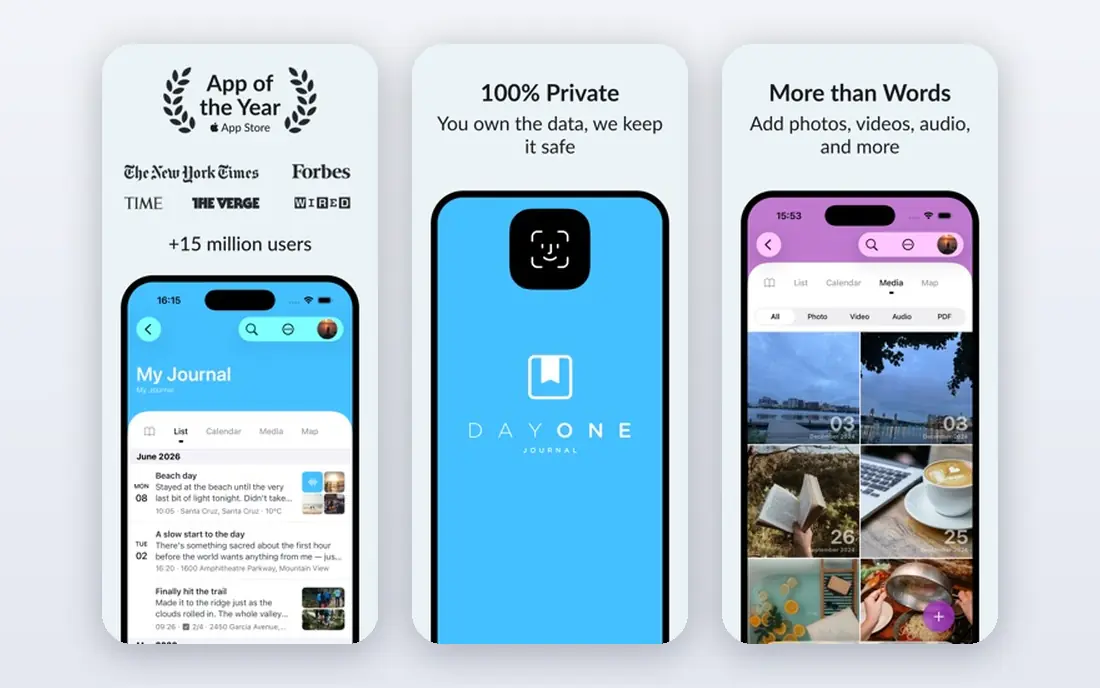
Day One is the reference journal app, with unlimited journals and entries, photos, video, audio, and drawings, plus automatic metadata for weather, location, and activity. Its end-to-end encryption protects private writing, On This Day recall surfaces old entries, and you can print physical books from your journals. Basic is free, Silver is 49.99 dollars a year for sync and media, and Gold is 74.99 dollars a year adding AI reflection features.
The best features sit behind paid tiers, and Android and web versions lag behind Apple apps. But for Apple users who want a polished, private, long-term journal, Day One remains the best overall pick.
- End-to-end encryption
- Multimedia entries
- On This Day recall
- Book printing
- Best features need a paid tier
- Android and web lag behind Apple apps

Apple Journal comes free with iPhone, iPad, and Mac, with on-device suggestions that prompt you with photos, workouts, places, and music from your day. Entries are protected by device and app lock, and suggestions are generated on-device, which suits privacy-conscious writers. There is no subscription and no separate account to manage.
It is Apple only, and export and template features are thinner than Day One's. But if you live in Apple's ecosystem and want a free, private journal that is already installed, Apple Journal is the obvious starting point.
- Free on iPhone, iPad, and Mac
- On-device suggestions
- Device lock and privacy
- Apple only
- Fewer export and template features than Day One
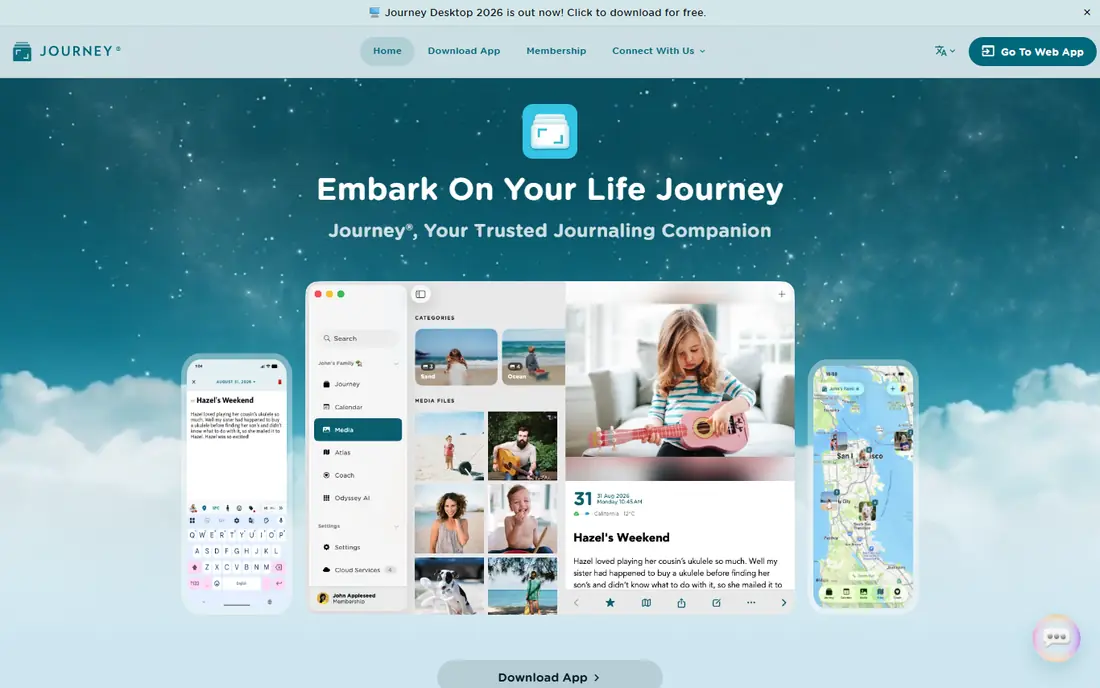
Journey is the best cross-platform journal, working across Mac, iPhone, iPad, Android, Windows, and web, with rich text, media, and an end-to-end encryption option. That breadth suits households and workers who switch devices often, since your journal follows you everywhere. Free covers basic journaling, with Premium from around 4.17 dollars a month or 49.99 dollars a year, and a lifetime option.
Full features need a paid tier, and AI coaching is limited on lower plans. But for cross-platform journaling without Apple lock-in, Journey is the best choice.
- Works on Apple, Android, Windows, and web
- Rich media
- End-to-end encryption option
- Paid tiers needed for full features
- AI features are limited on lower plans
Rosebud is an AI journal that guides reflection with prompts, follow-up questions, and weekly insights drawn from your entries. That guidance helps writers who stare at a blank page, turning journaling into a conversation that surfaces patterns in mood, goals, and habits. Entries are encrypted with app lock, and a free tier covers basic journaling.
Paid plans run around 8.99 dollars a month or 107.99 dollars a year for full AI features. Blank-page writers may prefer Day One or Obsidian. But for guided, reflective journaling, Rosebud is the best AI option here.
- AI prompts and reflection
- Encrypted entries
- App lock
- Weekly insights
- Paid plan from 8.99 dollars a month
- AI focus may not suit blank-page writers
Diarium is an offline-first journal with a one-time Pro purchase from 14.99 dollars, avoiding subscriptions entirely. You sync through your own cloud storage, such as OneDrive or Google Drive, which keeps your data under your control and avoids a vendor lock-in subscription. The free tier covers basic journaling on each platform.
It is less polished than Day One, and sync setup needs your own cloud account. But for writers who dislike subscriptions and want offline-first journaling, Diarium is the best value option.
- One-time Pro purchase from 14.99 dollars
- Offline-first
- Sync via your own cloud
- Less polished than Day One
- Sync setup needs your own cloud storage
Penzu is a web-first private journal with iPhone and iPad apps, built around password protection, locks, and private-by-default entries. That web focus suits writers who journal at a desk and want a simple, private diary without a complex app. Free covers basic journaling, with paid plans from 19.99 dollars a year.
Full features need a paid tier, and the interface feels dated next to Day One or Journey. But for web-first, private journaling, Penzu remains a reliable, long-running choice.
- Web-first with mobile apps
- Password and lock features
- Private by default
- Paid tiers needed for full features
- Interface feels dated next to Day One
Grid Diary structures journaling around a grid of prompts and templates, so each day's entry covers the same questions: what you did, how you felt, what you are grateful for, and what you plan next. That structure helps writers who want consistency and reflection without deciding what to write each day. Free covers basic use, with premium from 2.99 dollars a month or 22.99 dollars a year.
The template structure can feel restrictive for free-form writers. But for guided, habit-forming journaling, Grid Diary's prompts are genuinely helpful.
- Grid-based prompts and templates
- Structured daily entries
- Affordable premium
- Template structure may feel restrictive
- Less free-form than Day One
Stoic combines journaling with guided reflection, mood check-ins, and habit tracking, drawing on Stoic philosophy for daily prompts about what you can control and what matters. Its clean design and prompt-driven flow suit morning and evening routines, with app lock for privacy. Free covers basic journaling, with premium and a separate AI plan for full features.
Journal depth is below Day One's, and AI features need a separate plan. But for a daily reflection routine that combines journaling, mood, and habits, Stoic is the best guided option.
- Prompt-driven reflection
- Mood and habit check-ins
- App lock
- Clean design
- AI features need a separate plan
- Journal depth below Day One
Obsidian is a local-first notes app that works well as a journal, with daily notes, templates, linking between entries, and a large plugin ecosystem. Your entries live in plain Markdown files on your device, giving you full control and easy export, with no vendor lock-in. Personal use is free, with sync from 4 dollars a month if you want cloud sync.
Journaling needs some setup with templates and daily notes, unlike Day One's ready-made flow. But for writers who want their journal inside a larger notes system they fully control, Obsidian is the best choice.
- Local-first vaults
- Free for personal use
- Powerful linking and plugins
- Daily notes
- Setup needed for journaling templates
- Sync costs extra from 4 dollars a month
How we picked these
We compared official pricing pages, platform support, privacy features, and user reviews for journal apps actively available in 2026. We favored apps with real journaling features, not just notes, and we covered free, paid, cross-platform, AI, and one-time purchase options. We did not claim hands-on testing; our comparison rests on published specifications, pricing, and public user reviews.
How to build a journaling habit
Pick the app you will actually open. A polished app you ignore helps less than a simple app you use daily, so start with the free option on your main device and add paid features only after a month of consistent writing. Set a small, fixed time, such as five minutes after breakfast or before bed, and keep entries short at first.
Also decide what your journal is for. If it is reflection, prompts from Rosebud, Grid Diary, or Stoic help. If it is memory, Day One's media and On This Day recall matter more. If it is privacy, local-first options like Obsidian or Diarium give you the most control. Match the app to the purpose, and the habit follows more easily.