Best Accounting Software for Contractors in 2026: 9 Tools Compared
By ToolNimba Editorial Team October 31, 2026 11 min read

- Top pick
 QuickBooks Online
Small contractors and wide integrations
Starting priceSee websiteCheck out QuickBooks OnlineRead our review - Runner-up
 Sage 100 Contractor
Mid-size contractors and job costing
Starting priceSee websiteCheck out Sage 100 ContractorRead our review - Also great
 Sage 300 Construction and Real Estate
Large contractors and developers
Starting priceSee websiteCheck out Sage 300 Construction and Real EstateRead our review
How we researched this
We compared official pricing and feature pages, app store listings, privacy policies and public user reviews. Prices change, so check the provider's site before you pay.
Key takeaways
- QuickBooks Online suits small contractors who want wide integrations and a familiar system.
- Sage 100 Contractor and Sage 300 CRE suit mid-size and large contractors with deeper job cost needs.
- Foundation Software suits contractors with complex payroll, including certified and union payroll.
- Match the tool to your project size and payroll complexity, not just to monthly price.
Quick comparison
| Name | Best for | Starting price | Free plan | |
|---|---|---|---|---|
| QuickBooks Online | Small contractors and wide integrations | See website | Free trial | Visit |
| Sage 100 Contractor | Mid-size contractors and job costing | See website | No | Visit |
| Sage 300 Construction and Real Estate | Large contractors and developers | See website | No | Visit |
 Foundation Software | Contractor payroll and job costing | See website | No | Visit |
 Sage Intacct Construction | Growing multi-entity firms | See website | No | Visit |
 Viewpoint Vista | Enterprise contractors | See website | No | Visit |
 Xero | Small trades and simple books | See website | Free trial | Visit |
 FreshBooks | Service contractors and invoicing | See website | Free trial | Visit |
 Buildertrend | Home builders and remodelers | See website | No | Visit |
The best accounting software for contractors
Contractors need job costing, progress billing, retainage, and payroll in a way that general accounting tools do not always provide. The tools below range from accessible small-business accounting to full construction ERP systems.
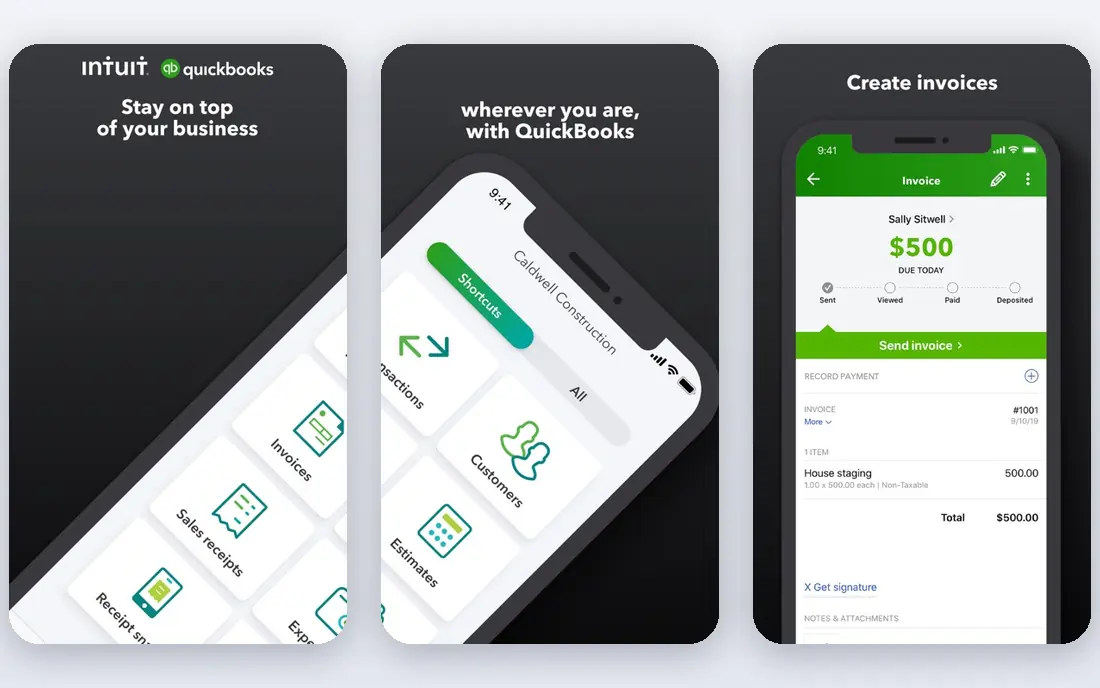
QuickBooks Online suits small to mid-size contractors who want an accessible, widely supported system. QuickBooks Online is a useful pick for contractors who need accounting that understands jobs, not just general books. It offers project tracking, progress invoicing, retainage handling, and many integrations, and it suits teams that track costs by project, phase, or client. For construction, job-level profit is the key report, and generic accounting alone often misses it.
In daily use, QuickBooks Online helps contractors invoice by progress or milestone, track retainage and change orders where supported, and record labour, materials, and subcontractor costs against each job. Payroll and certified payroll needs matter for many contractors, so check whether those features are built in or need an add-on. Mobile access for field teams also matters, since expenses and time are often recorded away from the office.
- Project tracking, progress invoicing, retainage handling, and many integrations
- Invoicing and expense tracking
- Reporting for job profitability
- Construction depth varies
- Add-ons or setup may be needed for full job costing
Sage 100 Contractor suits established contractors who need proven job costing and construction workflows. Sage 100 Contractor is a useful pick for contractors who need accounting that understands jobs, not just general books. It offers job costing, payroll, AIA billing, and project management features, and it suits teams that track costs by project, phase, or client. For construction, job-level profit is the key report, and generic accounting alone often misses it.
In daily use, Sage 100 Contractor helps contractors invoice by progress or milestone, track retainage and change orders where supported, and record labour, materials, and subcontractor costs against each job. Payroll and certified payroll needs matter for many contractors, so check whether those features are built in or need an add-on. Mobile access for field teams also matters, since expenses and time are often recorded away from the office.
- Job costing, payroll, AIA billing, and project management features
- Invoicing and expense tracking
- Reporting for job profitability
- Construction depth varies
- Add-ons or setup may be needed for full job costing
Sage 300 Construction and Real Estate
Best for: Large contractors and developers
Sage 300 CRE suits large general contractors and developers with complex cost structures. Sage 300 Construction and Real Estate is a useful pick for contractors who need accounting that understands jobs, not just general books. It offers deep job cost, payroll, AIA billing, retainage, and compliance tools, and it suits teams that track costs by project, phase, or client. For construction, job-level profit is the key report, and generic accounting alone often misses it.
In daily use, Sage 300 Construction and Real Estate helps contractors invoice by progress or milestone, track retainage and change orders where supported, and record labour, materials, and subcontractor costs against each job. Payroll and certified payroll needs matter for many contractors, so check whether those features are built in or need an add-on. Mobile access for field teams also matters, since expenses and time are often recorded away from the office.
- Deep job cost, payroll, AIA billing, retainage, and compliance tools
- Invoicing and expense tracking
- Reporting for job profitability
- Construction depth varies
- Add-ons or setup may be needed for full job costing
Foundation Software suits contractors with demanding payroll and detailed job cost needs. Foundation Software is a useful pick for contractors who need accounting that understands jobs, not just general books. It offers job costing, certified payroll, prevailing wage, and AIA billing, and it suits teams that track costs by project, phase, or client. For construction, job-level profit is the key report, and generic accounting alone often misses it.
In daily use, Foundation Software helps contractors invoice by progress or milestone, track retainage and change orders where supported, and record labour, materials, and subcontractor costs against each job. Payroll and certified payroll needs matter for many contractors, so check whether those features are built in or need an add-on. Mobile access for field teams also matters, since expenses and time are often recorded away from the office.
- Job costing, certified payroll, prevailing wage, and AIA billing
- Invoicing and expense tracking
- Reporting for job profitability
- Construction depth varies
- Add-ons or setup may be needed for full job costing
Sage Intacct Construction suits fast-growing firms that need cloud ERP, dashboards, and consolidation. Sage Intacct Construction is a useful pick for contractors who need accounting that understands jobs, not just general books. It offers cloud ERP, multi-entity reporting, dashboards, and strong integrations, and it suits teams that track costs by project, phase, or client. For construction, job-level profit is the key report, and generic accounting alone often misses it.
In daily use, Sage Intacct Construction helps contractors invoice by progress or milestone, track retainage and change orders where supported, and record labour, materials, and subcontractor costs against each job. Payroll and certified payroll needs matter for many contractors, so check whether those features are built in or need an add-on. Mobile access for field teams also matters, since expenses and time are often recorded away from the office.
- Cloud ERP, multi-entity reporting, dashboards, and strong integrations
- Invoicing and expense tracking
- Reporting for job profitability
- Construction depth varies
- Add-ons or setup may be needed for full job costing
Viewpoint Vista suits enterprise contractors with self-performed work and complex cost control. Viewpoint Vista is a useful pick for contractors who need accounting that understands jobs, not just general books. It offers job costing, payroll, WIP tracking, and forecasting, and it suits teams that track costs by project, phase, or client. For construction, job-level profit is the key report, and generic accounting alone often misses it.
In daily use, Viewpoint Vista helps contractors invoice by progress or milestone, track retainage and change orders where supported, and record labour, materials, and subcontractor costs against each job. Payroll and certified payroll needs matter for many contractors, so check whether those features are built in or need an add-on. Mobile access for field teams also matters, since expenses and time are often recorded away from the office.
- Job costing, payroll, WIP tracking, and forecasting
- Invoicing and expense tracking
- Reporting for job profitability
- Construction depth varies
- Add-ons or setup may be needed for full job costing
Xero suits small contractors and trades who want simple cloud accounting with easy invoicing. Xero is a useful pick for contractors who need accounting that understands jobs, not just general books. It offers invoicing, expense tracking, bank feeds, and a large app marketplace, and it suits teams that track costs by project, phase, or client. For construction, job-level profit is the key report, and generic accounting alone often misses it.
In daily use, Xero helps contractors invoice by progress or milestone, track retainage and change orders where supported, and record labour, materials, and subcontractor costs against each job. Payroll and certified payroll needs matter for many contractors, so check whether those features are built in or need an add-on. Mobile access for field teams also matters, since expenses and time are often recorded away from the office.
- Invoicing, expense tracking, bank feeds, and a large app marketplace
- Invoicing and expense tracking
- Reporting for job profitability
- Construction depth varies
- Add-ons or setup may be needed for full job costing
FreshBooks suits smaller service contractors who bill by time and need fast invoicing and payments. FreshBooks is a useful pick for contractors who need accounting that understands jobs, not just general books. It offers invoicing, time tracking, expense tracking, and client payments, and it suits teams that track costs by project, phase, or client. For construction, job-level profit is the key report, and generic accounting alone often misses it.
In daily use, FreshBooks helps contractors invoice by progress or milestone, track retainage and change orders where supported, and record labour, materials, and subcontractor costs against each job. Payroll and certified payroll needs matter for many contractors, so check whether those features are built in or need an add-on. Mobile access for field teams also matters, since expenses and time are often recorded away from the office.
- Invoicing, time tracking, expense tracking, and client payments
- Invoicing and expense tracking
- Reporting for job profitability
- Construction depth varies
- Add-ons or setup may be needed for full job costing
Buildertrend suits home builders and remodelers who need project management with financial tools. Buildertrend is a useful pick for contractors who need accounting that understands jobs, not just general books. It offers project scheduling, client communication, budgeting, and invoicing, and it suits teams that track costs by project, phase, or client. For construction, job-level profit is the key report, and generic accounting alone often misses it.
In daily use, Buildertrend helps contractors invoice by progress or milestone, track retainage and change orders where supported, and record labour, materials, and subcontractor costs against each job. Payroll and certified payroll needs matter for many contractors, so check whether those features are built in or need an add-on. Mobile access for field teams also matters, since expenses and time are often recorded away from the office.
- Project scheduling, client communication, budgeting, and invoicing
- Invoicing and expense tracking
- Reporting for job profitability
- Construction depth varies
- Add-ons or setup may be needed for full job costing
How we picked these
We compared official feature pages, pricing pages, app store listings, privacy policies, and public reviews for each product on this list. We kept only products that are live in October 2026 and that fit the topic directly, and we left out products whose pricing or core features we could not verify. Where a vendor does not publish a clear starting price, we say See website rather than guess. We did not claim hands-on testing that we did not do, and we weighed the fit for different users more heavily than brand size alone.
How to choose accounting software for contractors
Start with your job cost reports. List the reports you must produce each month, such as job profit, WIP, retainage, change orders, and payroll by job. If a tool cannot produce those reports cleanly, it will create spreadsheet work every month, even if its general accounting looks good.
Next, check payroll and billing needs. Certified payroll, prevailing wage, union deductions, and AIA progress billing are not standard in general accounting tools. Confirm whether each feature is built in, offered as an add-on, or handled through an integration, and test it with a real project type you run often.
Finally, plan the migration carefully. Move at a project boundary or fiscal period start where possible, and run old and new systems in parallel for one close if you can. Train field staff on mobile time and expense entry, since job cost accuracy depends on timely field data, not just office bookkeeping.
Sources
- https://quickbooks.intuit.com
- https://www.sage.com/en-us/products/sage-100-contractor/
- https://www.sage.com/en-us/products/sage-300-construction/
- https://www.foundationsoft.com
- https://www.sageintacct.com/construction
- https://www.trimble.com/en/products/viewpoint-vista
- https://www.xero.com
- https://www.freshbooks.com
- https://buildertrend.com