Best Free Photo Enhancer Tool in 2026: 9 Tools Compared
By ToolNimba Editorial Team October 31, 2026 9 min read

- Top pick
 Remini
Old photo restoration and faces
Starting priceFreeCheck out ReminiRead our review - Runner-up
 Topaz Photo AI
Professional sharpening and upscaling
Starting priceSee websiteCheck out Topaz Photo AIRead our review - Also great
 Fotor
Quick online enhancement and editing
Starting priceFreeCheck out FotorRead our review
How we researched this
We compared official pricing and feature pages, app store listings, privacy policies and public user reviews. Prices change, so check the provider's site before you pay.
Key takeaways
- Remini is best for faces and old photos, while Topaz Photo AI leads on raw quality for photographers.
- Upscale.media and Upscayl are the strongest truly free options, one online and one local.
- PicWish and Lets Enhance are best when you need batch work, not just one photo.
- AI enhancement can invent detail, so compare the result with the original before printing or publishing.
Quick comparison
| Name | Best for | Starting price | Free plan | |
|---|---|---|---|---|
| Remini | Old photo restoration and faces | Free | Yes | Visit |
| Topaz Photo AI | Professional sharpening and upscaling | See website | No | Visit |
| Fotor | Quick online enhancement and editing | Free | Yes | Visit |
 Upscale.media | Free online upscaling | Free | Yes | Visit |
 Lets Enhance | Batch upscaling for teams | See website | Yes | Visit |
 Upscayl | Free local upscaling on desktop | Free | Yes | Visit |
 PicWish | One click enhancement and batch work | Free | Yes | Visit |
 YouCam Enhance | Face and selfie enhancement | Free | Yes | Visit |
 Adobe Lightroom | Photo editing with AI enhancement | See website | Free trial | Visit |
The best free photo enhancer tools
Free photo enhancement has improved a lot, but free does not mean unlimited or identical. The tools below split into quick mobile enhancers, web upscalers, batch tools, and professional desktop software, so the best pick depends on your photo type and volume.
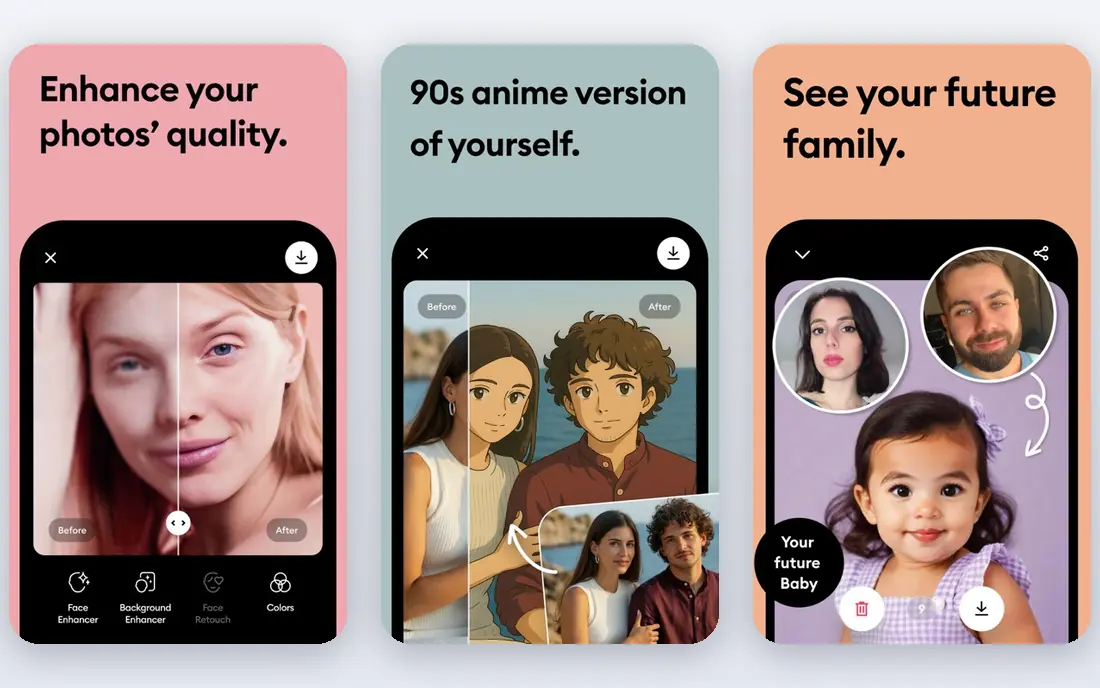
Remini is the app many people reach for first when an old or compressed photo needs rescue, and the reason is focus. It specializes in faces and old photos, so a faded family portrait or a heavily compressed profile picture often comes back sharper and clearer in seconds. The mobile workflow is simple: upload, enhance, and compare before saving.
The free tier is limited, and paid plans can feel expensive if you only need a few photos a year. Results can also look over smoothed on skin, so check the output at full size before printing. For occasional face restoration, Remini is a strong starting point.
- Strong face restoration
- Colorizes black and white photos
- Simple mobile workflow
- Free use is limited
- Paid plans are weekly or monthly
- Results can look over smoothed
Topaz Photo AI is the choice for photographers who need consistent quality across many photos. Its sharpen, denoise, and upscale models handle high ISO noise, motion blur, and low resolution with more control than a one tap mobile app. Batch processing and plugin support for Lightroom and Photoshop also fit a real editing workflow.
The cost and hardware needs are the catch. It is paid desktop software, and processing can be slow on older computers. Dial back the default strength on portraits to avoid a plastic look. For serious photo work, the control is worth it.
- Strong denoise, sharpen, and upscale models
- Batch processing
- Lightroom and Photoshop plugins
- Paid desktop software
- Slower on older machines
- Defaults can over smooth skin

Fotor suits people who want enhancement and basic editing in one browser tab, without installing software. Upload a photo, run the AI enhancer, then adjust brightness, crop, or color in the same place. That combination helps for social posts and small business images where speed matters more than pixel level control.
Free exports can carry limits, so check the output terms before using a photo commercially. AI enhancement also varies by photo type, with faces and well lit scenes doing better than very dark or heavily damaged images. For quick online work, Fotor is convenient and capable.
- Browser based enhancer plus editor
- Batch options
- Simple interface
- Some exports carry limits or watermarks on free plans
- AI results vary by photo
Upscale.media is the most straightforward free option for occasional upscaling. There is no software to install, and the free tier covers a small number of upscales each month, which is enough for many casual users. The interface stays focused on one job, so there is little to learn before your first result.
The limit is volume. If you need dozens of upscales a month, the free tier will run out quickly and a paid plan or desktop tool makes more sense. It also lacks the full editing tools of Fotor or Lightroom. For a few photos a month, it is hard to beat on simplicity.
- Genuinely free tier for occasional use
- Simple upload and upscale
- No software install
- Limited free upscales per month
- Fewer editing tools than full editors
Lets Enhance is built for volume. If you need to upscale many product photos, listing images, or archive scans, batch processing saves far more time than enhancing one photo at a time in a mobile app. Credits rolling over on some plans also helps teams with uneven monthly needs.
It is less appealing as a creative editor, and larger volumes are paid. Solo users with one photo will find a free mobile or web tool simpler. For ecommerce and catalog work, the batch workflow is the reason to choose it.
- Batch processing
- Credits roll over on some plans
- Good for product and listing photos
- Paid for larger volumes
- Interface is more utilitarian than creative editors
Upscayl is the privacy friendly pick in this list, because it runs on your own computer instead of sending photos to a server. It is free and open source, and it can upscale images significantly using local AI models. That matters for sensitive photos and for users who want no subscription at all.
The trade is ease of use. Upscayl is desktop software with a more technical feel, and choosing the right model takes a little learning. Beginners may prefer a web tool first. For free, private upscaling, Upscayl is excellent.
- Free and open source
- Runs locally for privacy
- Upscales up to 16x on supported models
- Desktop only
- Interface is technical for beginners
- Results depend on model choice
PicWish balances simplicity and volume better than most web enhancers. One click enhancement handles clarity, lighting, and resolution, and the web version can batch up to 30 images at once. Multiple modes let you choose standard, HD, or restoration work depending on the photo.
Free downloads may carry limits depending on size and plan, so check before using images for print or sale. Very damaged photos may still need a desktop tool or manual repair. For ecommerce sellers and social creators, PicWish is a practical daily tool.
- One click enhancement
- Batch up to 30 images on web
- Multiple enhancement modes
- Free downloads may carry limits
- High volume needs desktop app or paid plan
YouCam Enhance focuses on portraits and selfies, which is exactly what many phone users need. It sharpens faces, fixes faded color and lighting, and can upscale to higher resolution for profile pictures and social posts. The mobile and web options make it easy to use without desktop software.
It is less suited to outdoor scenes, documents, or heavily damaged archive photos, where a restoration focused tool does better. Free use is also limited. If faces are your main subject, YouCam Enhance is a strong, simple choice.
- Strong portrait enhancement
- Upscale to higher resolution
- Simple mobile and web options
- Free tier limited
- Best for faces rather than outdoor scenes or documents
Adobe Lightroom is the right choice when enhancement is one step in a larger photo workflow. AI denoise and enhance tools sit beside exposure, color, organization, and export controls, so a photographer can fix and finish a photo without switching apps. Large libraries benefit most from its catalog and preset system.
The subscription and learning curve are real barriers for casual users who only need one photo fixed. Lightroom is also more than most people need for a single enhancement. For regular photographers, though, it remains the most complete option here.
- Full editing workflow
- AI denoise and enhance
- Strong organization for large libraries
- Subscription required
- Learning curve for beginners
- Enhancement is part of a larger editor
How we picked these
We compared official feature pages, current pricing pages, app store listings, and privacy policies, along with public reviews, to check what each product actually offers in October 2026. We kept only products that are available now and that fit the topic directly, and we left out tools that were discontinued, region locked in a way that limits most readers, or too narrow for the list. Prices change often, so check the vendor page before you pay, and treat any free plan limit as a starting point rather than a promise for the future.
What to check before you enhance
Start with the photo type. Faces and old portraits favor Remini and YouCam Enhance. Outdoor scenes and product photos favor Topaz, Lets Enhance, or PicWish. ### Free limits and privacy
Check how many free enhancements you get, whether downloads carry watermarks, and whether photos are processed on a server or locally. Upscayl keeps processing local, which helps for private images. ### Realistic expectations
AI enhancement predicts detail, it does not recover detail that was never captured. Slightly soft or compressed photos improve well. Severely blurred or tiny photos may look sharper but can also gain invented textures, so always compare before and after at full size.