Best Pedometer App in 2026: 9 Apps Compared
By ToolNimba Editorial Team October 31, 2026 11 min read

- Top pick
 Pacer
Phone steps with challenges
Starting priceFreeCheck out PacerRead our review - Runner-up
 StepsApp
Clean design and simple tracking
Starting priceFreeCheck out StepsAppRead our review - Also great
 Fitbit
Wearable-based step tracking
Starting priceFreeCheck out FitbitRead our review
How we researched this
We compared official pricing and feature pages, app store listings, privacy policies and public user reviews. Prices change, so check the provider's site before you pay.
Key takeaways
- Pacer is the best phone-only step counter for community challenges, while StepsApp is the best choice for a clean, design-led daily view.
- Apple Health and Google Fit are the best free starting points, because they already track steps on many phones without a new subscription.
- Fitbit suits owners of Fitbit or Pixel Watch hardware, since its best accuracy comes from a wearable rather than a phone alone.
- Phone step counts vary with where you carry the phone, so use trends over weeks, not a single day's total, to judge progress.
Quick comparison
| Name | Best for | Starting price | Free plan | |
|---|---|---|---|---|
| Pacer | Phone steps with challenges | Free | Yes | Visit |
| StepsApp | Clean design and simple tracking | Free | Yes | Visit |
| Fitbit | Wearable-based step tracking | Free | Yes | Visit |
 Google Fit | Free Android step tracking | Free | Yes | Visit |
 Apple Health | Free iPhone step tracking | Free | Yes | Visit |
 Accupedo | Adjustable step sensitivity | Free | Yes | Visit |
 Pedometer by Simple Design | Simple Android step counting | Free | Yes | Visit |
 Sweatcoin | Rewards for walking | Free | Yes | Visit |
 ActivityTracker | Simple daily step history | Free | Yes | Visit |
The best pedometer apps
A good pedometer app does one job well: count steps reliably, show progress clearly, and stay out of the way. Extra features such as challenges, maps, and rewards help some people and distract others, so the best app is the one you will still open in a month.

Pacer is the most complete phone-based pedometer for people who like social motivation. It counts steps using the phone's motion sensors, without a wearable, and it adds GPS-tracked walks, guided plans, and community challenges where friends, family, or colleagues can compete on steps. Syncing with Apple Health, Fitbit, and Garmin lets it pull in wearable data where available. The free tier covers basic step counting and challenges, while Premium, listed at $9.99 per month or $49.99 per year, adds custom goals, advanced plans, and more detailed reports. Some users report double-counting when phone and wearable data combine, so check your sync settings if totals look high. For a phone-only walker who wants groups and challenges, Pacer is the strongest all-round choice.
- Counts steps from the phone alone
- Community challenges and groups
- Syncs with Apple Health, Fitbit, and Garmin
- Premium costs $9.99 per month or $49.99 per year
- Some features, such as custom goals, need Premium
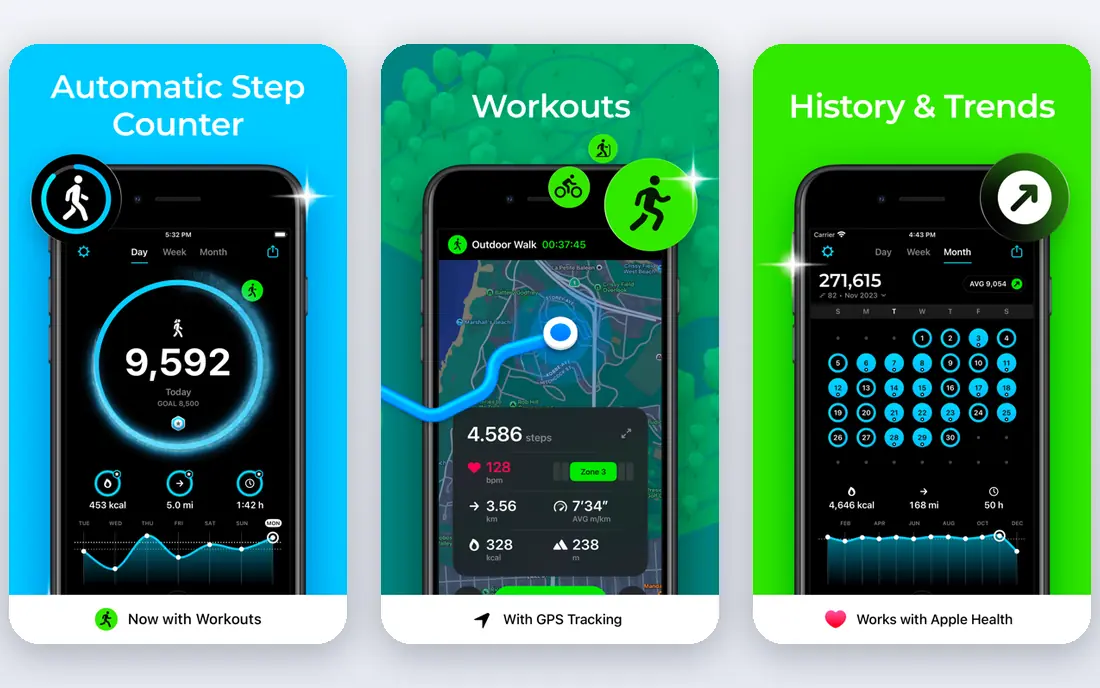
StepsApp turns step counting into a pleasure to check. The interface is clean, with clear daily totals, distance, active calories, and charts for weeks, months, and years, plus widgets and colour themes. It counts steps from the phone, syncs with Apple Health, Google Fit, Garmin, and other wearables, and it works without an account for basic tracking, which suits privacy-conscious users. The free version covers core tracking, while Pro is listed around $19.99 per year in some listings, with other offers showing lower prices, so check the in-app price in your store. Android users see ads on the free tier, while iPhone users get a cleaner free experience. For a walker who wants a beautiful, simple pedometer without a community feed, StepsApp is the best-designed option here.
- Beautiful daily, weekly, and yearly charts
- Apple Watch and wearable sync
- No account needed for basic use
- Android free tier includes ads
- Some advanced features need Pro
Fitbit is the best pedometer app if you already wear a Fitbit tracker or Pixel Watch, because steps are counted all day from the wrist, even when your phone is on a desk. The app shows steps, distance, sleep, heart rate, and activity trends in one dashboard, with challenges and community features for motivation. Phone-only tracking is available, but it is less accurate than wrist tracking. The basic app is free, while Fitbit Premium, listed at $9.99 per month or $79.99 per year, adds detailed sleep analysis, readiness scores, and guided programs. Fitbit data now sits inside Google's health system, which suits Android users and raises privacy questions for others. If you want a wearable-first step counter with a broad health view, Fitbit remains a strong choice.
- Automatic 24/7 step tracking from a wearable
- Broad health dashboard
- Community challenges
- Best accuracy needs Fitbit or Pixel Watch hardware
- Premium costs $9.99 per month or $79.99 per year
Google Fit is the free, no-fuss step counter for Android users. It tracks steps, distance, and active minutes from the phone, and it syncs with Wear OS watches and other fitness apps. Heart Points reward more intense activity, while Move Minutes track general movement, which gives a broader picture than steps alone. There are no ads, no subscription, and no account beyond your Google account. Google Fit is simpler than Pacer or StepsApp, with fewer charts, challenges, and customisation options. iPhone users can use Google Fit, but Apple Health is usually a better fit on iOS. For an Android user who wants free, reliable step tracking without a new app to learn, Google Fit is the easiest starting point, and it pairs well with a dedicated app if you later want more detail.
- Completely free
- Native on many Android phones
- Heart Points and Move Minutes for activity goals
- Less detailed than dedicated pedometer apps
- IPhone support is more limited
Apple Health is already on every iPhone, and it tracks steps from the phone and Apple Watch without any extra app or subscription. It stores steps, distance, flights climbed, and other health data in one place, with privacy controls and encrypted sync through iCloud. Third-party apps such as Pacer and StepsApp can read Apple Health data, so Apple Health often works as the quiet source behind a prettier app. Apple Health has no challenges, groups, or gamification, and its charts are plain compared with StepsApp. That simplicity suits users who want a private, free step record without a social feed. If you want motivation features, add Pacer or StepsApp on top of Apple Health. If you want a free, accurate record with no extra cost, Apple Health alone is enough.
- Completely free and built into iOS
- Accurate phone and Apple Watch step data
- No ads or subscription
- No community challenges or social features
- Charts are functional rather than beautiful
Accupedo suits walkers whose step counts never quite match reality, because it lets you adjust detection sensitivity. Whether you carry a phone in a pocket, a bag, or a hand, or you walk with a shuffling gait, tuning sensitivity can improve accuracy in a way that fixed apps cannot. Widgets, a power-saving mode, detailed statistics, and goal setting round out a practical, if plain, pedometer. The free version includes ads, with Pro listed around $2.99 in some listings, though prices vary by store. The design is older than StepsApp or Pacer, and it lacks community challenges. For a user who cares more about accurate counting than beautiful charts, Accupedo's sensitivity controls make it worth trying, especially if other apps overcount or undercount your steps.
- Adjustable sensitivity for different carrying styles
- Widgets and power-saving mode
- Detailed history
- Design feels older than StepsApp
- Pro features vary by platform
Pedometer by Simple Design
Best for: Simple Android step counting
Pedometer by Simple Design, often called Pedometer Step Counter, is a straightforward Android step counter for users who want no social features and no complex setup. It uses the phone's motion sensors to count steps, lets you pause and reset counts, and offers a GPS training mode for separate walks with pace and distance feedback. Goal setting covers common aims such as staying fit, losing weight, reducing stress, and sleeping better. The app is free, with in-app purchases listed from $2.99 to $39.99 depending on the feature, so check what each purchase adds before buying. The design is basic, and iPhone users should choose Apple Health or StepsApp instead. For an Android user who wants a simple, free pedometer without a community feed, this app does the job with minimal fuss.
- Very simple to use
- Pause and reset controls
- GPS training mode for walks
- In-app purchases vary widely
- Design and features are basic
Sweatcoin turns steps into a currency. Outdoor steps verified by the app earn Sweatcoins, which can be spent in a marketplace on offers, products, and prize draws. That reward model motivates some walkers who find plain step counts boring, and the app adds challenges and social features to keep the habit going. The trade-offs are clear. GPS-based verification uses more battery than a simple pedometer, the app includes rewarded ads, and marketing data sharing is broader than in Apple Health or Google Fit. Step-to-coin conversion is also limited, so Sweatcoin is a motivator, not an income source. For a walker who needs an external reward to keep moving, Sweatcoin can help. For a private, accurate step record, choose Apple Health, Google Fit, or StepsApp instead.
- Earns coins for steps that can be spent on offers
- Marketplace and prize draws
- Social features
- Higher battery use with GPS tracking
- Ads and marketing sharing
- Step conversion is limited
ActivityTracker, also known as Activity Tracker Pedometer, offers a simple, lightweight way to track steps, distance, and calories, with daily and weekly history that is easy to read at a glance. It suits users who want a step record without challenges, maps, or a large social feed, and it works on both iPhone and Android. The interface is plain but clear, which helps for a quick daily check. The free version covers basic tracking, with a subscription listed around $9.99 per year in some listings for extra features. It does not offer the community depth of Pacer or the design polish of StepsApp. For a walker who wants a simple history app that stays out of the way, ActivityTracker is a solid, low-cost option.
- Simple daily and weekly step history
- Works on iPhone and Android
- Lightweight and easy to use
- Fewer social and training features than Pacer
- Some features need a subscription
How we picked these
We compared official app store listings, vendor feature pages, and public reviews for pedometer apps available in 2026, focusing on phone-only accuracy, wearable sync, free tier usability, battery use, privacy, and community features. We included built-in options such as Apple Health and Google Fit alongside dedicated apps, because many users do not need a new subscription to track steps well. We did not claim hands-on testing of every app. Prices vary by store and region, so check the in-app price before subscribing.
Getting more accurate step counts from your phone
Carry your phone in the same place each day, such as a front pocket, for the most consistent counts. A phone left on a desk, in a bag that swings, or in a car will miss steps or add false steps, and no app can fully correct for that. If accuracy matters, a wrist wearable usually beats a phone, because it moves with you all day.
Use trends, not single days
Compare weekly averages rather than one day's total. A day with 4,000 steps after a day with 12,000 steps may reflect a rest day, a desk day, or a phone left at home, not a failure. Set a realistic daily goal, review the weekly trend, and raise the goal slowly.
Check sync settings if totals look wrong
If you use both a phone and a wearable, check whether an app is adding phone steps and wearable steps together. Turning off double-counting in sync settings, or choosing one primary source, usually fixes totals that look far too high.