Best Sales Tools for Teams in 2026: 9 Tools Compared
By ToolNimba Editorial Team November 7, 2026 9 min read

- Top pick
 HubSpot Sales Hub
Teams that want sales and marketing in one place
Starting priceFreeCheck out HubSpot Sales HubRead our review - Runner-up
 Salesforce Sales Cloud
Large or complex sales organisations
Starting price$25 per user per monthCheck out Salesforce Sales CloudRead our review - Also great
 Pipedrive
Small teams that want a visual pipeline
Starting price$14 per user per monthCheck out PipedriveRead our review
How we researched this
We compared official pricing and feature pages, app store listings, privacy policies and public user reviews. Prices change, so check the provider's site before you pay.
Key takeaways
- HubSpot and Zoho give small teams a low-cost start, while Salesforce suits larger teams with admin support.
- Pipedrive and Close win on daily simplicity, while Outreach and Salesloft focus on structured outbound work.
- Apollo stands out when prospect data matters as much as the CRM itself.
- Always price the full seat count and add-ons, since entry prices rarely show the whole bill.
Quick comparison
| Name | Best for | Starting price | Free plan | |
|---|---|---|---|---|
| HubSpot Sales Hub | Teams that want sales and marketing in one place | Free | Yes | Visit |
| Salesforce Sales Cloud | Large or complex sales organisations | $25 per user per month | Free trial | Visit |
| Pipedrive | Small teams that want a visual pipeline | $14 per user per month | Free trial | Visit |
 Zoho CRM | Budget-conscious teams and Zoho users | $14 per user per month | Yes | Visit |
 Close | High-volume inside sales teams | $49 per user per month | Free trial | Visit |
 Outreach | Teams running structured outbound sequences | See website | Free trial | Visit |
 Salesloft | Outbound teams that want cadence and coaching | See website | No | Visit |
 Apollo | Teams that need prospect data plus outreach | See website | Yes | Visit |
 Freshsales | Small teams that want CRM plus calling | $15 per user per month | Yes | Visit |
The best sales tools for teams
Sales tools work best when they match how your team actually sells. A visual pipeline helps one team, while structured sequences help another, and a large CRM helps a third. We compared nine tools on fit, price, and daily workflow, so you can shortlist two or three and test them on real deals.
HubSpot Sales Hub
Best for: Teams that want sales and marketing in one place

Start with the proven option in this group: HubSpot Sales Hub covers contact management, deals, email tracking, and reporting in one system, which keeps small and mid-sized teams from stitching together several tools. It suits teams that want marketing and sales data in the same place and that prefer a guided setup over heavy custom work.
The trade-off is worth naming before you commit. Higher tiers and onboarding fees can lift the total bill well above the entry price, especially as seats are added. Try it with a real example from your own work before you commit to a paid plan.
- Free CRM included
- Email tracking and sequences on paid plans
- Large integration library
- Costs rise quickly on higher tiers
- Some features need onboarding
Salesforce Sales Cloud
Best for: Large or complex sales organisations
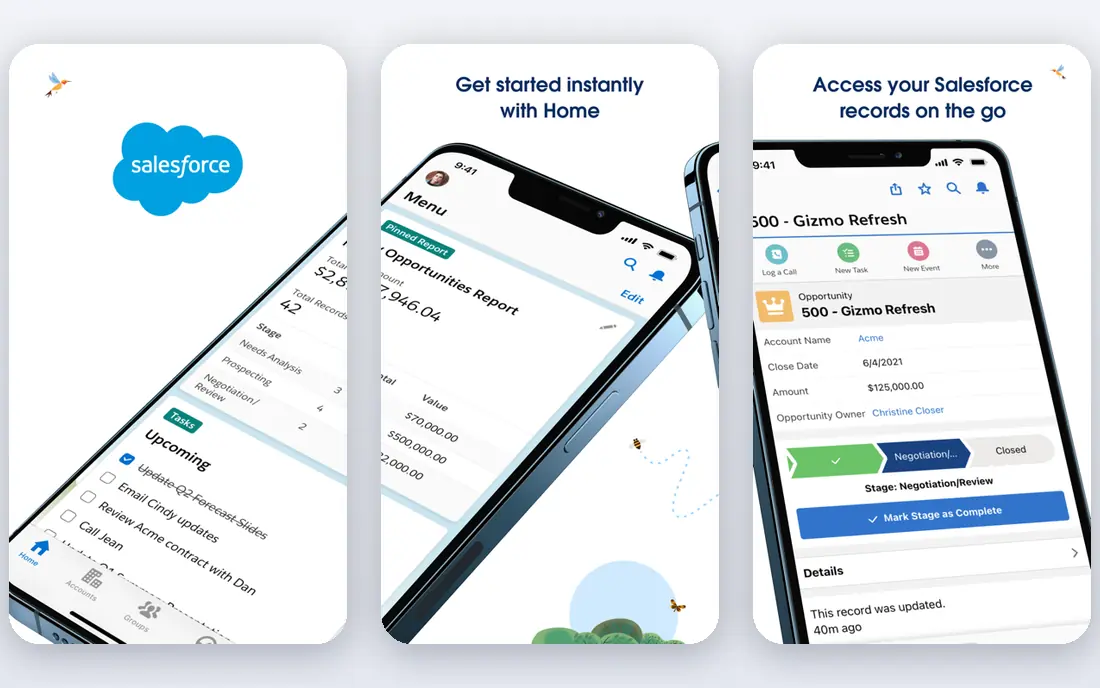
If you want a short setup and a clear daily workflow, consider Salesforce Sales Cloud offers deep customisation, territory and forecast controls, and a large marketplace of add-ons for teams with varied sales processes. It suits larger organisations that have admin support and that need one system to match a detailed sales process.
Before you pay, weigh this limit against the benefit. Smaller teams may pay for power they never use, and a poor setup can slow adoption instead of speeding it up. Use the free tier or trial to test one realistic task, then decide based on that result.
- Deep customisation and reporting
- Huge app ecosystem
- Strong forecasting tools
- Setup often needs admin time
- Pricing and editions can be confusing for small teams
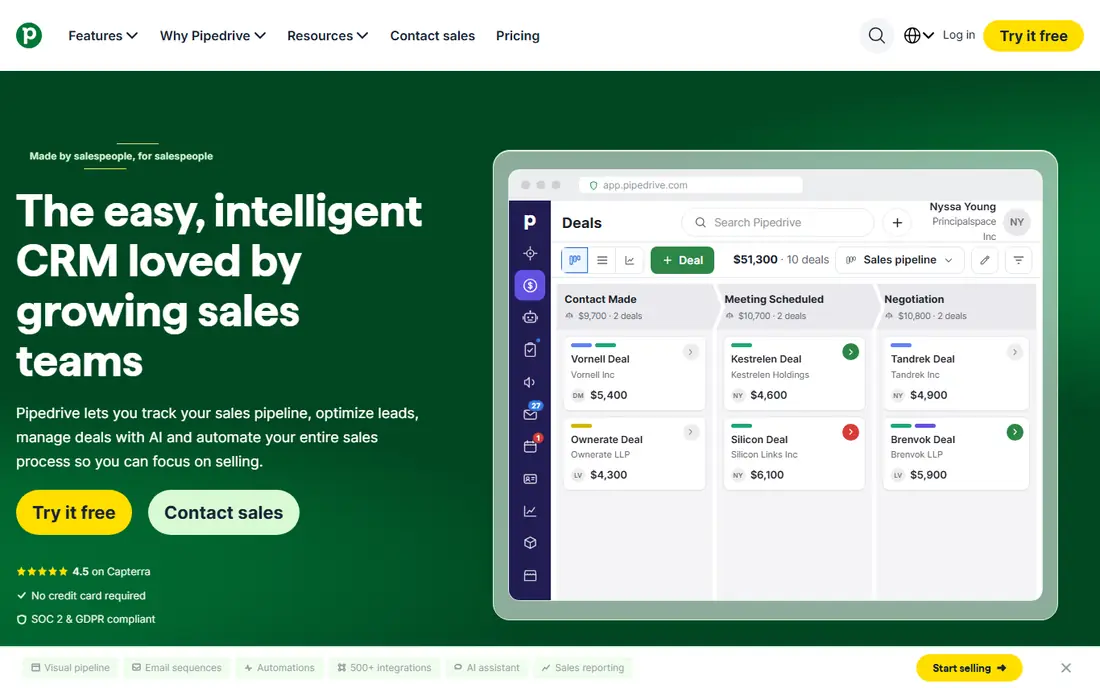
For buyers who value depth and a long track record, Pipedrive keeps the pipeline front and centre, so reps can see deals, next actions, and stalled opportunities without digging through menus. It suits small sales teams that want a simple daily workflow and that value speed over deep customisation.
That strength comes with a clear limit. Teams that need built-in marketing automation may need add-ons, which adds cost and complexity. Compare the plan limits with your actual volume, not with the headline feature list.
- Clear visual pipeline
- Easy to learn
- Useful automation on higher plans
- No free plan
- Marketing features are limited without add-ons
A practical middle ground in this list is Zoho CRM gives small teams a low-cost route to contact, deal, and automation features, with a free plan for very small teams. It suits teams that already use Zoho apps or that want a low starting price with room to grow.
The honest catch is easy to miss on a pricing page. Some modules feel less polished than others, so a trial with your real pipeline is worth the time. Shortlist it, test it for a week, and keep notes on what slowed you down.
- Low entry price
- Free plan for up to three users
- Wide Zoho app family
- Interface can feel uneven across modules
- Setup takes care for larger teams
When price is the first filter, Close is built for reps who live on the phone and in email, with calling and messaging inside the same workflow as deals. It suits inside sales teams that make many touches a day and that want fewer tabs open.
No option here is free of compromise, and this one is no exception. Teams that need broad marketing tools or deep custom reporting may find it narrow. If it passes a small real-world test, it is worth a longer look.
- Built-in calling, email, and SMS
- Fast workflow for outreach-heavy teams
- No free plan
- Marketing and reporting depth is thinner than large CRMs
For people who already work with related tools, Outreach focuses on structured sequences, follow-ups, and engagement signals for outbound teams. It suits sales teams that run repeatable outreach plays and that want coaching data from real activity.
Set expectations before you sign up. Without clear sequence rules and clean data, the tool can add noise rather than focus. Run a pilot with one project first, and only expand if the workflow holds up.
- Sequence and engagement tools for outbound
- Coaching and analytics features
- Enterprise pricing can be high
- Best value needs disciplined sequence management
If you need a specialist rather than a broad all-rounder, Salesloft combines cadences, dialling, and coaching views so managers can see where deals stall. It suits outbound teams that want one place for prospecting steps and manager review.
The weak point shows up most in daily use. Quote-based pricing makes budgeting harder, so ask for the full per-seat and add-on cost early. Test the exact task you will repeat most often, since that is where value shows up.
- Cadence building
- Call and email workflow
- Conversation and coaching tools
- Pricing is quote-based for many teams
- Smaller teams may find it costly
A quieter choice that still covers the core job is Apollo pairs a prospect database with outreach tools, which helps teams find contacts and start sequences without buying two products. It suits prospecting-heavy teams that want data and outreach in a single workflow.
A careful buyer should check this point first. Contact accuracy varies by niche, so verify a sample list before you rely on it for a campaign. Check support, export options, and renewal terms before you rely on it daily.
- Large contact database
- Prospecting and sequence tools in one place
- Data quality varies by segment
- Higher plans are needed for larger outreach volume
To round out the shortlist, Freshsales bundles CRM, phone, and email in a package that is easy to set up for small teams. It suits teams that want a single low-cost system and that do not need heavy custom development.
The final check is about fit, not features alone. Growing teams may hit limits on customisation and reporting as their process gets more complex. Put it beside one other option on this list and compare them on the same task.
- Built-in phone and email
- AI lead scoring on higher plans
- Simple setup
- Advanced customisation is limited
- Some features sit on higher tiers
How we picked these
We compared official feature pages, pricing pages, and app store listings for each product, and we kept only products that exist now and clearly fit the topic. We checked whether the free tier or trial covers a realistic task, and we noted where a headline price leaves out add-ons, seats, or usage limits.
We did not claim hands-on testing we did not do, and we did not invent ratings, user counts, or awards. Where a price could not be verified from the vendor, we wrote See website, and we suggest checking the vendor page again before you buy, since plans change.
How to choose a sales tool for your team
Match the tool to the job you repeat most
Start from the repeated task. If reps spend the day on calls, built-in calling matters more than a long feature list. If managers need forecasts, reporting and pipeline controls matter more. Pick the tool that makes the most common task faster, not the one with the longest list.
Check the total cost, not just the first price
Add up seats, add-ons, and onboarding before you compare prices. A low per-seat price can still cost more than a higher one once calling, automation, or marketing add-ons are included. Ask for a written quote for your exact team size and check renewal terms.
Test before you commit
Run a short pilot with live deals, not sample data. Give two reps the same task in each shortlisted tool and compare time spent, missed follow-ups, and how easy it is to find the next action. The winner should be clear from that test, not from a demo.
Sources
- https://www.hubspot.com/products/sales
- https://www.salesforce.com/sales/
- https://www.pipedrive.com
- https://www.zoho.com/crm/
- https://close.com
- https://www.outreach.io
- https://www.salesloft.com
- https://www.apollo.io
- https://www.freshworks.com/crm/sales/
- https://nethunt.com/blog/top-pipedrive-crm-alternatives/
Frequently asked questions
Which sales tool is best for a small team?
For a small team, Pipedrive, Zoho CRM, and HubSpot Sales Hub are the usual starting points because they are easier to learn and cheaper at entry level. Pipedrive suits a visual pipeline, Zoho suits a tight budget, and HubSpot suits teams that also need marketing tools. Test one with your real pipeline before you buy.
Do sales tools need a CRM as well?
Many sales tools include a CRM, but outreach tools such as Outreach and Salesloft work best beside a CRM rather than instead of one. If you already use a CRM, check the integration before you buy, since duplicate contacts and missed syncs cause more work than they save.
Are there free sales tools for teams?
Yes. HubSpot, Zoho CRM, Apollo, and Freshsales offer free plans, although limits apply to users, contacts, or features. A free plan works well for a very small team or a trial, but growing teams should check what the first paid tier adds.
How much do sales tools cost per user?
Entry prices on this list range from free to about $49 per user per month, while enterprise tools are often quote-based. The total depends on seats, add-ons, and onboarding, so always request a quote for your team size rather than trusting the headline price alone.
What should a sales team test in a trial?
Test deal creation, follow-up reminders, email and call logging, and reporting on a live pipeline. Also test mobile access, since reps often update deals away from a desk. If a task takes more clicks than your current process, that is a warning sign.