Best Weather Radar App in 2026: 9 Apps Compared
By ToolNimba Editorial Team October 31, 2026 9 min read

- Top pick
 Windy
Detailed global radar and forecast models
Starting priceFreeCheck out WindyRead our review - Runner-up
 MyRadar
Fast, clear animated radar
Starting priceFreeCheck out MyRadarRead our review - Also great
 RadarScope
Serious storm tracking and NEXRAD data
Starting price$9.99 per monthCheck out RadarScopeRead our review
How we researched this
We compared official pricing and feature pages, app store listings, privacy policies and public user reviews. Prices change, so check the provider's site before you pay.
Key takeaways
- Windy leads for model comparison and detailed maps, while MyRadar leads for fast, readable radar.
- RadarScope is the specialist pick for severe weather, but casual users will be happier with a free app like WeatherBug or Weather and Radar.
- A future radar slider shows a model forecast, not live radar, so trust the current loop most when a storm is near.
Quick comparison
| Name | Best for | Starting price | Free plan | |
|---|---|---|---|---|
| Windy | Detailed global radar and forecast models | Free | Yes | Visit |
| MyRadar | Fast, clear animated radar | Free | Yes | Visit |
| RadarScope | Serious storm tracking and NEXRAD data | $9.99 per month | Free trial | Visit |
 WeatherBug | Free radar plus lightning and alerts | Free | Yes | Visit |
 AccuWeather | Minute-by-minute rain timing | Free | Yes | Visit |
 Weather and Radar | Free radar with simple forecasts | Free | Yes | Visit |
 The Weather Channel | Forecasts, radar, and weather news | Free | Yes | Visit |
 CARROT Weather | Customizable radar with personality | See website | No | Visit |
 RainViewer | Simple global rain radar | Free | Yes | Visit |
The best weather radar app
A live weather radar app should show current precipitation clearly, update quickly, and make storms easy to follow. This list mixes free radar apps with one serious pro option, so you can pick based on whether you check rain casually or track storms closely. Safety note: no app replaces official warnings, so follow local emergency guidance during severe weather.
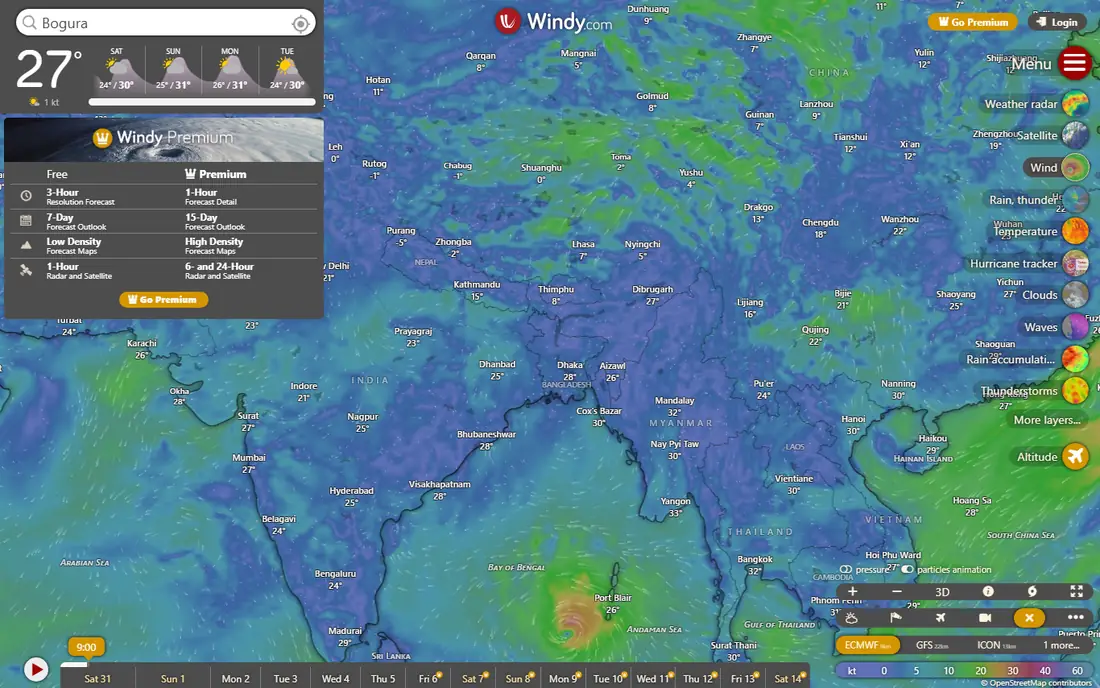
Windy fits weather enthusiasts, sailors, pilots, and outdoor planners who want to compare forecast models rather than read a single summary. You can switch between ECMWF, GFS, and other models, check wind and rain layers, and follow storms across a detailed map. That model comparison is the real strength, since different models often disagree and seeing both helps you judge uncertainty. The catch is complexity, because casual users who only want rain timing may prefer a simpler forecast app. Check the export or sharing step early, because a tool that feels fast while you edit can still add friction at delivery.
- Many forecast models in one view
- Detailed wind, rain, and satellite layers
- No ads on the main service
- Interface can overwhelm casual users
- Alerts are less central than in forecast apps
MyRadar fits people who open an app to see rain and storms right now, without wading through news and lifestyle content. Its animated radar loads quickly, layers stay readable, and you can follow a storm cell as it moves across the map. Speed and clarity make it a strong daily radar choice, especially during severe weather. The catch is that deeper forecast and aviation layers sit behind optional purchases, so check what your plan includes. Try the free tier or trial on a small job first, and note what is locked behind a paid plan before you build a workflow around it.
- Very fast radar animation
- Clean layers
- Optional RouteCast and extra layers
- Some advanced layers need a subscription
- Coverage varies outside the US
RadarScope fits storm chasers, spotters, and serious weather watchers who want professional-grade radar data on a phone. It shows high-resolution NEXRAD products, including velocity and reflectivity, with tools for tracking rotation and storm structure. For severe weather, that depth matters, since velocity data reveals wind patterns that basic rain maps hide. The catch is the learning curve, because advanced products take study before they make sense under pressure. Before you commit, test it on one real project with your usual files and export settings, so you can see where it slows down before it matters.
- High-resolution NEXRAD radar
- Velocity and storm-relative products
- Spotter tools
- Paid subscription
- Learning curve for advanced radar products
WeatherBug fits households that want a free radar app with lightning alerts and severe weather warnings in one place. It pairs live radar with lightning maps, current conditions, and alerts, so you can check a storm and its lightning risk together. Lightning detection is a practical safety feature, especially for outdoor plans and youth sports. The catch is ads, which appear on the free tier, though the core radar and alerts remain usable. Check the export or sharing step early, because a tool that feels fast while you edit can still add friction at delivery.
- Live radar with lightning detection
- Severe weather alerts
- Neighborhood conditions
- Ads on the free tier
- Interface includes extra content sections
AccuWeather fits commuters and planners who care less about radar layers and more about when rain will start and stop at their street. Its MinuteCast feature gives short-term precipitation timing, backed by longer forecasts and radar maps. That timing focus helps with practical decisions, such as when to leave or whether to move an outdoor event. The catch is the ad-supported free experience, and full ad removal sits on a paid plan. Try the free tier or trial on a small job first, and note what is locked behind a paid plan before you build a workflow around it.
- MinuteCast rain timing
- Detailed forecasts
- Widespread coverage
- Ads on free tier
- Removing ads needs a paid plan
Weather and Radar fits casual users who want a large amount of free radar without paying for a specialist app. Its rain radar, forecast maps, and simple layout make it easy to check current rain and the hours ahead. For everyday use, that free depth is hard to beat, especially if you mainly check rain before heading out. The catch is pro depth, since storm chasers will still want RadarScope or Windy for advanced products. Before you commit, test it on one real project with your usual files and export settings, so you can see where it slows down before it matters.
- Generous free radar
- Rain forecast maps
- Clean layout
- Advanced features vary by region
- Fewer pro-level radar products
The Weather Channel fits users who want forecasts, radar, and storm news in one familiar app. It covers daily and hourly forecasts, maps, and severe weather coverage, with a layout most people learn quickly. That breadth suits households that check weather once or twice a day for planning. The catch is radar depth, because it does not match the specialist products serious storm watchers prefer. Check the export or sharing step early, because a tool that feels fast while you edit can still add friction at delivery.
- Broad forecasts and radar
- Storm news and video
- Familiar interface
- Ads on free tier
- Radar depth lags specialist apps
CARROT Weather fits users who want a radar app they can customize deeply, from data sources to layout and alerts. It offers detailed radar and forecast layers, with a distinctive tone that makes checking the weather more engaging. Customization is the draw, since you can shape the app around the data you actually check. The catch is price and tone, because full features need a subscription and the humor will not suit every household. Try the free tier or trial on a small job first, and note what is locked behind a paid plan before you build a workflow around it.
- Highly customizable interface
- Detailed radar layers
- Witty forecast style
- Subscription needed for full features
- Personality is not for everyone
RainViewer fits travelers and casual users who want a quick global rain radar without accounts, settings, or clutter. Its map loads fast, shows animated precipitation, and covers many regions, which helps when you are away from home. Simplicity is the point, and it does that one job well. The catch is depth, since you will still need a forecast app for alerts, hourly detail, and severe weather warnings. Before you commit, test it on one real project with your usual files and export settings, so you can see where it slows down before it matters.
- Fast global radar
- Simple interface
- Useful for quick rain checks
- Limited forecast depth
- Fewer alerts than full weather apps
How we picked these
We compared official feature pages, current pricing pages, app store listings, privacy policies where they mattered, and public reviews. We kept only products that exist and work today, and that fit the topic directly rather than loosely. Where a price was unclear or changed by plan, we used See website instead of guessing, and we treated free tiers as useful only when they cover real work, not just a demo. We also weighed the honest trade-offs. A strong feature set means less when the price, the learning curve, or the export options make everyday use harder. That is why each write-up below names a catch alongside the strengths, so you can match the tool to your budget, skill level, and the kind of output you actually need.
How to pick a weather radar app
Decide how you use radar
If you check rain before a walk, a simple free app is enough. If you track severe storms, look for velocity data, lightning, and fast updates, and be ready to learn what those products mean.
Check your region and data source
Radar coverage and quality vary by country and by provider. Test an app at home and on a trip, and confirm that alerts, units, and maps work for your location before storm season.
Do not confuse forecast with live radar
Many apps show a future radar slider, which is a model prediction, not observed rain. Use the live loop for timing, and treat the forecast slider as a guide that can shift.