Jira Alternatives in 2026: 9 Tools Compared
By ToolNimba Editorial Team October 29, 2026 11 min read

- Top pick
 Asana
Balanced team project management
Starting price$10.99 per user per monthCheck out AsanaRead our review - Runner-up
 monday.com
Visual boards and workflows
Starting price$9 per seat per monthCheck out monday.comRead our review - Also great
 ClickUp
Low-cost all-in-one work hub
Starting price$7 per user per monthCheck out ClickUpRead our review
How we researched this
We compared official pricing and feature pages, app store listings, privacy policies and public user reviews. Prices change, so check the provider's site before you pay.
Key takeaways
- Asana and monday.com are the easiest moves for teams that found Jira too complex, while Linear is the closest fit for software teams that want speed.
- ClickUp and Trello offer the lowest entry cost, but ClickUp takes longer to set up and Trello stays simple on purpose.
- Notion works best when docs and tasks must live together, and Basecamp wins when a team wants fewer features, not more.
- Per-user pricing means the bill depends on headcount, so price each tool at your real team size, not its headline rate.
Quick comparison
| Name | Best for | Starting price | Free plan | |
|---|---|---|---|---|
| Asana | Balanced team project management | $10.99 per user per month | Yes | Visit |
| monday.com | Visual boards and workflows | $9 per seat per month | Yes | Visit |
| ClickUp | Low-cost all-in-one work hub | $7 per user per month | Yes | Visit |
 Trello | Simple kanban boards | $5 per user per month | Yes | Visit |
 Linear | Fast issue tracking for software teams | $8 per user per month | Yes | Visit |
 Notion | Docs plus tasks in one workspace | $10 per user per month | Yes | Visit |
 Wrike | Structured work for larger teams | $10 per user per month | Yes | Visit |
 Basecamp | Simple team communication and tasks | $15 per user per month | Yes | Visit |
 Zoho Projects | Low-cost projects inside Zoho | See website | Yes | Visit |
The best Jira alternatives
Jira is powerful for software delivery, but its setup, permissions and terminology can feel heavy for teams that do not live in agile ceremonies every day. The tools below cover the same core job, tracking work from idea to done, with different trade-offs in speed, simplicity and price.

Asana is the safest general replacement for Jira for a mixed team. Marketing, operations and product people can all use the same lists, boards and timelines without learning sprint jargon, and tasks, due dates, assignees and comments work the way most people expect. The free plan covers up to 15 users in older listings, with unlimited tasks and projects, which makes it easy to test with a real team.
Paid Starter starts at $10.99 per user per month on annual billing, with timeline and custom fields, while Advanced at $24.99 adds portfolios, goals and workload views. Time tracking is not built in, so teams that bill by the hour will need an integration. If your team left Jira because it felt slow and technical, Asana is the most likely tool to stick.
- Easy to learn for non-developers
- Timeline, boards and calendars
- Many integrations
- No native time tracking
- Advanced portfolios sit on higher plans
- Costs rise with seats

monday.com suits teams that think in boards and columns. You can build a board for almost any workflow, from content calendars to hiring pipelines, add status columns, and automate routine moves such as notifying an owner when a status changes. Templates help a new team start without designing every board from scratch, and dashboards give managers a quick view across boards.
Pricing needs care. The free plan covers up to 2 seats and 3 boards, Basic is $9 per seat per month on annual billing, Standard is $12 and Pro is $19, and paid plans require a minimum of 3 seats. Basic also lacks automations and integrations, so Standard is the realistic entry point for most teams. If your team size matches a seat bundle and you will use automations, monday.com is a polished and flexible Jira alternative.
- Highly visual boards
- Many templates
- Strong automations on Standard and above
- Paid plans need at least 3 seats
- Basic has no automations
- Seat bundles can waste money
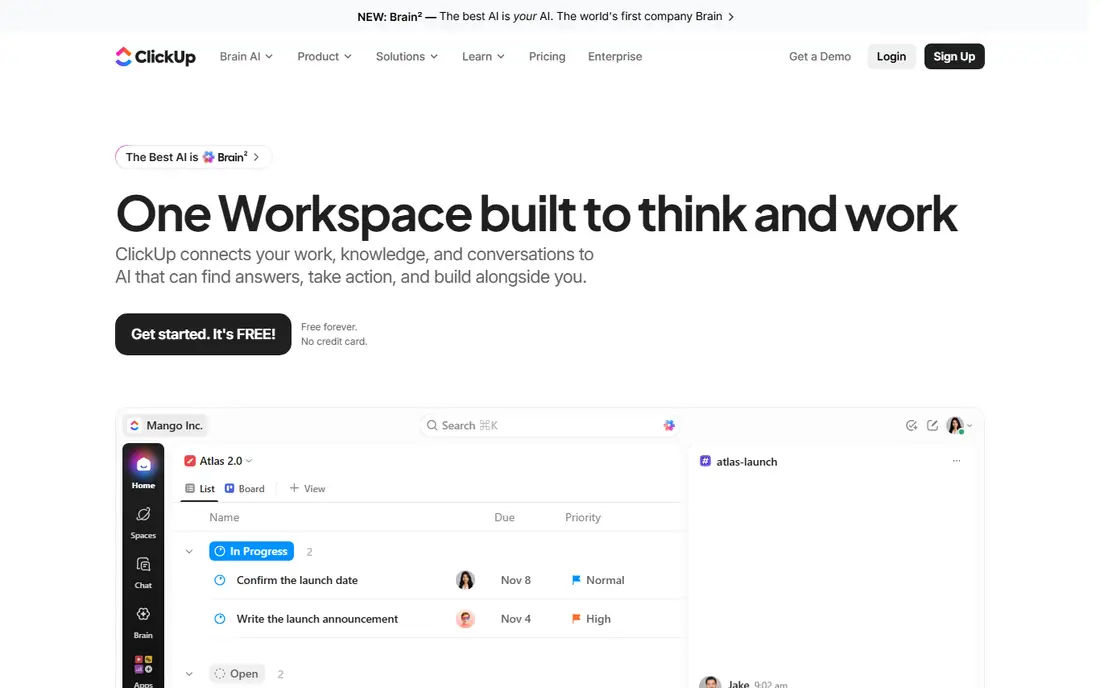
ClickUp tries to replace several tools at once, with tasks, docs, whiteboards, goals, dashboards and native time tracking under one login. The free plan includes unlimited tasks, 60 MB of storage and core views, which is generous for a small team, and Unlimited at $7 per user per month on annual billing adds unlimited storage, integrations and Gantt charts. Business at $12 adds more dashboards, automations and workload tools.
The breadth is also the drawback. New users often face too many options, and teams need time to agree on a structure before ClickUp feels calm. AI tools are sold separately, so factor that in if you want them. For a team on a tight budget that wants one hub for almost everything, ClickUp offers the most features per dollar on this list.
- Generous free plan
- Docs, goals, time tracking and dashboards in one place
- Low paid entry price
- Setup can feel overwhelming
- Interface is busy
- AI features are separate paid add-ons
Trello is the simplest move away from Jira, and for many small teams that simplicity is the point. A board with lists and cards is easy to explain in a minute, and the free plan gives unlimited cards, up to 10 boards per workspace and 250 automation runs a month. Standard at $5 per user per month on annual billing adds unlimited boards, custom fields and 1,000 automation runs, while Premium at $10 adds calendar, timeline, table and dashboard views.
Trello does not try to be a full project portfolio tool. Reporting is thin, large boards get unwieldy, and you cannot easily show that one task depends on another. If your work is a straightforward flow from to do to doing to done, Trello will feel fast and cheap. If you need sprints, dependencies and portfolio reporting, look at Asana, Linear or Wrike instead.
- Easiest board to learn
- Low price
- Unlimited cards on free
- Free limited to 10 boards per workspace
- Weak reporting
- No native dependency management
Linear is the Jira alternative most software teams pick when they want speed above all else. Issues, cycles, triage and roadmaps are built around how developers actually work, keyboard shortcuts are central, and sync with GitHub and GitLab keeps code and issues linked. The interface feels instant compared with heavier tools, which matters when a team triages dozens of issues a day.
The free plan covers up to 250 active issues, Standard is $8 per user per month and Plus is $14, with private teams and deeper integrations on Plus. Non-developers may find Linear too code-focused, and it has fewer templates for marketing or operations work. If your team left Jira for a faster, cleaner issue tracker rather than for a general project tool, Linear is the closest match.
- Very fast interface
- Built for software cycles and triage
- GitHub and GitLab sync
- Less suited to non-technical teams
- Free limited to 250 issues
- Fewer general project templates
Notion works as a Jira alternative when the problem is scattered knowledge, not just task tracking. Project pages, specs, meeting notes and task databases can live in the same workspace, so a new hire can read the context and see the work without hunting through three tools. The free plan gives unlimited pages and blocks for individuals, with a 10-guest limit, and Plus at $10 per user per month on annual billing adds unlimited file uploads and longer page history.
Notion is not a like-for-like Jira replacement for agile delivery. Sprint planning, burndown charts and dependency handling are weaker, and teams that need those views will need workarounds or another tool. Business at $20 per user per month adds full AI features and private teamspaces. Choose Notion when docs and tasks must stay together, and choose Linear or Asana when sprint rigour matters more.
- Docs, wikis and databases in one place
- Flexible pages
- Good for small teams and startups
- Not a dedicated sprint tool
- Automation is limited
- Full AI access sits on Business
Wrike suits teams that need structure, approvals and reporting across many projects at once. Gantt charts, dashboards, custom fields and request forms help managers see workload and deadlines, and proofing tools let creative teams review images and documents inside the task itself. The free plan is usable for basic task tracking, Team is $10 per user per month on annual billing, and Business is $25 with resource planning, time tracking and deeper automation.
The jump from Team to Business is the decision point, because custom fields, dashboards and meaningful automation live higher up the ladder. Seats are also sold in fixed bands, so odd team sizes can pay for unused seats. For a larger team that outgrew Trello and wants control without Jira complexity, Wrike is a strong, if more formal, option.
- Strong Gantt charts and dashboards
- Proofing for creative work
- Resource planning on Business
- Learning curve is steep
- Key features sit on Business
- Seats are sold in fixed bands
Basecamp takes the opposite approach from most tools here: it deliberately offers fewer features. Every project gets the same six tools, including to-dos, message boards, schedules, documents and group chat, so a new team member can learn the whole system in an afternoon. The free plan covers one project and up to 20 users, Plus is $15 per user per month, and Pro Unlimited is a flat $299 per month on annual billing for unlimited users.
That simplicity is also the limit. There are no Gantt charts, no task dependencies, no custom fields and no native time tracking, and teams that need those will feel boxed in. Basecamp is also notable for shipping no native AI features, which some teams will see as a plus. Pick Basecamp when your team wants communication and to-dos in one calm place, not a configurable project machine.
- Same features on every plan
- Very easy onboarding
- Flat-rate option for large teams
- No Gantt charts or dependencies
- No native time tracking
- Limited customisation
Zoho Projects is the practical Jira alternative for businesses already running on Zoho. Tasks, milestones, Gantt charts, timesheets and issue tracking sit alongside Zoho CRM, Books and Desk, so project work, customer records and invoices share the same login. The free plan covers small teams with basic project needs, and paid plans are priced per user, with details that vary by region, so we list the starting price as See website rather than guessing a figure that may not match your account.
Outside the Zoho ecosystem, Zoho Projects is less compelling than Asana or Linear, and its interface feels more traditional. Inside Zoho, though, the integrations save real time, because a project can link to a CRM deal or a support ticket without a third-party connector. If your business already pays for Zoho, start here before buying another project tool.
- Good value inside the Zoho suite
- Gantt, milestones and timesheets
- Integrates with Zoho CRM and Books
- Interface feels dated next to Linear
- Best value only if you already use Zoho
- Pricing varies by plan and region
How we picked these
We compared official feature pages, pricing pages and app store listings, and public reviews, rather than claiming hands-on trials we did not run. We looked for tools that are still sold and supported in 2026, that cover core project and issue tracking, and that offer a free plan or trial for a real team test. We favoured a mix of simple boards, general project tools and developer-focused trackers, so a team leaving Jira for different reasons can find a fit.
How to choose between them
Start with who will use the tool every day. If the team is mixed and non-technical, shortlist Asana, monday.com and Trello. If the team is mostly developers, shortlist Linear first and ClickUp second. If docs matter as much as tasks, add Notion. Then run a two-week trial with one real project, not a demo project, and check three things: can everyone update status without training, does reporting show what a manager needs, and does the bill at your real headcount still make sense. The tool that passes those three tests is the right Jira alternative, even if it is not the most powerful one on paper.