Best App to Book Flights in 2026: 9 Apps Compared
By ToolNimba Editorial Team November 10, 2026 11 min read

- Top pick
 Google Flights
Price tracking and flexible dates
Starting priceFreeCheck out Google FlightsRead our review - Runner-up
 Skyscanner
Global fare comparison
Starting priceFreeCheck out SkyscannerRead our review - Also great
 Kayak
Search plus trip management
Starting priceFreeCheck out KayakRead our review
How we researched this
We compared official pricing and feature pages, app store listings, privacy policies and public user reviews. Prices change, so check the provider's site before you pay.
Key takeaways
- Google Flights and Skyscanner are the best free starting pair for comparing fares across airlines and dates.
- Hopper helps with the buy-now-or-wait decision, while Going is better for deal alerts you were not searching for.
- Kayak suits travelers who want flight search, trip management and price forecasts in one app.
- Kiwi.com finds unusual multi-airline routes, but check baggage and connection rules before booking.
- For most trips, compare in an app, then book direct with the airline when the price is close, for easier changes and refunds.
Quick comparison
| Name | Best for | Starting price | Free plan | |
|---|---|---|---|---|
| Google Flights | Price tracking and flexible dates | Free | Yes | Visit |
| Skyscanner | Global fare comparison | Free | Yes | Visit |
| Kayak | Search plus trip management | Free | Yes | Visit |
 Hopper | Price predictions and fare freezes | Free | Yes | Visit |
 Kiwi.com | Multi-airline route combos | Free | Yes | Visit |
 Momondo | Lowest fare search | Free | Yes | Visit |
 Expedia | Booking flights plus hotels | Free | Yes | Visit |
 Going | Curated cheap flight deals | Free | Yes | Visit |
 Trip.com | Asia routes and target alerts | Free | Yes | Visit |
The best app to book flights
A flight booking app should do more than show one price. It should compare airlines, show flexible dates, track price changes, and make clear what is included before checkout. We compared official feature pages, app store listings and recent flight app comparisons for the apps below, focusing on coverage, alerts, flexible search, booking route and extra fees.

Google Flights is the research tool most travelers should open first. Search is fast, the calendar and price graph show cheaper days at a glance, and the Explore map helps flexible travelers find cheap destinations from a home airport. Price tracking sends alerts when a saved fare changes, which removes the need to check the same route every morning.
The limit is booking. Google Flights links you to the airline or an agent to complete the purchase, so checkout terms depend on that seller. That is usually a benefit, since booking direct with the airline gives easier changes and refunds, but it means Google Flights alone does not manage your booking. Use it to find and track the fare, then book where the terms suit you best.
- Fast search across many airlines
- Price graph and calendar view
- Tracking alerts for saved routes
- Not a booking app itself, it links out to airlines and agents
- No dedicated mobile app
- Price guarantee is limited to US routes
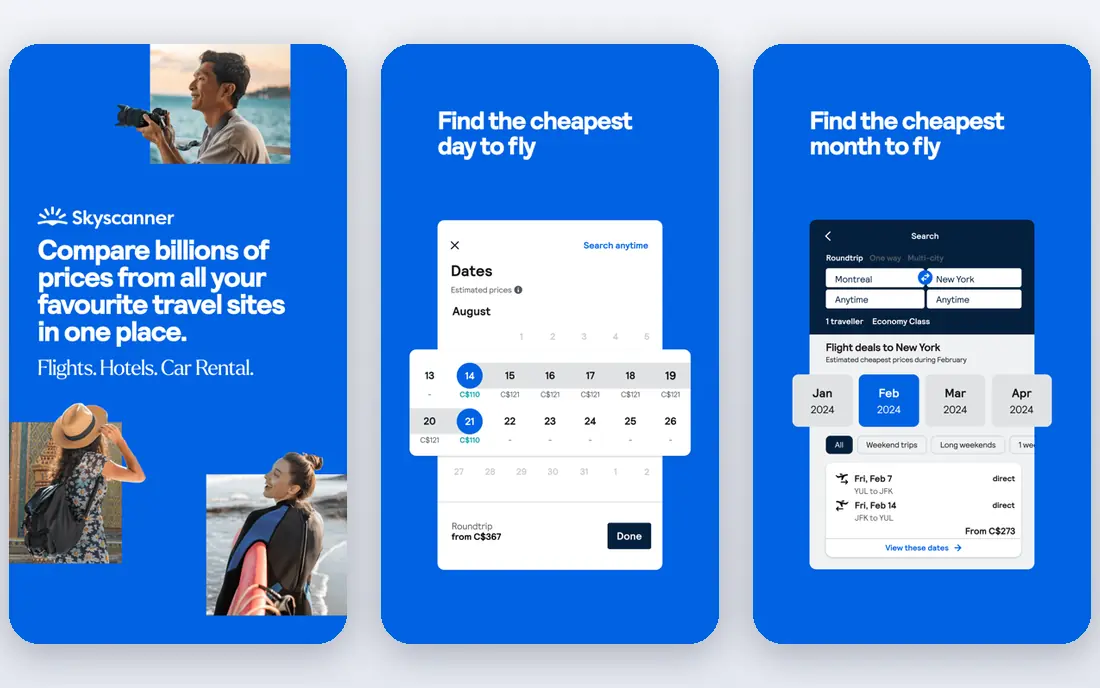
Skyscanner is the best cross-check for Google Flights, especially outside the US. It covers many airlines and online agents, includes budget carriers that some search tools miss, and its whole-month view makes flexible-date savings obvious. For a traveler open on dates, that view alone can save more than any prediction feature.
As with Google Flights, Skyscanner is a search and comparison tool, not the seller in most cases. Check who you are actually buying from at checkout, and read baggage, change and refund terms before paying. When the airline price is close to an agent price, booking direct is usually the safer choice, even if it costs a little more.
- Wide global coverage including budget airlines
- Whole-month search
- Price alerts for routes
- Booking goes through airlines or agents
- Third-party agent terms vary
- Fare shown may exclude bags and seats
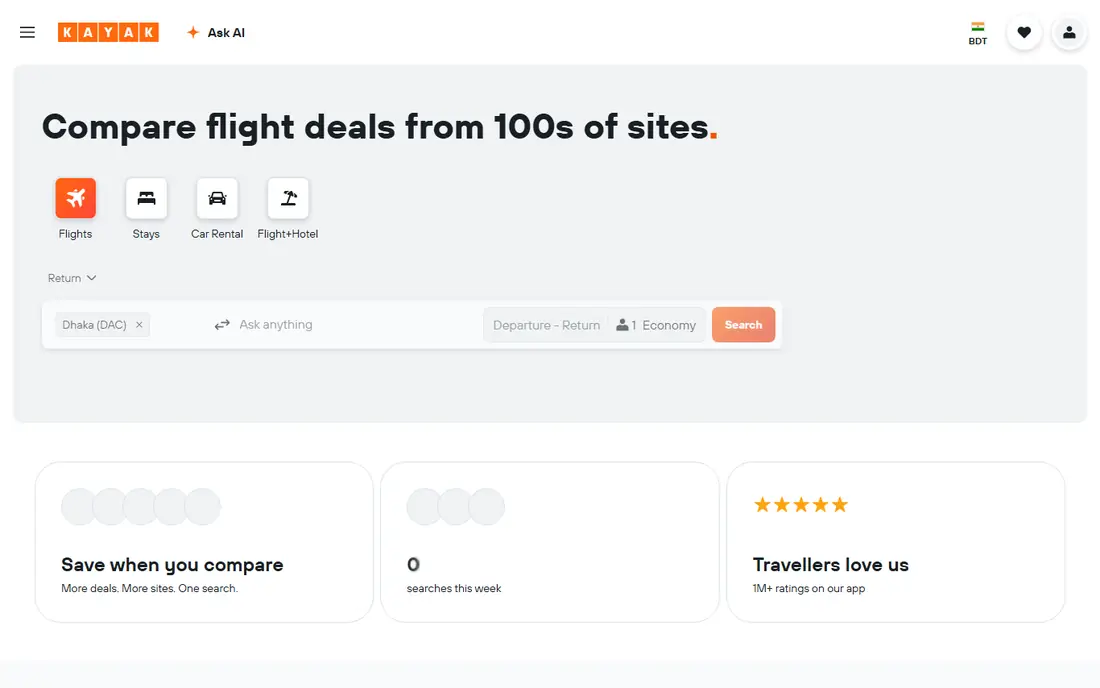
Kayak suits travelers who want one app for search, tracking and trip organization. You can set unlimited alerts, use price forecasts to judge whether to book now or wait, and keep itineraries in the same app. That combination helps on a multi-leg trip, where several fares and changes need tracking at once.
Forecasts deserve caution. A buy-or-wait signal is a statistical estimate based on past fares, not a promise that a price will fall. Use it as one input beside your travel dates and flexibility, not as a rule. Kayak also lists agents alongside airlines, so check the seller and total price, including bags, before you commit.
- Unlimited price alerts
- Buy-or-wait forecasts
- Trip management and itinerary tools in one app
- Search results mix airlines and agents
- Forecasts are estimates, not guarantees
- Some features need an account
Hopper is built for the timing question that worries most travelers: should I book now or wait. Its predictions watch a specific trip and tell you when a fare looks likely to rise or fall, and its watches notify you of changes. For a short-term trip with some flexibility, that guidance can prevent a costly early booking or a missed drop.
The trade-offs are booking route and add-ons. Hopper books in-app, which adds a layer between you and the airline if a flight changes, and its flexibility and freeze options cost extra. Use Hopper for timing advice and watches, compare its final total with the airline price, and only pay for an add-on when the flexibility is worth the fee for that trip.
- Clear buy-now-or-wait advice
- Price watches for specific trips
- Optional fare freeze and flexibility add-ons
- Books in-app rather than direct with the airline
- Paid add-ons can raise the total
- Predictions work best short-term
Kiwi.com earns its place for adventurous routes. It combines carriers that do not normally partner, creating itineraries that a single airline search would miss, and its Nomad tool helps plan multi-city trips. For a traveler visiting several cities on a budget, those combos can open routes that look impossible in a standard search.
Self-transfer routes need care. You may need to collect bags, recheck in, and allow extra time between flights, and a missed connection on separate tickets is not the airline responsibility in the same way as a single-ticket connection. Read the connection details, allow a long layover, and check visa and baggage rules before booking a Kiwi.com combo.
- Finds self-transfer routes other tools miss
- Nomad multi-city search
- Price alerts for routes
- Self-transfer connections carry extra risk
- Baggage may need rechecking
- Customer support is via the agent, not the airline
Momondo, part of the same group as Kayak, is worth checking when the lowest fare matters most. It often surfaces cheap international fares and agent prices that other tools rank lower, and its calendar view helps flexible travelers pick cheaper days. For a long-haul trip where a small percentage saving is still a large cash amount, that extra search is worthwhile.
The lowest fare needs the same checkout check as any agent price. Confirm the seller, the total including bags and seat selection, and the change policy before paying. If the saving is small and the agent is unfamiliar, booking direct or through a known seller is usually the better trade, even at a slightly higher price.
- Strong at finding the lowest fare, especially international
- Calendar and price graphs
- Links to airlines and agents
- Lowest fare may come from an unfamiliar agent
- Fare may exclude bags
- Search interface is less polished than rivals
Expedia suits travelers who want flights and a hotel in one booking, or who already use its rewards program. You can compare flight options, add a hotel, and manage the trip in one account, which simplifies a package holiday or a business trip with a fixed hotel need. Price drop protection on select flights is a useful extra where it applies.
For flight-only search, Expedia is narrower than the dedicated search tools above, and changes must go through Expedia rather than direct to the airline. Use Expedia when a package or rewards benefit outweighs that layer, and use Google Flights or Skyscanner first when the flight itself is the main decision.
- Books flights, hotels and packages in one place
- Rewards program for members
- Price tracking on some flights
- Flight search is narrower than Google Flights or Skyscanner
- Package savings vary
- Changes go through Expedia, not the airline
Going, formerly Scott's Cheap Flights, is a deal club rather than a search engine. You set your home airports, and Going sends curated alerts for cheap fares, mistake fares and premium cabin deals that match. That model finds deals you were not searching for, which is its main value over a route tracker that only watches trips you already plan.
The limits are geography and speed. Going works best for US departures, and the best deals disappear fast, so you need to be ready to book when an alert lands. The free tier covers basic alerts, while paid tiers at $49 or $199 per year add more destinations and premium deals. Try the free tier first, and upgrade only if the alerts match trips you would actually take.
- Hand-checked deal alerts for your home airports
- Mistake fares and deep discounts
- Free tier for basic alerts
- Best for US departures
- Paid tiers cost $49 or $199 per year
- Deals need fast action before fares vanish
Trip.com is a useful extra search for Asia routes and for travelers who want target price alerts. You can set a price you are willing to pay, and the app alerts you when a fare hits that target, which is more focused than a general price watch. Its Asia coverage, including regional carriers, can surface options that US-focused tools rank lower.
Trip.com books as an agent, so the same checkout caution applies: check the seller terms, baggage inclusion and change policy before paying. For a US domestic trip, Google Flights or Skyscanner will usually be enough. For an Asia itinerary or a target-price hunt, Trip.com is a worthwhile second search.
- Strong Asia route coverage
- Target price alerts
- Books flights and hotels in one app
- Booking is through an agent
- Change and refund terms vary by fare
- Less familiar to some US travelers
How we picked these
We compared official feature pages, app store listings and recent flight app comparisons, and kept only apps that search, track or book flights and still work in October 2026. We favored free search tools, prediction tools and deal clubs that cover different traveler needs, rather than listing nine identical search engines. We did not claim hands-on booking tests, and we noted where an app searches but does not sell, since that changes who handles changes and refunds.
How to get the best fare without overpaying for extras
The cheapest headline fare is not always the cheapest trip. Baggage, seat selection, change fees and booking-agent terms can erase a saving quickly. The steps below keep the total honest.
Search in two tools, then check the airline
Run your route in Google Flights and Skyscanner, add Kayak or Momondo for a cross-check, and then check the airline own site for the same fare. If the airline price is close, book direct for easier changes. If an agent is much cheaper, read its terms fully before you trade service for savings.
Use flexible dates and alerts together
Flexible-date views show cheaper days, while alerts catch drops on a fixed route. Set alerts early, even before you are ready to book, and use the calendar view to shift a trip by a day or two when the saving is large. A one-day shift on a long-haul route can matter more than any prediction tool.
Read the total before you pay
Confirm baggage allowance, seat selection cost, change and cancellation terms, and whether the fare is a single ticket or a self-transfer combo. A fare that excludes a checked bag, charges for a seat and cannot be changed may cost more than a slightly higher fare that includes those items.
Sources
- https://editorialge.com/best-flight-price-tracker-apps/
- https://www.going.com/guides/best-apps-for-booking-flights
- https://blog.lebara.co.uk/best-flight-booking-apps-for-cheap-tickets/?noamp=mobile
- https://www.google.com
- https://www.skyscanner.com
- https://www.kayak.com
- https://www.hopper.com
- https://www.kiwi.com
- https://www.momondo.com
- https://www.expedia.com
- https://www.going.com
- https://www.trip.com
Frequently asked questions
What is the best app to book flights?
Google Flights and Skyscanner are the best free pair for most travelers, since they compare many airlines and track prices. Hopper helps with timing, Kayak helps with trip management, and Going helps with deal alerts. The best app for you depends on whether you need search, timing, management or deals.
What is the best flight app for cheap flights?
Skyscanner and Momondo are strong for finding the lowest fare, especially on international routes, while Going surfaces curated cheap deals and mistake fares. Compare at least two search tools before booking, and check the total price including bags, since the lowest headline fare is not always the lowest total.
Is it better to book through the app or directly with the airline?
Booking direct with the airline usually gives faster help if a flight is delayed or cancelled, smoother refunds, and full frequent-flyer credit. Booking through an agent can save money on some fares, but it adds a layer between you and the airline. Book through the agent only when the saving is large and you trust its change policy.
What is the best app for flight deals?
Going is the best app for curated flight deals, with alerts for your home airports and deep discounts on selected routes. Hopper and Google Flights are better for tracking a specific route you already plan. Use Going for deals you were not searching for, and a tracker for trips you have already chosen.
Does Hopper actually save money?
Hopper predictions can help with timing, especially short-term, but they are estimates based on past fares, not guarantees. Use Hopper watches and buy-or-wait advice as one input, compare the final total with the airline price, and do not pay for add-ons unless the flexibility is worth the fee for that trip.
Can I book flights on Google Flights?
No, Google Flights is a search and tracking tool, not a booking app. It links you to the airline or an agent to complete the purchase. That is often a benefit, since booking direct with the airline gives better change and refund handling, but it means Google Flights does not manage your booking after purchase.