Best Apps for Cleaning Business in 2026: 9 Tools Compared
By ToolNimba Editorial Team November 10, 2026 9 min read

- Top pick
 ZenMaid
Residential maid services
Starting priceSee websiteCheck out ZenMaidRead our review - Runner-up
 Jobber
All-round field service
Starting priceSee websiteCheck out JobberRead our review - Also great
 Housecall Pro
Online booking and payments
Starting priceSee websiteCheck out Housecall ProRead our review
How we researched this
We compared official pricing and feature pages, app store listings, privacy policies and public user reviews. Prices change, so check the provider's site before you pay.
Key takeaways
- ZenMaid is our pick for residential maid services because it is built around recurring cleans and cleaner scheduling.
- Jobber is the best all-rounder if you also take on other home services, since it covers quoting, scheduling, invoicing and payments.
- Housecall Pro suits teams that want online booking and customer communication in one place, with a mobile app cleaners can use in the field.
- BookingKoala and Launch27 are strong choices for booking-led cleaning companies that get most jobs online.
- Small teams should check plan limits carefully, since appointment caps, user counts and SMS costs change the real monthly bill.
Quick comparison
| Name | Best for | Starting price | Free plan | |
|---|---|---|---|---|
| ZenMaid | Residential maid services | See website | Free trial | Visit |
| Jobber | All-round field service | See website | Free trial | Visit |
| Housecall Pro | Online booking and payments | See website | Free trial | Visit |
 BookingKoala | Online booking-led cleaning | See website | Free trial | Visit |
 Launch27 | Booking and dispatch | See website | Free trial | Visit |
 Swept | Commercial janitorial teams | See website | No | Visit |
 Connecteam | Managing cleaning staff | Free | Yes | Visit |
 MaidCentral | Growing multi-team maid services | See website | No | Visit |
 ServiceM8 | Mobile-first job management | See website | Free trial | Visit |
The best apps for cleaning business
A cleaning business lives or dies on its schedule. Recurring cleans, cleaner availability, cancellations and invoicing all pile up fast, and a spreadsheet stops working once you have more than a few regular clients. We compared official pricing and feature pages for tools built for cleaning or widely used by cleaning firms, and we focused on scheduling, client communication, payments and how well each tool fits residential versus commercial work.

ZenMaid is the most purpose-built tool on this list for a maid service. Weekly and biweekly cleans, cleaner assignment and client reminders sit at the center of the product, rather than being added to a general field service app. That focus shows in how quickly a small team can set up routes and keep them running week after week.
The limits matter. Lower tiers cap appointments, so a fast-growing service should check the plan that covers its real monthly volume. If you also do plumbing, lawn care or other trades, a broader tool such as Jobber may fit better. For pure residential cleaning, ZenMaid is our first recommendation.
- Built for recurring cleans
- Simple cleaner scheduling
- Automated customer reminders
- Starter plan limits appointments
- Less suited to mixed trade work
- SMS costs may be separate

Jobber is the safe all-rounder. It handles quotes, scheduling, dispatch, invoicing and payments, and clients can book and pay through a branded hub. Cleaning firms that also handle other home services get one system for everything, and the QuickBooks link keeps bookkeeping simpler.
Pricing depends on plan and team size, so the headline price is not always the price a growing crew pays. Some features that cleaners want, such as advanced scheduling controls, sit on higher tiers. Still, for a business that plans to grow beyond cleaning alone, Jobber is a strong foundation.
- Quote to invoice workflow in one place
- Client hub and online booking
- QuickBooks integration
- Costs rise with users and plan tier
- Some advanced features need higher tiers
- Setup takes time
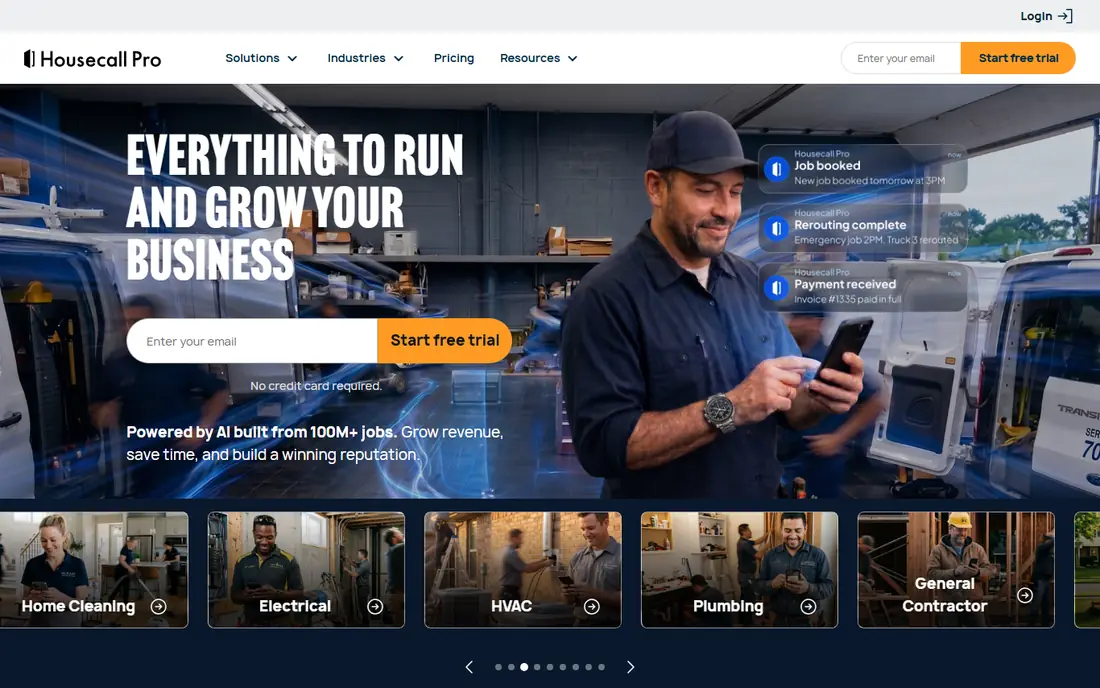
Housecall Pro leans into the customer experience. Clients book online, get reminders, and pay from their phone, while cleaners see jobs, directions and job details in the mobile app. That polish helps cleaning firms that win work through their website and want a professional booking flow.
It costs more at the entry level than purpose-built cleaning tools, and the features in each tier differ, so read the plan comparison before you buy. If online booking is your main source of jobs, the extra cost often pays for itself in saved phone time.
- Strong online booking and customer messaging
- Mobile app for field teams
- Invoicing and payments built in
- Starting price is higher than ZenMaid
- Plan differences need careful checking
- Add-ons can raise costs
BookingKoala is built around one idea: let customers book a clean online with as little back and forth as possible. It handles services, providers, availability and pricing rules, which suits cleaning companies that run mostly through their website. The booking flow feels tailored to cleaning in a way general schedulers do not.
Watch the pricing structure. Costs can grow with providers, storage or contacts, so a team with many cleaners should model the full bill. For a booking-led residential service, BookingKoala is a focused and capable choice.
- Booking focused design for cleaning
- Provider management
- Built for service businesses
- Costs can rise with providers and contacts
- Less general field service depth than Jobber
- Check storage limits
Launch27 has served cleaning businesses for years with online booking, team assignment and customer management. It fits companies that take bookings online and then dispatch cleaners to jobs, and it includes the recurring scheduling that cleaning firms rely on.
Pricing details are less transparent than some rivals, so ask for a quote and confirm what is included before you commit. If you like its booking flow in a trial, it can run a cleaning operation well, but compare it with BookingKoala and ZenMaid on price and limits first.
- Online booking and dispatch for cleaning teams
- Team scheduling
- Customer accounts
- Pricing is not fully published
- Smaller ecosystem than Jobber
- Check payment and integration options
Swept is aimed at commercial cleaning and janitorial firms that manage crews across many sites. It focuses on scheduling, cleaner communication, check-ins and accountability, which are the daily headaches for multi-location operations. Supervisors can track who arrived, what was done and where problems came up.
It is less of a full quote-to-cash system than Jobber or Housecall Pro, so some firms pair it with separate invoicing. Pricing follows location bands, which makes sense for janitorial work but needs a clear count of your sites. For commercial teams, Swept is worth a close look.
- Built for multi-site janitorial work
- Cleaner check-ins and messaging
- Supervisor tools for quality checks
- Operations focused, so quoting and invoicing may need another tool
- Pricing varies by location band
- No free plan
Connecteam is a workforce app rather than a cleaning booking system, and that distinction matters. It excels at schedules, time clocks, checklists, forms and team chat, and its free tier covers small teams. A cleaning firm that already has booking and invoicing sorted can use it to run its staff day to day.
Do not expect it to replace Jobber or ZenMaid for client quotes and payments. Used alongside a booking tool, or as a staff management layer for a larger janitorial firm, Connecteam offers strong value, especially for teams starting out.
- Free tier for up to 10 users
- Scheduling, time tracking and forms
- Good for team communication
- Not a full cleaning CRM or billing system
- Invoicing needs another tool
- Advanced plans add cost
MaidCentral is built for maid services that have outgrown simple scheduling. It combines scheduling, automation, payroll support and financial reporting in a system designed for multi-team operations. Firms that run many crews and need tighter control over margins often find its depth useful.
The price puts it out of reach for solo operators and very small teams, and it is more system than a two-person service needs. If you are scaling past a handful of cleaners and your current tool is creaking, MaidCentral is a serious step up.
- Deep automation for maid services
- Financial and scheduling tools
- Built for multi-team operations
- High starting price
- Overkill for solo cleaners
- No free trial for most buyers
ServiceM8 gives field teams a mobile-first way to manage jobs, from dispatch to quote to invoice. Cleaners can see job details, record time and capture signatures on their phones, and the office keeps one job record from start to finish. Offline access helps when a site has poor signal.
It is a general field service tool rather than a cleaning specialist, so recurring clean workflows may need more setup than in ZenMaid. For a mobile-heavy team that values a strong field app, ServiceM8 is a capable option.
- Mobile-first dispatch and job cards
- Quoting and invoicing
- Offline access in the field
- Pricing structure needs care
- Less cleaning-specific than ZenMaid
- Some features are add-ons
How we picked these
We compared official pricing pages, feature documentation and public reviews for tools used by cleaning businesses, and we favored products with recurring scheduling, cleaner management and client communication. We included both cleaning-specific tools and general field service tools that cleaning firms actually use, and we noted where pricing is quote based or limited by appointments, users or locations. Trial each shortlisted tool with your real schedule before you commit, since a demo rarely shows how it handles cancellations and route changes.
What to check before you buy cleaning software
Start by mapping your week. Count your recurring cleans, your cleaners and your sites, then check each plan against those numbers, not the headline price. A cheap starter plan with a 40 appointment cap is expensive if you run 200 cleans a month. Next, check how clients book and pay, and whether reminders, deposits and card payments are included or charged separately.
Finally, think about your team in the field. Cleaners need a simple mobile view, clear job notes and a way to flag problems, or they will fall back to text messages and the system will lose its value. Run a one week trial with two cleaners and your real clients, and pick the tool they actually use without chasing.
Sources
- https://www.zenmaid.com
- https://getjobber.com
- https://www.housecallpro.com
- https://www.bookingkoala.com
- https://www.launch27.com
- https://www.sweptworks.com
- https://connecteam.com
- https://www.maidcentral.com
- https://www.servicem8.com
- https://rankite.com/blog/best-software-for-cleaning-business
- https://www.tradetechpick.com/articles/best-cleaning-business-software-small-company.html
Frequently asked questions
What is the best software for a cleaning business?
For a residential maid service, ZenMaid is our top pick because it is built for recurring cleans. Jobber is the best all-rounder, especially if you also offer other home services, and Housecall Pro suits booking-led teams.
What is the best app for a small cleaning business?
ZenMaid and BookingKoala are strong low cost starting points for small residential services, while Connecteam can manage a small team for free. Check appointment and user limits before you choose, since those decide the real cost.
What software do maid services use to schedule recurring cleans?
ZenMaid, Jobber, Housecall Pro and BookingKoala all handle recurring schedules, with ZenMaid the most focused on weekly and biweekly maid routes. Swept and MaidCentral suit larger or commercial operations with many sites or teams.
Does cleaning business software include invoicing and payments?
Most tools on this list include invoicing, and many include card payments, but the details differ. Jobber and Housecall Pro cover quote to payment well, while Connecteam and Swept may need a separate invoicing tool.
Can cleaning software help with cleaner payroll?
Some tools track hours and job completion, which feeds payroll, and several integrate with QuickBooks or payroll providers. Check whether time tracking, GPS check-ins and payroll exports are included in your plan or sold as add-ons.