Best Construction Accounting Software in 2026: 9 Tools Compared
By ToolNimba Editorial Team November 11, 2026 10 min read

- Top pick
 Sage 100 Contractor
Small to midsize contractors
Starting priceSee websiteCheck out Sage 100 ContractorRead our review - Runner-up
 Sage 300 Construction
Larger contractors and developers
Starting priceSee websiteCheck out Sage 300 ConstructionRead our review - Also great
 QuickBooks Desktop Enterprise
Established QuickBooks users
Starting price$2,210 per yearCheck out QuickBooks Desktop EnterpriseRead our review
How we researched this
We compared official pricing and feature pages, app store listings, privacy policies and public user reviews. Prices change, so check the provider's site before you pay.
Key takeaways
- Sage 100 Contractor and Foundation Software suit small to midsize contractors that need true job costing and certified payroll.
- QuickBooks Desktop Enterprise works for established QuickBooks users, but it needs add-ons for full construction billing.
- Trimble Viewpoint Vista, Acumatica and CMiC suit larger firms that need ERP depth, multi-entity reporting and complex payroll.
- Most purpose-built construction tools are quote-only, so budget implementation and training separately from the license.
Quick comparison
| Name | Best for | Starting price | Free plan | |
|---|---|---|---|---|
| Sage 100 Contractor | Small to midsize contractors | See website | No | Visit |
| Sage 300 Construction | Larger contractors and developers | See website | No | Visit |
| QuickBooks Desktop Enterprise | Established QuickBooks users | $2,210 per year | No | Visit |
 Foundation Software | Union and prevailing wage payroll | See website | No | Visit |
 Jonas Premier | Cloud construction ERP | See website | No | Visit |
 Trimble Viewpoint Vista | Midsize to large contractors | See website | No | Visit |
 Acumatica Construction Edition | Growing firms needing cloud ERP | See website | No | Visit |
 CMiC | Large general contractors | See website | No | Visit |
 Knowify | Trade contractors on QuickBooks | $99 per month | Free trial | Visit |
The best construction accounting software
Construction accounting differs from regular accounting in one crucial way: every cost must tie to a job, a cost code and a phase, while billing follows progress, retainage and change orders. Generic accounting software tracks the company as a whole, which leaves contractors managing jobs in spreadsheets. The tools below are built for job costing first, and they differ mainly by firm size and complexity.
Sage 100 Contractor, formerly Master Builder, brings accounting, estimating, job costing, payroll and project management into one system for small to midsize general contractors and subcontractors. Its construction reports cover job costs, progress billing and bond reporting, which generic tools do not provide out of the box. Pricing is quote-only, with third-party listings suggesting around $115 per user per month.
The interface shows its age, and users report a learning curve and limited training resources. Integration with modern project tools can also take work. For a contractor that wants one mature system for the whole job lifecycle and can invest in training, Sage 100 remains a proven choice.
- Strong job costing
- Construction-specific reports
- Estimating, payroll and project management in one system
- Quote-only pricing
- Interface feels dated
- Integration with other tools can be difficult
Sage 300 Construction, formerly Timberline, targets larger contractors, developers and firms with more complex projects. It pairs accounting and job costing with project management, document control and reporting that scales across many jobs and entities. Pricing is quote-only and varies with users and modules.
Small firms should look elsewhere. Sage 300 carries implementation and training costs that only make sense at scale, and its depth can slow a two-person shop. For a growing general contractor outgrowing Sage 100 or QuickBooks, it is the natural next step within the Sage family.
- Scalable for larger firms
- Strong project and document management
- Deep job cost reporting
- Quote-only pricing
- Implementation takes time
- Overkill for small trade firms
QuickBooks Desktop Enterprise
Best for: Established QuickBooks users
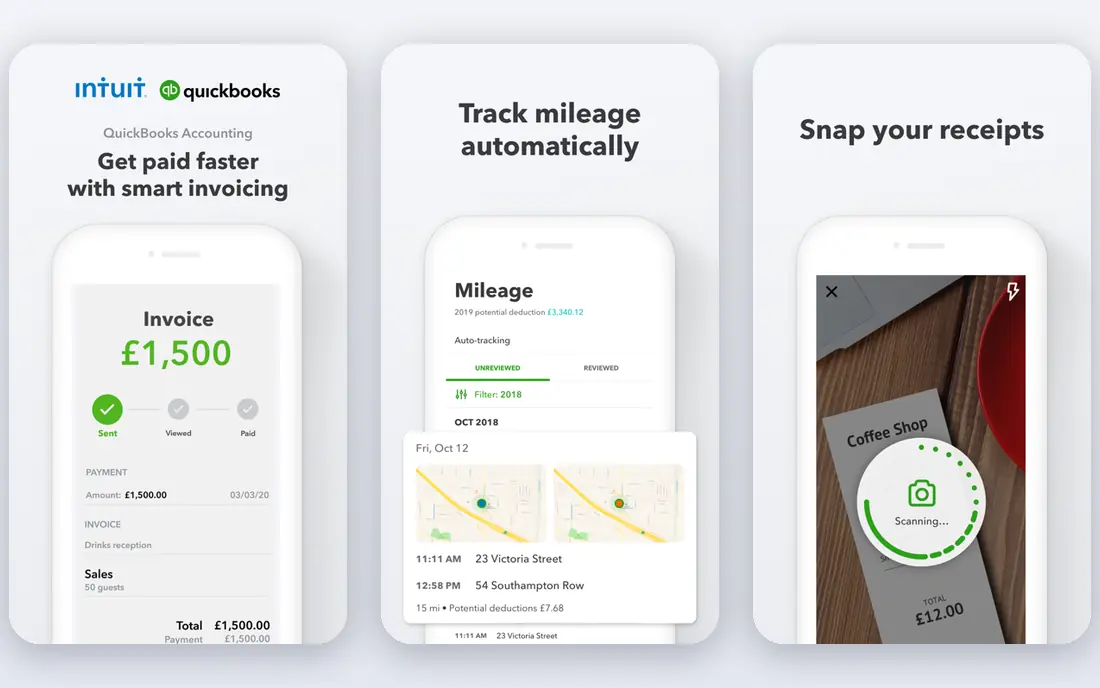
QuickBooks Desktop Enterprise is the top of the QuickBooks line, and its Contractor edition adds job costing, progress invoicing and reporting that small contractors need. Gold starts at $2,210 per year per user, with Platinum and Diamond tiers above it adding features such as advanced inventory and payroll options. Firms already running QuickBooks will find the learning curve shortest here.
The honest limit is depth. Enterprise handles construction accounting adequately for small contractors, but firms past about 50 employees or with multi-entity operations usually need a purpose-built tool such as Foundation or Viewpoint. It also remains desktop-first, so remote teams should check hosting options before buying.
- Familiar QuickBooks workflow
- Strong reporting
- Contractor edition adds job costing and progress invoicing
- Desktop-first
- AIA billing needs care or add-ons
- Annual subscription per user
Foundation Software is purpose-built for contractors, with job costing, progress billing, retainage, change orders and payroll that handles union and prevailing wage rules. That payroll depth is why many union and public-works contractors choose it over generic accounting tools. Pricing is quote-only, so expect a sales conversation and an implementation quote.
Foundation is not a quick self-serve signup. Plan for training and a careful data migration from your old system. For contractors whose payroll complexity drives the buying decision, that effort pays off in fewer compliance headaches and cleaner certified payroll reports.
- Built for construction accounting
- Strong prevailing wage and certified payroll
- Progress billing and retainage
- Quote-only pricing
- Implementation and training needed
- Interface is functional rather than modern
Jonas Premier is a cloud construction ERP for general contractors, subcontractors and specialty firms, covering job costing, accounting, project management and service work in one system. Its dashboards show job performance in real time, WIP reporting is a headline feature, and AIA billing plus a subcontractor portal cover the billing workflow. Pricing is quote-only, with third-party estimates suggesting monthly costs that scale with users and modules.
Implementation is the cost to watch. Estimates for onboarding run into thousands of dollars depending on complexity, so budget it separately from the license. For firms that want a modern cloud system without the weight of a full enterprise ERP, Premier is a strong middle option.
- Cloud system with real-time job dashboards
- WIP reporting
- AIA billing and subcontractor portal
- Quote-only pricing
- Implementation can cost thousands
- Module choices affect the final price
Vista by Viewpoint, now part of Trimble, is a long-established construction ERP for midsize to large contractors. It covers job costing, financial management, payroll, HR, service management and equipment costing in one system, with deep cost code structures that drill from a job cost line to the invoice behind it. Pricing is quote-only and depends on modules, users and deployment.
The learning curve is steep, and field project management usually comes through companion Trimble products such as ProjectSight rather than Vista itself. Support responsiveness also draws complaints in reviews. For established contractors with complex payroll and equipment needs, Vista remains a proven, if demanding, choice.
- Full construction ERP
- Payroll and HR inside the system
- Equipment costing and tracking
- Quote-only pricing
- Steep learning curve
- Project management often needs companion Trimble products
Acumatica Construction Edition
Best for: Growing firms needing cloud ERP
Acumatica Construction Edition adds construction financial management, project budgets, job costing, progress billing and forecasting to a modern cloud ERP. Its resource-based pricing avoids per-user fees, which helps firms with many field users, and license estimates for ERP deployments often start around $10,000 per year before implementation. Partner implementation is the norm.
Acumatica suits diversified firms that need construction plus distribution, manufacturing or multi-entity finance in one system. Construction-only firms may find configuration heavier than a specialist tool such as Foundation or Jonas. If your business is broader than construction alone, Acumatica is worth a serious look.
- Modern cloud ERP
- Resource-based pricing with no per-user fees
- Construction modules for job cost and billing
- Quote-only ERP pricing
- Implementation through partners
- Configuration overhead for construction-only firms
CMiC is an enterprise construction platform for large general contractors and heavy civil firms, covering financials, project management, documents, HR and payroll in one system. Its financial engine is built for construction from the ground up, with multi-company and multi-currency support for large organizations. Pricing is custom quote, with implementations often running into six figures for large firms.
That scale is the point and the warning. CMiC implementations can take a year or more, and reviewers describe rigid workflows until internal processes are fully mapped. Small and midsize firms should not buy it. Large ENR-ranked contractors with IT resources will get the most from its depth.
- Construction-native financial engine
- Multi-company and multi-currency support
- Project and document management in one platform
- Quote-only pricing
- Long implementations
- Steep learning curve and rigid workflows until processes are mapped
Knowify is not a standalone accounting system. It is a job costing and project layer that sits on QuickBooks, adding the construction features QuickBooks lacks: detailed job budgets, progress billing, AIA G702 and G703 forms, retainage and change orders. Its Advanced plan starts at $99 per month on annual billing, which is far cheaper than moving to a full ERP.
That design is its strength and its limit. Trade contractors who like QuickBooks but need real job costing get a big upgrade without a system migration. Firms that have outgrown QuickBooks entirely, or that need certified payroll and multi-entity ERP, will still need a purpose-built tool above it.
- Job costing and AIA billing on top of QuickBooks
- Retainage and change order tracking
- Affordable entry price
- Requires QuickBooks
- Less depth than full ERP tools
- Advanced plan needed for full AIA features
How we picked these
We compared official product pages, feature documentation and recent construction software roundups for tools that handle construction job costing, progress billing and related payroll in 2026. We favored purpose-built construction accounting and ERP tools over generic accounting software, with QuickBooks Enterprise and Knowify included because so many small contractors run on QuickBooks. Most vendors here do not publish prices, so we mark those as See website rather than repeating third-party estimates as fact.
How to choose by firm size
A two-person trade firm should start with QuickBooks plus Knowify, or with Sage 100 Contractor if it wants one system. A midsize general contractor with union payroll should shortlist Foundation and Jonas Premier. A large contractor with complex payroll, equipment and multi-entity reporting should look at Vista, Acumatica or CMiC, and should expect a long implementation.
Whatever your size, get implementation quoted separately, ask for a demo using your own job cost codes, and talk to a reference customer of similar size. Construction software fails most often not on features, but on a migration that was under-budgeted and a team that was under-trained.
The features that matter most
Job costing accuracy comes first, since every other report depends on it. Next come progress billing with retainage, change order tracking, certified payroll where it applies, and WIP reporting for bonded work. If a tool cannot produce a clean WIP schedule, it is not a construction accounting tool, whatever its marketing says.
Budgeting honestly
License cost is only part of the total. Add implementation, data migration, training and the first year of support, and ask whether payroll, mobile time entry or document management cost extra. A quote-only vendor that will not break those out is a warning sign, not a detail to sort out later.
Sources
- https://www.sage.com/en-us/products/sage-100-contractor/
- https://www.sage.com/en-us/products/sage-300-construction/
- https://quickbooks.intuit.com/desktop/enterprise/
- https://www.foundationsoft.com/
- https://www.premiercs.com/
- https://www.trimble.com/en/solutions/erp
- https://www.acumatica.com/industries/construction/
- https://www.cmicglobal.com/
- https://www.knowify.com/pricing
Frequently asked questions
What is the best construction accounting software for small contractors?
Sage 100 Contractor and Foundation Software are the strongest purpose-built picks, while QuickBooks Desktop Enterprise with Knowify is the cheapest path for firms already on QuickBooks. The right choice depends on payroll complexity and whether you want one system or a QuickBooks add-on.
What is the difference between construction accounting and regular accounting?
Construction accounting tracks every cost against a job, cost code and phase, and handles progress billing, AIA documents, retainage, change orders and certified payroll. Regular accounting tracks the company as a whole, which forces contractors to manage jobs in spreadsheets.
How much does construction accounting software cost?
Small contractors can start around $99 per month for Knowify on top of QuickBooks, or $2,210 per year per user for QuickBooks Enterprise Gold. Mid-market purpose-built tools are quote-only, and ERP tools such as Acumatica, Vista and CMiC often start around $10,000 per year before implementation.
Can QuickBooks handle construction accounting?
QuickBooks Online handles it poorly, while QuickBooks Desktop Enterprise with the Contractor edition handles it adequately for small contractors, with job costing and progress invoicing. Past about 50 employees or multi-entity operations, purpose-built tools do the job properly.
What is job costing and why does it matter?
Job costing assigns every labor hour, material purchase and subcontractor invoice to a job and cost code, so you know each projects true margin while it is running. That lets you fix a losing job in April instead of discovering the loss in October when nothing can be done.