Best GPS App in 2026: 10 Apps Compared
By ToolNimba Editorial Team November 9, 2026 12 min read

- Top pick
 Google Maps
Everyday navigation and sharing
Starting priceFreeCheck out Google MapsRead our review - Runner-up
 Apple Find My
Apple households and devices
Starting priceFreeCheck out Apple Find MyRead our review - Also great
 Life360
Dedicated family safety
Starting priceFreeCheck out Life360Read our review
How we researched this
We compared official pricing and feature pages, app store listings, privacy policies and public user reviews. Prices change, so check the provider's site before you pay.
Key takeaways
- Google Maps is our pick for most people, since it pairs strong navigation with free location sharing and live traffic.
- Apple Find My is the best free choice for Apple households, with device and people location built into the system.
- Life360 is the strongest dedicated family app, with place alerts, driving reports, and crash detection on paid tiers.
- Glympse is the best option for temporary sharing, since recipients need no app and shares expire automatically.
- Family tracking requires consent from every adult tracked, and parents should agree clear rules with children about when tracking is on.
Quick comparison
| Name | Best for | Starting price | Free plan | |
|---|---|---|---|---|
| Google Maps | Everyday navigation and sharing | Free | Yes | Visit |
| Apple Find My | Apple households and devices | Free | Yes | Visit |
| Life360 | Dedicated family safety | Free | Yes | Visit |
 Waze | Live traffic and hazard alerts | Free | Yes | Visit |
 Glympse | Temporary location sharing | Free | Yes | Visit |
 GeoZilla | Family location on both platforms | Free | Yes | Visit |
 Sygic | Offline maps and navigation | Free | Yes | Visit |
 TomTom GO | Reliable driving navigation | Free | Free trial | Visit |
 HERE WeGo | Offline maps and transit | Free | Yes | Visit |
 iSharing | Simple cross-platform family tracking | Free | Yes | Visit |
The best gps app
The best GPS app depends on the job. Navigation, family safety, and temporary sharing are different tasks, and no single app wins all three. The list below covers each job, so you can pick the tool that fits how you actually travel and keep in touch.
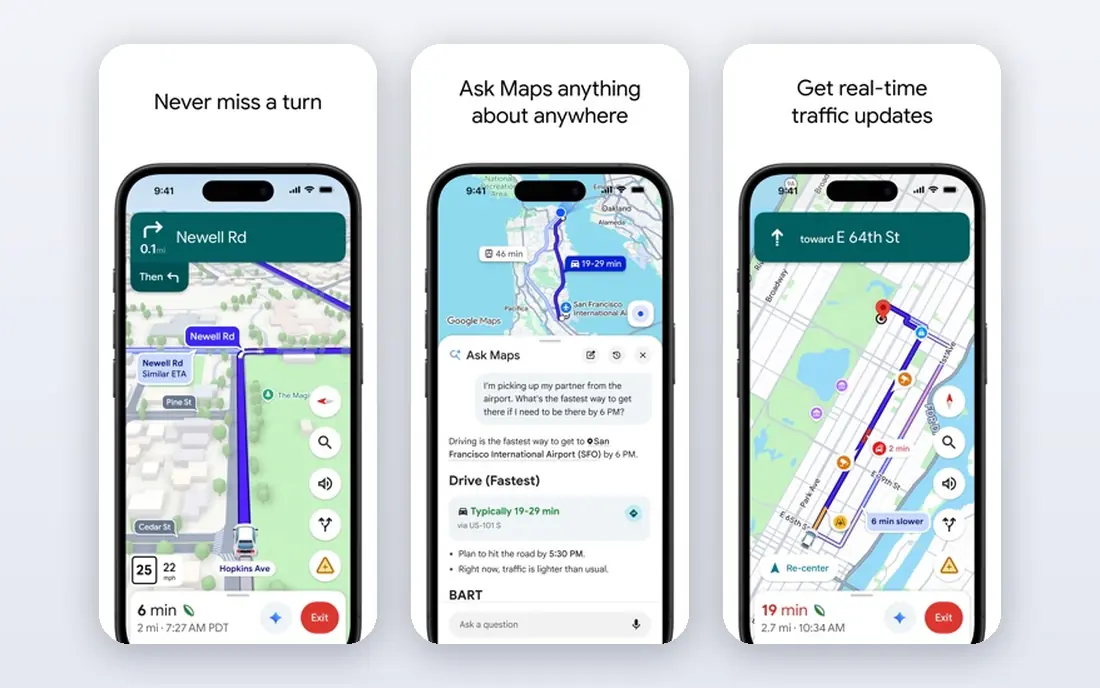
Google Maps is the default navigation app for most Android users, and it works well on iOS too. Driving directions use live traffic, rerouting is fast, and transit, walking, and cycling directions are strong in most cities. Location sharing is built in, so you can share your live location with chosen contacts for a set time or until you turn it off.
The limit is family safety depth. Google Maps does not offer the place alerts, driving reports, or crash detection that Life360 provides, and shared locations depend on the phone being on and connected. For everyday navigation plus casual sharing with consent, though, it is hard to beat, and it costs nothing. That combination makes it our pick for most people.
- Strong navigation with live traffic
- Free location sharing with time limits
- Wide transit, walking, and cycling coverage
- Location sharing lacks the place alerts of dedicated family apps
- Accuracy drops indoors

Apple Find My is the quiet winner for households that use iPhones, iPads, and Macs. It is built into the system, so there is nothing to install, and it can locate devices through the Find My network even when a device is offline. People location sharing works with family members and chosen friends, with controls for who sees what and for how long.
The trade-off is platform lock-in. Android users cannot join the same system, and Find My does not offer driving reports, crash detection, or long location history. For an Apple-only household that wants simple, private, free tracking with consent, it is the obvious first choice. Mixed-device households should look at Life360 or GeoZilla instead.
- Built into every Apple device at no cost
- Finds devices even when offline
- Location sharing with family and friends
- Only works within the Apple ecosystem
- No driving reports or place history
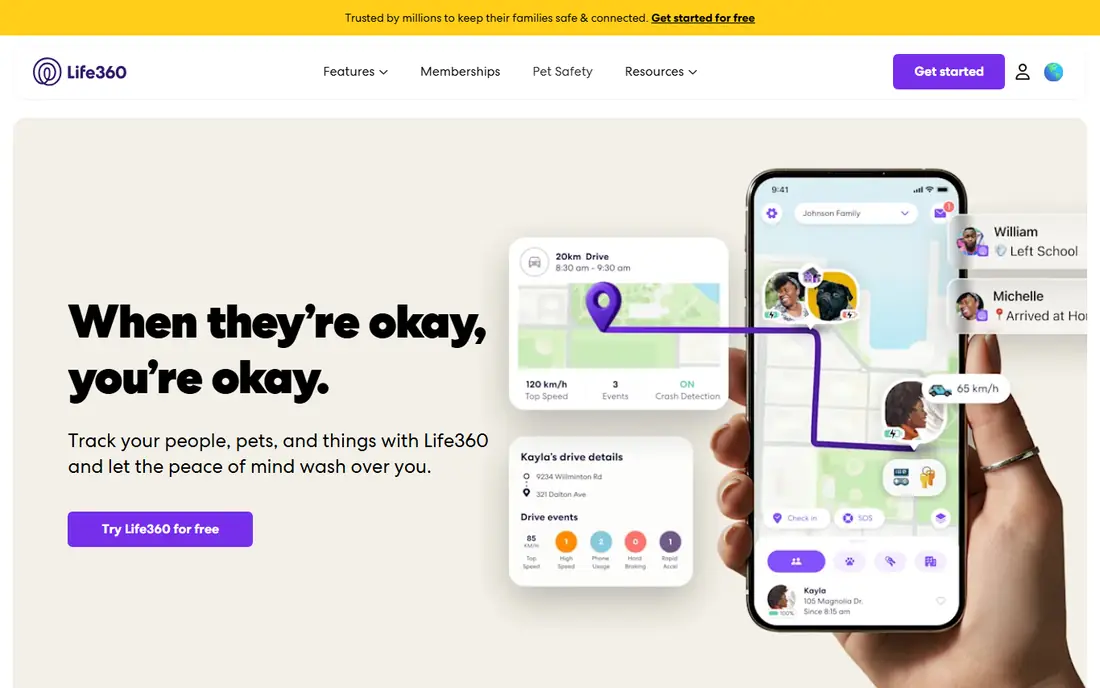
Life360 is the most complete dedicated family tracking app on this list. The free tier covers real-time location sharing and a family map, while paid tiers add unlimited place alerts, longer location history, individual driver reports, emergency dispatch in eligible regions, and roadside assistance. Paid plans start with Silver at $9.99 per month, with Gold at $16.99 per month and Platinum at $24.99 per month, and all paid tiers include a 7-day free trial.
The honest catch is that the free plan is basic, with only two days of location history and limited place alerts. Battery use can also be noticeable on older phones, since background location needs to stay active. For families with new drivers or older relatives, the paid safety features are the reason to choose Life360 over a free built-in option. Agree the rules as a family first, since tracking works best with consent and trust.
- Family map with place alerts
- Driving reports and crash detection
- Works on iOS and Android
- Best features sit on paid tiers
- Location history is limited on the free plan
Waze is a driving app first, and it is excellent at that job. Drivers report hazards, traffic jams, road closures, and speed traps in real time, and the app reroutes quickly around problems. It is free, it works on both major platforms, and it is popular enough that reports stay fresh on busy roads.
It is not a family tracking app, though, and it should not be chosen for that job. There are no place alerts, no location history for family members, and no safety features beyond driving alerts. If your main need is the fastest drive with the best live warnings, Waze is our pick. Pair it with Google Maps or Life360 if you also need location sharing.
- Real-time hazard and police alerts from drivers
- Fast rerouting around traffic
- Free on iOS and Android
- No family tracking features
- Map data is thinner for walking and transit
Glympse solves a narrow problem very well. You share your live location for a set time through a link, and the recipient opens it in a browser without installing anything. When the timer ends, sharing stops on its own. That makes it ideal for meeting friends, letting family follow a trip, or sharing an ETA without setting up a permanent tracking relationship.
The limit is scope. There are no place alerts, no location history, and no ongoing family map, so it cannot replace Life360 for daily family safety. If you only need to share location for a few hours, though, Glympse is the simplest and most private option, since nothing lingers after the share expires.
- Recipients need no app, just a link
- Shares expire automatically
- Free to use
- No geofencing or long-term history
- Not built for ongoing family tracking
GeoZilla is a cross-platform family locator that covers the core needs: a family map, location sharing, place alerts, and safety tools, on both iOS and Android. It suits mixed-device households that want a dedicated family app but do not need Life360's full driving and roadside package. The free tier covers basic sharing, and paid options add more features.
The drawback is scale. GeoZilla has a smaller community and less name recognition than Life360, so support resources and third-party coverage are thinner. Check current pricing on the vendor site before subscribing, since paid tiers vary. For a straightforward family locator without the higher Life360 price, GeoZilla is a solid alternative.
- Works on iOS and Android
- Family location with place alerts
- Safety features for everyday use
- Smaller user base than Life360
- Some features require a paid plan
Sygic is a navigation app built for drivers who travel where data is patchy or expensive. You can download maps for whole countries and navigate offline, with speed limit warnings and lane guidance. That makes it a strong pick for road trips, rural driving, and international travel, where Google Maps and Waze depend more on a live connection.
Family tracking is handled through a separate Sygic product, so do not buy Sygic navigation expecting a family map in the same app. Paid licences give access to the full feature set, and pricing varies by region and plan, so check the vendor site. If offline navigation is your priority, Sygic is our pick in this category.
- Offline maps for travel without data
- Speed limit and camera warnings
- Works worldwide
- Best features require a paid licence
- Family tracking is a separate product line
TomTom GO brings the company's long mapping history to a phone app, with reliable maps, live traffic, and offline downloads. Driving guidance is clear, lane advice is good, and the app suits drivers who want a dedicated navigation tool rather than a general map app. A free trial lets you test the full version before paying.
The catch is that full use requires a paid subscription after the trial, and pricing varies by plan and region, so confirm it on the TomTom site. There is also no family tracking here, so it belongs on this list for navigation only. If you value map quality and offline reliability over free extras, TomTom GO is worth the trial.
- Trusted TomTom maps and traffic
- Offline maps available
- Clear driving guidance
- Free use is limited to a trial period for full features
- No family tracking
HERE WeGo is a free map app with a useful trick: you can download maps for cities, regions, or whole countries and use them offline at no cost. It covers driving, transit, walking, and cycling directions, which makes it a good travel companion when you want to save data or roam without a local SIM. It works on both major phone platforms.
Live traffic and local business information are not as rich as Google Maps in every area, and that shows on busy commutes. For a free offline map with solid transit coverage, though, HERE WeGo is hard to fault. Keep Google Maps or Waze alongside it if live traffic is critical for your daily drive.
- Free offline maps for many regions
- Transit, walking, and driving directions
- Works on iOS and Android
- Live traffic is thinner than Google Maps or Waze in some areas
- Fewer local business details
iSharing is a straightforward family locator for households that want a shared map without a complex safety package. It offers real-time location, place alerts, and location history on both iOS and Android, with a simple setup that suits grandparents and younger family members alike. The free tier covers basic sharing, and paid plans add more history and alerts.
It does not match Life360 on driving reports, crash detection, or roadside help, so families with new drivers may still prefer Life360. Pricing for paid tiers should be confirmed on the vendor site, since it varies by plan. For simple, cross-platform family tracking at low cost, iSharing is a practical choice.
- Simple family map on iOS and Android
- Place alerts and location history
- Easy setup
- Safety features are thinner than Life360
- Some features require a paid plan
How we picked these
We compared official feature pages, pricing pages, app store listings, privacy policies, and public reviews for each app, and we kept only apps that are live and working in October 2026. We weighed navigation quality, location sharing controls, family safety features, offline support, and price, and we favored apps with clear consent controls. We did not claim hands-on testing. Where pricing varies by plan or region, we list it as "See website" rather than guessing.
Choosing between navigation and family tracking
Start by naming the job. If you need the fastest drive, pick Google Maps or Waze, and add HERE WeGo or Sygic for offline trips. If you need to know family members are safe, pick Life360, GeoZilla, or iSharing, and use a built-in option like Find My if everyone uses the same platform. If you only need a temporary share, Glympse does that job with the least setup and the least lingering data.
Consent and privacy rules that matter
Tracking an adult without their knowledge and consent is wrong and can be unlawful in many places, so every adult on a family map should agree to be there and know how to pause sharing. For children, agree the rules together: when tracking is on, who can see the location, and how long history is kept. Check each app's privacy policy for data retention, and turn off sharing when you no longer need it.
Battery and accuracy tips
Background location uses battery, so expect faster drain on family tracking apps than on navigation apps used for one trip. Accuracy is best outdoors with a clear sky view, and it drops indoors or in dense city streets, where phones fall back to Wi-Fi and cell signals. If a location looks wrong, check permissions, battery optimization settings, and signal before blaming the app.
Sources
- https://maps.google.com
- https://www.apple.com
- https://www.life360.com
- https://www.waze.com
- https://www.glympse.com
- https://www.geozilla.com
- https://www.sygic.com
- https://www.tomtom.com
- https://wego.here.com
- https://www.isharingsoft.com
- https://agiletech.vn/blog/best-gps-location-tracking-apps/
- https://www.life360.com/plans-pricing?icid=nav_plans_us
Frequently asked questions
What is the best gps app overall?
Google Maps is the best GPS app for most people, since it combines strong navigation, live traffic, transit directions, and free location sharing in one free app. Apple Find My is better for Apple-only households, and Waze is better for drivers who want the liveliest hazard alerts. The best choice depends on whether navigation, family safety, or temporary sharing matters most.
What is the best tracking app for family?
Life360 is the best dedicated family tracking app, with a family map, place alerts, driving reports, and crash detection on paid tiers. Apple Find My is the best free option for Apple households, and GeoZilla and iSharing are solid cross-platform alternatives. Every family app on this list requires consent, and parents should agree rules with children about tracking.
Is there a free GPS tracking app?
Yes. Google Maps location sharing, Apple Find My, Glympse, and HERE WeGo are all free for their core features, and Life360, GeoZilla, and iSharing offer free tiers. Free tiers usually limit history, place alerts, or safety features, so check what the free plan actually includes before relying on it for daily family safety.
Can I track my family without them knowing?
You should not track an adult without their consent, and most reputable apps are designed so the tracked person knows sharing is on and can pause it. For children, parents should explain what is tracked, why, and for how long, and review those rules as children get older. Apps that advertise hidden tracking raise serious privacy and legal concerns, and we do not recommend them.
Which GPS app works offline?
Sygic, TomTom GO, and HERE WeGo all offer offline maps, with HERE WeGo providing offline maps at no cost for many regions. Download maps over Wi-Fi before you travel, since offline maps take storage space and need occasional updates. Google Maps also allows offline areas, but its offline features are more limited than a dedicated offline app.
Do GPS tracking apps drain battery?
Yes, background location tracking uses more battery than occasional navigation, and the effect is larger on older phones. You can reduce drain by limiting background refresh for apps you do not need, keeping the phone charged, and using temporary sharing like Glympse for short trips instead of always-on family tracking. If battery life is critical, a built-in option like Find My tends to be lighter than a third-party family app.