Best iPhone Cleaner App Free in 2026: 8 Options Compared
By ToolNimba Editorial Team November 10, 2026 11 min read

- Top pick
 Cleaner Kit
All-round photo, video, and contact cleanup
Starting price$4.99 per monthCheck out Cleaner KitRead our review - Runner-up
 Cleanup
Fast duplicate photo cleanup
Starting price$5.95 per weekCheck out CleanupRead our review - Also great
 Clever Cleaner
Free-first duplicate and large-video cleanup
Starting price$6.99 per weekCheck out Clever CleanerRead our review
How we researched this
We compared official pricing and feature pages, app store listings, privacy policies and public user reviews. Prices change, so check the provider's site before you pay.
Key takeaways
- The best free iPhone cleaner app is one that lets you finish a real cleanup without forcing a subscription first.
- Cleaner Kit is the largest name here, but its free tier limits how many items you can delete at once.
- Clever Cleaner is a strong free-first option, with a paid lifetime option for readers who want no subscription.
- Always review deletions before you confirm them, since a duplicate scan can flag photos you want to keep.
Quick comparison
| Name | Best for | Starting price | Free plan | |
|---|---|---|---|---|
| Cleaner Kit | All-round photo, video, and contact cleanup | $4.99 per month | Yes | Visit |
| Cleanup | Fast duplicate photo cleanup | $5.95 per week | Yes | Visit |
| Clever Cleaner | Free-first duplicate and large-video cleanup | $6.99 per week | Yes | Visit |
 Boost Cleaner | Quick photo and contact cleanup | See website | Yes | Visit |
 Phone Cleaner | Storage cleanup with contact tools | See website | Yes | Visit |
 Gemini Photos | Duplicate and similar photo cleanup on iOS | See website | Yes | Visit |
 CleanMyPhone | Photo decluttering with smart sorting | See website | Yes | Visit |
 iCleaner Kit | Gallery cleanup with a free trial | $7.99 per week | Yes | Visit |
The best iPhone cleaner apps
iPhone cleaner apps cannot delete system files the way desktop cleaners do, because iOS limits what apps can touch. What they can do well is find duplicate photos, large videos, similar shots, old screenshots, and duplicate contacts, then help you delete them safely. That distinction shapes this whole list.
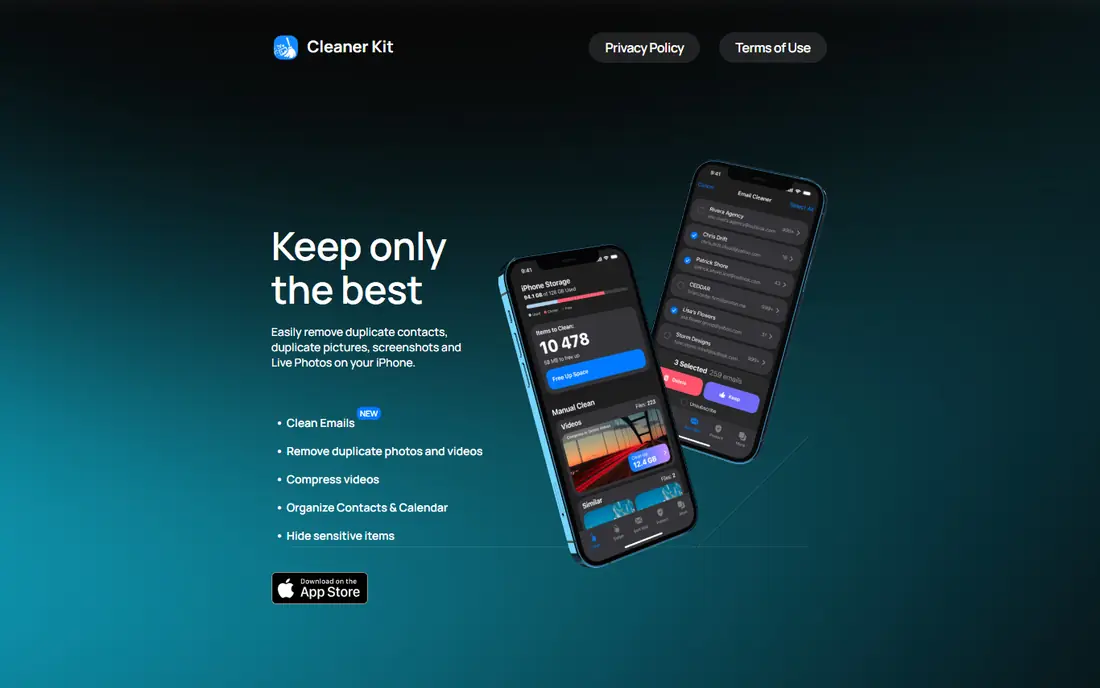
For readers who want all-round photo, video, and contact cleanup, Cleaner Kit is a natural place to start. It covers photos, videos, contacts, and calendars in one place, with swipe sorting that makes a large camera roll feel manageable. That focus matters because it shapes what you see each day, what you pay for, and what you can skip. We compared its official feature and pricing pages with what other users report, and the picture is consistent: the core tools work as described, while the extras vary in value.
The free version is a preview more than a full tool. Expect limits on batch deletions, and check which weekly or monthly plan the app store shows before you subscribe. Before you commit, check the current price at checkout, read the cancellation terms, and try the free tier or trial if one is offered. If the fit feels right, it is a sensible pick. If it feels forced, move on rather than paying for features you will not use.
- Duplicate and similar photo detection
- Video compression
- Contact cleanup
- Private vault
- Free tier limits deletions and shows ads
- Subscription needed for full cleanup
- Many plan variants
Cleanup suits readers who put fast duplicate photo cleanup first, and it shows in how the service is set up. It focuses on the job most people actually need: grouping duplicates and similar shots so you can clear them in one pass. That focus matters because it shapes what you see each day, what you pay for, and what you can skip. We compared its official feature and pricing pages with what other users report, and the picture is consistent: the core tools work as described, while the extras vary in value.
Weekly pricing is the catch. It can suit a single focused cleanup session, but it is poor value as a standing subscription if you clean rarely. Before you commit, check the current price at checkout, read the cancellation terms, and try the free tier or trial if one is offered. If the fit feels right, it is a sensible pick. If it feels forced, move on rather than paying for features you will not use.
- Fast duplicate grouping
- Email cleanup tools
- Confirmation before deletion
- Weekly pricing adds up fast
- Free tier is limited
- Tracking labels deserve a check
If free-first duplicate and large-video cleanup is your main goal, Clever Cleaner deserves a close look before you pay anywhere else. It stands out because the free tier lets you do real work each day rather than stopping after a tiny sample. That makes it a good first try before you pay anywhere. That focus matters because it shapes what you see each day, what you pay for, and what you can skip. We compared its official feature and pricing pages with what other users report, and the picture is consistent: the core tools work as described, while the extras vary in value.
The lifetime option, where offered, is worth comparing with the weekly price. If you clean often, a one-time payment beats a weekly charge over a year. Before you commit, check the current price at checkout, read the cancellation terms, and try the free tier or trial if one is offered. If the fit feels right, it is a sensible pick. If it feels forced, move on rather than paying for features you will not use.
- Free tier with daily limits
- Duplicate photos and large videos
- Live Photo handling
- Paid tiers still use weekly pricing
- Interface is simpler than rivals
- Some features need payment
Readers focused on quick photo and contact cleanup will find Boost Cleaner easy to understand from the first visit. It aims at a fast, no-fuss cleanup: scan, review, and delete what you no longer need. That narrow focus keeps the learning curve low. That focus matters because it shapes what you see each day, what you pay for, and what you can skip. We compared its official feature and pricing pages with what other users report, and the picture is consistent: the core tools work as described, while the extras vary in value.
Details and pricing vary by store listing, so treat the checkout screen as the source of truth. If the plan is unclear, use the free tier first and compare with Cleaner Kit. Before you commit, check the current price at checkout, read the cancellation terms, and try the free tier or trial if one is offered. If the fit feels right, it is a sensible pick. If it feels forced, move on rather than paying for features you will not use.
- Photo and contact cleanup
- Simple tools
- Quick scans
- Pricing varies by listing
- Free tier is limited
- Fewer public details than leaders
Phone Cleaner is best judged on one question: does it deliver storage cleanup with contact tools without extra fuss. It covers the basics without piling on extras, which is enough for readers whose main problem is a full camera roll and messy contacts. That focus matters because it shapes what you see each day, what you pay for, and what you can skip. We compared its official feature and pricing pages with what other users report, and the picture is consistent: the core tools work as described, while the extras vary in value.
The name is crowded on the app store. Check the developer name, screenshots, and in-app purchase list so you buy the app you actually reviewed. Before you commit, check the current price at checkout, read the cancellation terms, and try the free tier or trial if one is offered. If the fit feels right, it is a sensible pick. If it feels forced, move on rather than paying for features you will not use.
- Storage scanning
- Contact cleanup
- Simple design
- Many similarly named apps exist
- Free tier limits apply
- Verify the developer first
For duplicate and similar photo cleanup on ios, Gemini Photos is one of the more dependable names on this list. It comes from a known Mac software maker and focuses on photos, where most iPhone storage pressure lives. Its grouping of similar shots is genuinely useful. That focus matters because it shapes what you see each day, what you pay for, and what you can skip. We compared its official feature and pricing pages with what other users report, and the picture is consistent: the core tools work as described, while the extras vary in value.
It will not clean system files or other apps, because iOS does not allow that. Judge it only on photo cleanup, and confirm the current subscription on the store page. Before you commit, check the current price at checkout, read the cancellation terms, and try the free tier or trial if one is offered. If the fit feels right, it is a sensible pick. If it feels forced, move on rather than paying for features you will not use.
- Strong duplicate detection
- Similar-photo grouping
- Clean review flow
- Part of a wider MacPaw range
- Pricing varies
- Not a full system cleaner
CleanMyPhone earns its place here through its approach to photo decluttering with smart sorting, not through hype. It sorts photos into categories and highlights duplicates, old screenshots, and blurry shots, which speeds up a manual review. That focus matters because it shapes what you see each day, what you pay for, and what you can skip. We compared its official feature and pricing pages with what other users report, and the picture is consistent: the core tools work as described, while the extras vary in value.
Like every app here, it cannot touch iOS system storage. If your phone is full because of apps or downloads, you will need to manage those in Settings as well. Before you commit, check the current price at checkout, read the cancellation terms, and try the free tier or trial if one is offered. If the fit feels right, it is a sensible pick. If it feels forced, move on rather than paying for features you will not use.
- Smart photo sorting
- Duplicate detection
- Tidy interface
- Subscription pricing varies
- Photo-only focus
- Needs review before deletion
When gallery cleanup with a free trial matters most, iCleaner Kit gives you a clear, practical way to get started. It offers a trial and several plan lengths, so you can test the full cleanup before deciding. That flexibility helps if you want one thorough pass. That focus matters because it shapes what you see each day, what you pay for, and what you can skip. We compared its official feature and pricing pages with what other users report, and the picture is consistent: the core tools work as described, while the extras vary in value.
The weekly rate adds up quickly, so set a reminder if you start a trial. Cancel before renewal if you only needed a single cleanup. Before you commit, check the current price at checkout, read the cancellation terms, and try the free tier or trial if one is offered. If the fit feels right, it is a sensible pick. If it feels forced, move on rather than paying for features you will not use.
- Gallery cleanup
- Weekly, yearly, and lifetime options
- 3-day trial on some plans
- Weekly price is high for casual use
- Free tier is limited
- Plan names vary
How we picked these
We compared official feature pages, pricing pages, app store listings, privacy information, and public user feedback for each option, and we kept only products that exist now and truly fit the topic. We checked starting prices and free tiers where the vendor publishes them, and we wrote See website where a price could not be verified from the vendor. We did not claim hands-on testing, and we favoured options with clear terms and a usable free tier or trial where one exists.
How to clean an iPhone without paying for the wrong tool
Start in Settings, not in an app store. Check which categories use your storage, since photos, videos, and downloaded files are the usual culprits. If photos dominate, a cleaner app can help. If apps dominate, delete or offload unused apps yourself, because no cleaner app can do that for you. Next, use a free tier and review every group before deletion. Similar-photo tools are helpful, but they can group shots that look alike and mean different things to you. Back up important photos before a big delete, and clean in small batches until you trust the scan. Finally, compare total cost. A weekly plan that seems cheap can cost more in a month than a yearly or lifetime plan, so do the maths for how often you will actually clean.
Sources
Frequently asked questions
What is the best free iPhone cleaner app?
Clever Cleaner and Cleaner Kit both offer free tiers, but Clever Cleaner lets you do more without paying at once. Start free, review results carefully, and only pay if the free limits slow you down.
Can an iPhone cleaner app delete system files?
No. iOS does not let third-party apps delete system files or clean other apps. These apps mainly help with photos, videos, and contacts, plus manual steps in Settings.
Is Cleaner Kit free?
It is free to download with a limited free tier, but full cleanup needs a paid plan. The app store listing shows weekly and monthly options, so check the price before you subscribe.
Do I need a cleaner app at all?
Not always. You can delete duplicates and large videos by hand in Photos, and manage storage in Settings. An app earns its price by making a large, boring job faster.
Are iPhone cleaner apps safe?
Stick to well-known developers, read the privacy label, and review deletions before confirming. Avoid apps that ask for unrelated permissions or promise system-level cleaning that iOS does not allow.