Best Marketing Planning Software in 2026: 9 Tools Compared
By ToolNimba Editorial Team November 9, 2026 11 min read

- Top pick
 Enji
Small business marketing plans
Starting price$29 per monthCheck out EnjiRead our review - Runner-up
 Asana
Campaign planning and approvals
Starting price$10.99 per user per monthCheck out AsanaRead our review - Also great
 monday.com
Visual campaign boards
Starting price$9 per user per monthCheck out monday.comRead our review
How we researched this
We compared official pricing and feature pages, app store listings, privacy policies and public user reviews. Prices change, so check the provider's site before you pay.
Key takeaways
- Enji is the only tool here built to write the marketing plan itself, which makes it the best fit for small businesses without a marketing team.
- Asana, monday.com, ClickUp, Trello and Wrike are general work tools that plan campaigns well, but none of them writes your strategy for you.
- Flat pricing beats per-seat pricing for tiny teams, which is why Enji at $29 per month total deserves a close look before you pay per user elsewhere.
- Screendragon is the enterprise pick for agencies and large brands, with workflow automation and approvals, but it is quote-based and overkill for small teams.
- Start with the free tier of a general tool if your main problem is tracking tasks, and move to a specialist only when planning itself is the bottleneck.
Quick comparison
| Name | Best for | Starting price | Free plan | |
|---|---|---|---|---|
| Enji | Small business marketing plans | $29 per month | Free trial | Visit |
| Asana | Campaign planning and approvals | $10.99 per user per month | Yes | Visit |
| monday.com | Visual campaign boards | $9 per user per month | Yes | Visit |
 ClickUp | Budget all-in-one workspace | $7 per user per month | Yes | Visit |
 Trello | Simple Kanban planning | $5 per user per month | Yes | Visit |
 Wrike | Creative intake and proofing | $10 per user per month | Yes | Visit |
 Notion | Docs, wikis and planning | $10 per user per month | Yes | Visit |
 Smartsheet | Spreadsheet-style planning | $9 per user per month | Free trial | Visit |
 Screendragon | Enterprise marketing operations | See website | No | Visit |
The best marketing planning software
Marketing planning software should do more than hold a to-do list. The best tools turn a strategy into dated tasks, owners and campaigns, and show what is on track and what is stuck. We compared official pricing pages and feature lists to find options for solo owners, growing teams and large departments.
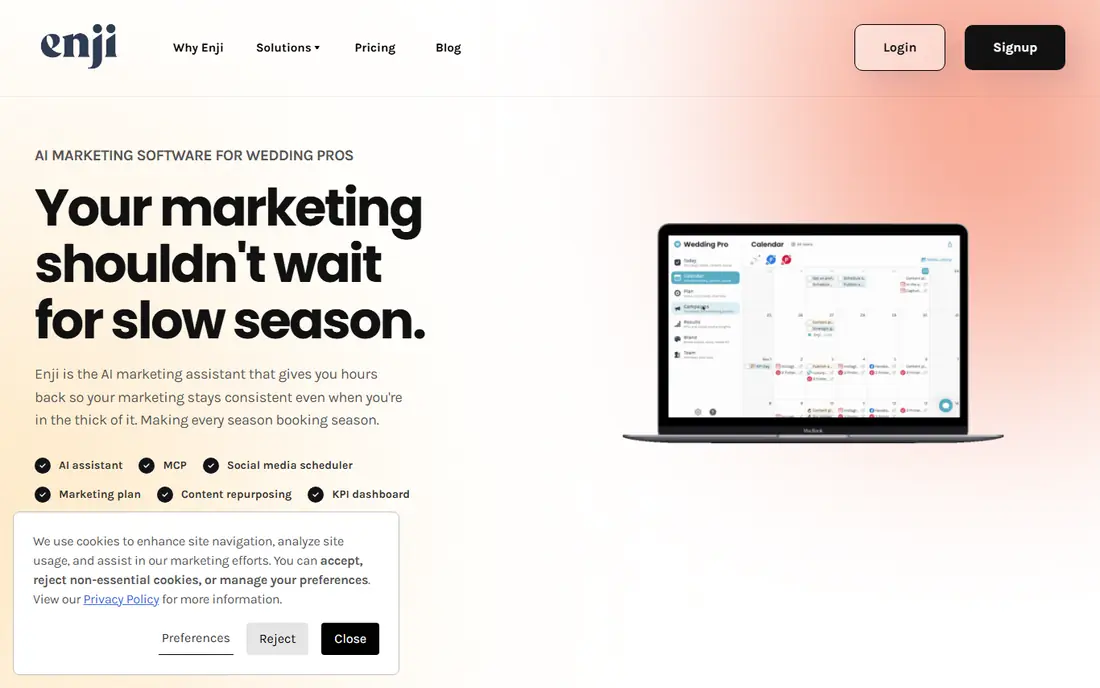
Enji is different from everything else on this list because it starts with the plan, not a blank board. Answer a questionnaire about your business, goals and available time, and Enji builds a personalized marketing plan with tasks on a calendar, suggested metrics and campaign templates. Social scheduling, AI drafting and analytics then live in the same place, so the plan actually gets done.
The flat $29 per month price is the other reason small teams like it: a five-person team pays the same as a solo owner, where per-seat tools would charge five times. The limits are scale and depth. Large departments with complex approvals and enterprise reporting will outgrow Enji, but a small business that needs marketing to happen without a marketing hire will not find a better fit.
- Builds a personalized marketing plan from a questionnaire
- Social scheduling and AI copywriting built in
- Flat price, not per seat
- Built for small business, not large departments
- No deep enterprise reporting
- Fewer integrations than general work tools

Asana is the safest first look for a marketing team that has outgrown spreadsheets and chat threads. A campaign becomes a project, each deliverable becomes a task with an owner and due date, and dependencies show who is blocking whom. Most people learn it in an afternoon, which matters when half the team is writers and designers who will not read documentation.
Pricing starts with a free Personal plan for very small teams, then Starter at $10.99 per user per month billed annually, and Advanced at $24.99 on the same basis. Marketers who want portfolios, workload views and approvals across several campaigns will end up on Advanced, so budget for that tier rather than the entry price. Asana plans work well, but it will not write the strategy for you.
- Clean timeline and board views
- Easy for non-technical staff to adopt
- Strong integration library
- Free plan covers only small teams
- Best planning features sit on higher tiers
- Per-seat cost climbs with team size
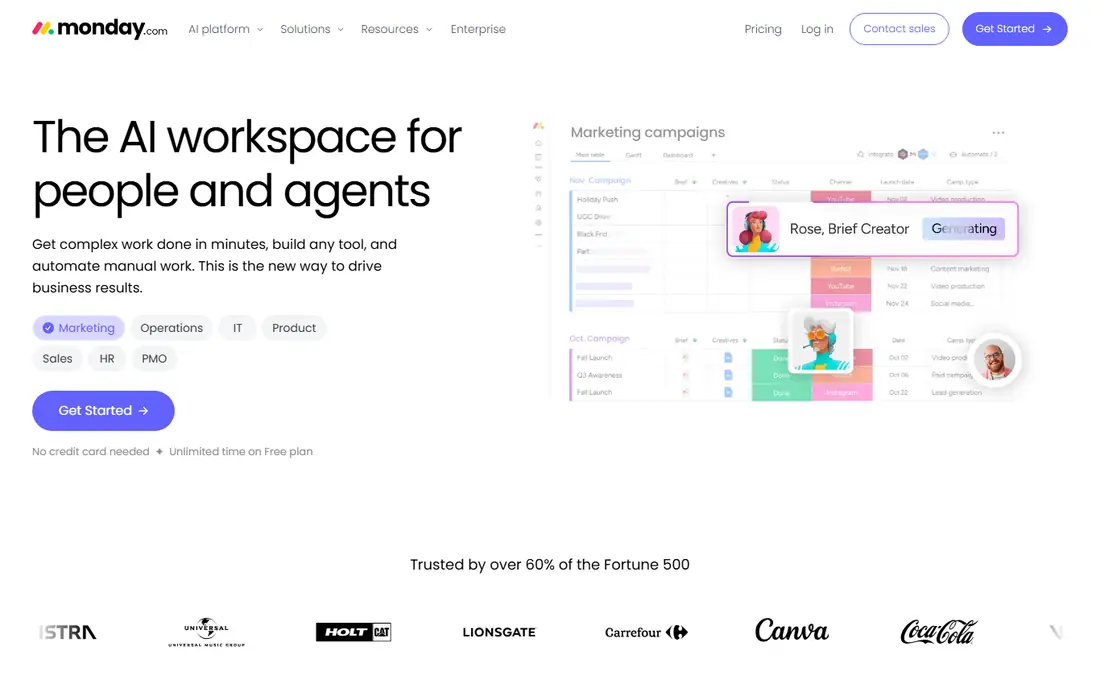
monday.com suits teams that think in boards and colors rather than lists. Campaigns become visual boards with status columns, timelines and owners, and dashboards roll those boards into reports for leadership. Automations can move items, notify owners and update statuses without manual chasing, which saves real time on recurring campaigns.
The entry Basic tier at $9 per seat per month billed annually covers the core, but teams that want more automations and views will move to Standard at $12. The free plan covers up to two users, so it works for a trial or a tiny team but not a department. If your team plans visually and reports upward often, monday.com is a strong pick.
- Flexible boards shaped around your workflow
- Strong dashboards for reporting
- Many automation recipes
- Cheapest tier is thin on automations and views
- Free plan limited to two seats
- Costs rise as boards and users grow
ClickUp is the budget all-in-one for teams that want docs, goals, tasks and dashboards without paying for four tools. The free tier is genuinely usable, and Unlimited at $7 per user per month billed annually adds more storage, integrations and reporting. For a small marketing team watching costs, that price is hard to beat.
The risk is sprawl. ClickUp offers so many views, fields and automations that a workspace can turn messy without an owner who keeps it tidy. Teams that appoint one person to guard the structure get the most from it. Teams that let everyone build their own system will feel the clutter within a month.
- Low entry price with a generous free tier
- Docs, goals and tasks in one workspace
- Flexible views and automations
- Feature depth can overwhelm new users
- Setup takes care to stay tidy
- Some users find performance uneven on huge workspaces
Trello is the right tool when planning has become too complicated for its own good. Boards, lists and cards map neatly onto a campaign: ideas in one column, work in progress in the next, published work at the end. Checklists, due dates and attachments cover most small-team needs, and new members understand it in minutes.
The ceiling arrives with scale. Reporting, workload views and advanced automation sit on higher tiers, with Standard at $5 and Premium at $10 per user per month billed annually. A solo marketer or a team of three running a handful of campaigns will rarely hit that ceiling. A department running dozens of campaigns at once should look at Asana or Wrike instead.
- Simplest board tool to learn
- Free tier covers core planning
- Cards, checklists and due dates just work
- Limited reporting and workload views
- Large campaigns need Power-Ups or higher tiers
- No built-in marketing strategy help
Wrike fits marketing departments that behave like internal agencies, with a steady stream of requests from sales, product and regional teams. Request forms feed a queue, work gets assigned, and reviewers mark up assets and sign off. That structure is useful when more than a dozen campaigns run at once and nothing can slip through chat.
Pricing starts with a free plan, then Team at $10 per user per month and Business at $25 billed annually, with higher tiers quoted. Add-ons for integration and security cost extra, so the real bill can run above the headline number. Small teams may find Wrike heavy, but creative departments with formal intake will appreciate the discipline.
- Request forms and approvals suit creative teams
- Handles many concurrent campaigns
- Free plan for basic task work
- Interface takes longer to learn than simpler tools
- Advanced resource planning sits on custom-priced tiers
- Add-ons cost extra
Notion is the planning tool for teams whose marketing lives in documents as much as in tasks. Strategy docs, brand guidelines, content calendars and task databases can sit in one workspace, linked together, so a campaign brief and its deliverables never drift apart. Templates for content calendars and campaign trackers shorten setup.
The weakness is that Notion is a general workspace, not a campaign system. Reporting, approvals and workload views are weaker than Asana or Wrike, and the Plus plan at $10 per user per month billed annually is where most teams land. If your planning starts in docs and ends in tasks, Notion fits. If it starts in approvals and budgets, look elsewhere.
- Docs, wikis, databases and tasks in one place
- Flexible templates for campaign planning
- Good free tier for individuals
- Not a dedicated campaign tool
- Reporting is weaker than rivals
- Large teams need setup discipline
Smartsheet suits marketing teams that already think in spreadsheets. Campaign plans live in grid rows with owners, dates and budgets, while Gantt, card and calendar views present the same data differently. Budget tracking and timeline reporting feel natural here, which is why finance-friendly marketing teams adopt it fast.
The trade is approachability. Teams that prefer visual boards or docs may find Smartsheet plain, and there is no permanent free tier, only a trial before the Pro plan at $9 per user per month billed annually. If your team runs on spreadsheets today, Smartsheet is the least disruptive upgrade on this list.
- Familiar spreadsheet interface with Gantt and card views
- Strong for budget and timeline tracking
- Good for spreadsheet-comfortable teams
- Less intuitive for visual-first teams
- Collaboration features trail rivals
- No free tier beyond the trial
Screendragon is the enterprise end of this list, built for agencies and large brands rather than small teams. It orchestrates people, workflows and resources across complex campaigns, with approvals, capacity planning and AI agents that help with briefing, proofing and compliance checks. Large organizations use it to standardize how work moves across many teams and markets.
That power comes with enterprise friction: pricing is quoted, not published, and setup is a project, not an afternoon. Small and mid-size teams will get more value faster from the tools above. Agencies and brands that run marketing as a large operation, with governance and audit needs, should put Screendragon on the shortlist.
- Built for agencies and enterprise marketing teams
- Workflow automation with approvals and resourcing
- AI agents for briefing, proofing and compliance
- Quote-based pricing with no public starting price
- Overkill for small teams
- Implementation takes real effort
How we picked these
We compared official pricing pages, feature lists and public reviews for tools that plan marketing work, from specialist planners to general work platforms used by marketing teams. We favored tools with published prices or a clear free tier, and we kept one enterprise option for large departments. We did not claim hands-on testing, and we left out pure social schedulers and pure analytics tools that do not plan campaigns.
How to choose for your team size
Solo owners and teams under five should start with Enji if they need a plan written for them, or Trello or ClickUp if they already know what to do and just need to track it. Flat or low pricing matters most at this size, because per-seat costs punish adding a contractor or part-timer for one campaign.
Mid-size teams need approvals and reporting
Teams of five to fifty need intake, approvals and reporting more than they need another board. Asana and Wrike handle that structure best, with monday.com close behind for visual teams. Budget for the tier that includes approvals and workload views, not the entry tier, and confirm how many seats you will actually need before signing.
Large departments need governance
Enterprise teams should weigh Screendragon or Wrike Business and above, where workflow governance, resource planning and audit trails matter more than the monthly price. Run a pilot on one campaign type before rolling out, and measure whether intake and approval times actually fall.
Sources
Frequently asked questions
What is marketing planning software?
Marketing planning software turns a marketing strategy into dated tasks, owners, budgets and campaigns, and tracks progress in one place. It ranges from specialist tools that build the plan itself, such as Enji, to general work platforms such as Asana that track the work once the plan exists.
Is Enji better than Asana for a small business?
For a small business without a marketing team, Enji is often better, because it builds a personalized plan, drafts content and schedules posts, while Asana only organizes tasks you define yourself. Asana is better when you already have a strategy and a team that needs structure, approvals and reporting.
Can I plan marketing campaigns for free?
Yes, for small teams. Trello, ClickUp, Asana, monday.com and Notion all offer free tiers that cover basic campaign planning. Free tiers usually limit seats, automations or views, so growing teams will eventually pay, but a solo marketer can plan real campaigns without spending anything.
How much should a small team budget for marketing planning software?
A solo owner can start free or at $29 per month flat with Enji. A team of five on a per-seat tool at $7 to $11 per user per month will pay $35 to $55 per month before higher tiers. Budget for the tier with the approvals and reporting you need, and add the cost of any seats for contractors.
Do these tools replace a marketing agency?
No, they organize and speed up marketing work, but they do not replace strategy, creative judgment or media expertise. Enji comes closest for small businesses by suggesting plans and drafting content, yet even it works best when a human reviews the strategy and the output before publishing.