Best Online Tools To Measure Ping Time in 2026: 9 Tools Compared
By ToolNimba Editorial Team November 9, 2026 11 min read

- Top pick
 Speedtest by Ookla
The all-round default
Starting priceFreeCheck out Speedtest by OoklaRead our review - Runner-up
 Fast.com
Quick streaming check
Starting priceFreeCheck out Fast.comRead our review - Also great
 Cloudflare Speed Test
Latency under load
Starting priceFreeCheck out Cloudflare Speed TestRead our review
How we researched this
We compared official pricing and feature pages, app store listings, privacy policies and public user reviews. Prices change, so check the provider's site before you pay.
Key takeaways
- Speedtest by Ookla is our pick for most people, because it reports ping alongside download and upload speed, with a large server network and a simple one-click test.
- Fast.com is the fastest check for streaming problems, since it tests against Netflix servers and shows whether video traffic is slower than your general connection.
- Cloudflare Speed Test is the best choice for gamers and video callers, because it also measures latency under load and jitter, which matter more than raw speed.
- TestMy.net is the pick for verifying what your provider really delivers, since it uses longer, randomized tests that are harder for a provider to game.
- A single ping number is not the whole story: jitter and packet loss explain many stutters that a good average ping hides.
Quick comparison
| Name | Best for | Starting price | Free plan | |
|---|---|---|---|---|
| Speedtest by Ookla | The all-round default | Free | Yes | Visit |
| Fast.com | Quick streaming check | Free | Yes | Visit |
| Cloudflare Speed Test | Latency under load | Free | Yes | Visit |
 TestMy.net | Honest long-form tests | Free | Yes | Visit |
 Meter.net | Browser ping with global servers | Free | Yes | Visit |
 Site24x7 Ping Test | Testing from many locations | Free | Yes | Visit |
 OpenSpeedTest | Self-hosted and browser tests | Free | Yes | Visit |
 DSLReports Speed Test | Detailed bufferbloat check | Free | Yes | Visit |
 Google Speed Test | Fast check inside search | Free | Yes | Visit |
The best online tools to measure ping time
Ping time, usually shown in milliseconds, is the round-trip time for a small packet to reach a server and return. Low ping makes games feel responsive and video calls feel natural. High ping creates lag even when download speed looks fine. The tools below all measure ping in a browser without installing software, but they differ in what else they show and how they test.
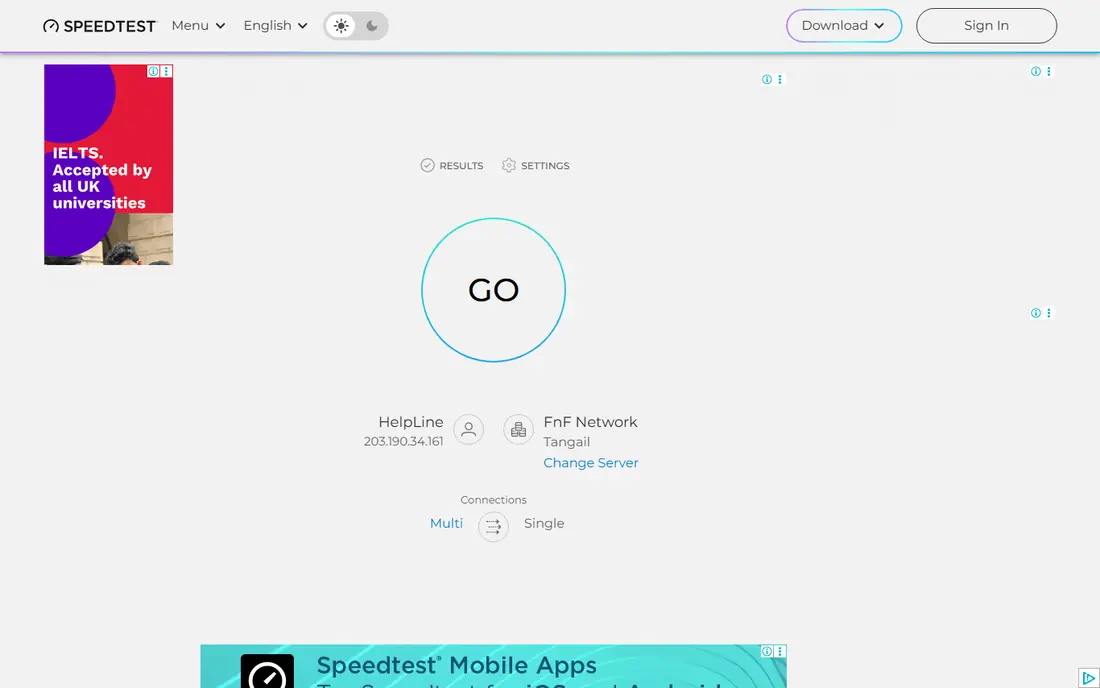
Speedtest by Ookla is the test most people already know, and for good reason. One click runs a ping test plus download and upload measurements, usually against a nearby server, and the result is easy to read and share. That combination makes it the best first test when something feels slow, because it answers the three basic questions at once: how fast is my download, how fast is my upload, and how responsive is the connection.
The main limit is that the auto-selected server gives you a best-case number. If you game on a server far away, or call colleagues in another region, test against a server near that destination instead of relying on the closest one. Speedtest lets you choose a server, and doing so gives a much more useful ping figure for your real use.
- Large global server network
- Ping, download, and upload in one test
- Easy result sharing
- Results depend on the auto-selected server
- Ads on the free web version
Fast.com, built by Netflix, starts testing the moment the page loads, which makes it the fastest check on this list. It measures your connection to Netflix servers, so it is especially useful when video buffers while other sites feel fine. If Fast.com is much slower than Speedtest, that gap can point to video traffic being treated differently, or to a problem on the route to streaming servers.
The detailed view adds upload speed and latency figures, including loaded latency, so it is worth expanding rather than stopping at the headline download number. Fast.com will not replace a full diagnostic tool, but for a thirty-second streaming check, nothing here is quicker.
- Instant result with no setup
- Tests against Netflix servers
- Shows loaded latency in detailed view
- Focused on download first
- Fewer server choices than Speedtest
Cloudflare Speed Test is our pick for gamers and frequent video callers. Beyond a basic ping figure, it measures latency while the connection is busy, which reveals bufferbloat, the stutter that appears when downloads or uploads saturate your link. It also reports jitter, the variation in ping, and packet loss, both of which explain choppy calls better than an average ping alone.
The results page is more detailed than Speedtest or Fast.com, so new users may need a minute to read it. That detail is the point, though: a connection with low average ping but high jitter will still feel unstable, and Cloudflare shows you that problem clearly. Run it when a game or call stutters even though a basic speed test looks fine.
- Measures unloaded and loaded latency, jitter, and packet loss
- Clean detailed results
- No account needed
- Results can look technical for new users
- Single-provider network
TestMy.net takes a different approach from most speed tests. Instead of a short burst against an auto-selected server, it runs longer, randomized file transfers and lets you choose the server and test size. That design makes it harder for a provider to temporarily boost results when it detects a popular test, and it gives a more realistic average for sustained use.
The trade-off is time and looks. Tests take longer, and the site looks dated next to Speedtest or Fast.com. For a one-off complaint to your provider, though, TestMy.net gives you stronger evidence, because you can show results across servers and over time. Use it when you need proof, not just a quick number.
- Longer randomized tests
- Manual server and test size choices
- Result history without an account
- Slower than one-click tests
- Interface looks dated
Meter.net offers a browser-based ping test that uses WebSocket technology to get close to a classic ICMP ping result, without needing an app or plugin. It can test response times from multiple locations at once, which helps when you want to know how your connection performs to different regions, not just to one nearby server.
It lacks the brand recognition and extra tools of Speedtest, and its result pages are simpler. For a focused ping check with geographic detail, however, Meter.net is a useful second opinion. If Speedtest and Meter.net disagree sharply, that difference itself is worth investigating, since it may reflect routing rather than your home connection.
- WebSocket-based ping close to classic ping
- Tests from multiple locations
- No install needed
- Less well known than Speedtest
- Fewer extra features
Site24x7 Ping Test answers a different question from the tools above: how fast is a website or server from locations around the world. You enter a host name, and the tool pings it from many monitoring locations, reporting round-trip time and packet loss per location. That is valuable for website owners, developers, and anyone troubleshooting why visitors in one region see delays.
It is not a test of your own home connection speed, so do not use it as a replacement for Speedtest. Use it alongside a personal speed test when the question is whether a server is slow for everyone, or only for you. That distinction saves a lot of wasted troubleshooting.
- Tests a host from many global locations
- Shows packet loss and round-trip time
- Useful for website owners
- Tests a server you specify, not your own connection speed
- Free tool limits apply
OpenSpeedTest is an open source, HTML5 speed test that runs entirely in the browser and measures ping, jitter, download, and upload. Individuals can use the public test, while businesses and schools can host their own instance, which is useful for testing an internal network without sending traffic to a public provider.
The public version has fewer servers than Ookla, so results depend on which server you reach. Self-hosting solves that for organizations, but it needs technical setup. For most home users, OpenSpeedTest is a clean, ad-light alternative to the bigger names, and for IT teams, the self-hosted option is its real strength.
- Fully browser-based with no plugins
- Can be self-hosted
- Measures ping, jitter, download, and upload
- Public server choice is smaller
- Self-hosting needs technical setup
DSLReports Speed Test has long been a favorite among network enthusiasts, because it grades bufferbloat and latency under load in detail. Like Cloudflare, it shows what happens to ping when your connection is busy, which is the condition that breaks games and calls in real homes. It also tests multiple streams, giving a fuller picture than a single-stream test.
The interface looks dated, and the grades take a little learning to interpret. If you only want a quick number, use Speedtest. If you want to diagnose why your connection stutters during uploads, or to compare routers and settings, DSLReports gives you the detail to do it properly.
- Detailed latency and bufferbloat grades
- Upload and download under load
- No account needed
- Dated interface
- Results can be hard to interpret at first
Google offers a speed test directly in search, powered by Measurement Lab, an open measurement project. Type a speed test query, run the test, and you get download, upload, and latency figures without visiting a separate site or installing anything. That convenience makes it the test we suggest when helping someone else check their connection over the phone.
Detail is limited, with no server choice, jitter breakdown, or history to compare over time. Treat it as a quick sanity check, then move to Speedtest or Cloudflare if the result looks wrong or you need to diagnose a problem. For a first answer in under a minute, it does the job.
- No site to remember, just search for a speed test
- Uses Measurement Lab servers
- Quick result
- Basic detail only
- No server choice or history
How we picked these
We compared official tool pages, documentation, and public guides, and we kept only tools that measure ping in a browser without requiring a download. We favored a mix of quick checks, detailed diagnostics, and multi-location tests, so readers can start simple and go deeper only if needed. Every tool listed here is free to use for a basic test, which matters for a topic where readers usually need an answer right now.
How to get a ping result you can trust
Test over a wired connection first if you can, since Wi-Fi interference can add jitter that has nothing to do with your internet provider. Close large downloads, cloud backups, and video streams before testing, then run the same test three times and note the range, not just the best result. A connection that reports 20, 45, and 90 ms across three runs has a stability problem that a single 20 ms result would hide.
What good ping looks like
For most uses, under 50 ms feels responsive, and under 30 ms is excellent for gaming and video calls. Above 100 ms, you will start to notice delays in conversation and game response, and above 150 ms, real-time interaction becomes frustrating. These are guides, not hard rules, since distance to the server matters: a server on another continent will always show higher ping than a local one, no matter how good your connection is.
When the problem is not your ping
If ping is low but video still buffers, the issue may be download speed, Wi-Fi coverage, or the server you are reaching. If ping is high only to one game or service, routing to that service may be the cause, and a different server region or a provider complaint may help more than a router restart. Test more than one tool and more than one destination before changing plans or hardware.
Sources
Frequently asked questions
What is a good ping time?
Under 50 ms is good for most uses, and under 30 ms is excellent for gaming and video calls. Above 100 ms, delays become noticeable, and above 150 ms, real-time apps feel sluggish. Distance to the server matters, so compare results to servers in the same region.
Why is my ping high when my download speed is fast?
Download speed and ping measure different things. Download speed shows how much data arrives per second, while ping shows how quickly a small packet returns. Distance, congestion, Wi-Fi interference, and poor routing can all raise ping even on a fast plan.
Does Wi-Fi increase ping?
Yes, in most cases. Wi-Fi is more prone to interference and congestion than a wired Ethernet connection, which can raise ping and jitter. If you need stable low ping for gaming or calls, test with a cable to see how much of the problem is Wi-Fi.
What is the difference between ping and jitter?
Ping is the average round-trip time, while jitter is how much that time varies. A connection with 30 ms ping and 25 ms jitter will feel worse than a steady 40 ms connection, because the variation causes stutters in calls and games. Cloudflare and DSLReports both report jitter.
Can I measure ping without installing anything?
Yes. Every tool on this list runs in a browser, including Speedtest, Fast.com, and Cloudflare Speed Test. You can also use the ping command in a terminal, but browser tools are easier and give you download and upload figures at the same time.
Which tool should I use to complain to my provider?
TestMy.net is a strong choice for provider complaints, because its longer tests and manual server choices are harder to game and produce a history you can show. Run tests at different times of day, save the results, and pair them with a Cloudflare or DSLReports bufferbloat check for a fuller case.