Best Passport Photo App in 2026: 9 Apps Compared
By ToolNimba Editorial Team November 9, 2026 9 min read

- Top pick
 PhotoAiD
Peace of mind with human review
Starting price$11 per photoCheck out PhotoAiDRead our review - Runner-up
 iVisa Passport Photo
Budget paid compliance checks
Starting price$5.95 per photoCheck out iVisa Passport PhotoRead our review - Also great
 Adobe Express
Free DIY cropping and background removal
Starting price$9.99 per monthCheck out Adobe ExpressRead our review
How we researched this
We compared official pricing and feature pages, app store listings, privacy policies and public user reviews. Prices change, so check the provider's site before you pay.
Key takeaways
- PhotoAiD is the safest paid choice, with AI checks plus a human review and a money-back guarantee if your photo is rejected.
- iVisa Passport Photo is the best budget paid option, from about $5.95, with checks against your specific country's rules.
- Adobe Express is the best free tool for careful users who will check the rules themselves, since it does not verify compliance.
- PassportPic.ai is the most private option, processing your photo on your device and charging $6.99 one-time per photo.
- IDPhoto4You is the best free web tool for print layouts, though you must crop and check compliance yourself.
Quick comparison
| Name | Best for | Starting price | Free plan | |
|---|---|---|---|---|
| PhotoAiD | Peace of mind with human review | $11 per photo | No | Visit |
| iVisa Passport Photo | Budget paid compliance checks | $5.95 per photo | No | Visit |
| Adobe Express | Free DIY cropping and background removal | $9.99 per month | Yes | Visit |
 PhotoGov | Cheap per-photo compliance | $4.90 per photo | No | Visit |
 PassportPic.ai | Private on-device processing | $6.99 one-time | No | Visit |
 IDPhoto4You | Free print layouts | Free | Yes | Visit |
 Smartphone iD | Phone-first ID photos | See website | No | Visit |
 CompliantPhoto | AI compliance validation | See website | No | Visit |
 Persofoto | Simple online ID photos | See website | No | Visit |
The best passport photo app
A passport photo app does three things: sizes your photo to the right dimensions, removes or replaces the background, and, in the best cases, checks the result against your country's rules. The difference between apps is mostly that last step. A plain crop tool is free but leaves compliance to you, while a verified service costs a few dollars and catches mistakes before the passport office does.

PhotoAiD is the most-cited paid service in this category for one reason: it does not just crop your photo. An AI pass checks compliance, then a real person reviews it, and the company offers a money-back guarantee if the photo is rejected. It works on web, iOS, and Android, covers dozens of countries, and delivers a ready-to-submit digital file.
You preview for free but pay to download, at roughly the price of a drugstore photo. Treat the guarantee as the reassurance, not any "100 percent acceptance" marketing, and read the refund terms first. For a first-time applicant or a passport you cannot afford to delay, PhotoAiD is our top pick.
- AI check plus human expert review
- Money-back guarantee if rejected
- Covers 100 plus countries
- Costs around $11 per photo
- You pay to download
- Premium pricing versus free tools
iVisa Passport Photo, from the visa service iVisa, checks your photo against the rules of the specific country and document you choose, then delivers a compliant file. Pricing starts from about $5.95, which undercuts PhotoAiD, and the preview is free with payment only for the download.
It does not advertise a human review step, and country coverage is narrower than PhotoAiD's. For travelers who want a verified photo at the lowest paid price, iVisa is the best value.
- Checks against a specific country's rules
- Multi-document support
- Preview free, pay to download
- Pay to download
- Fewer countries than PhotoAiD
- No human review advertised
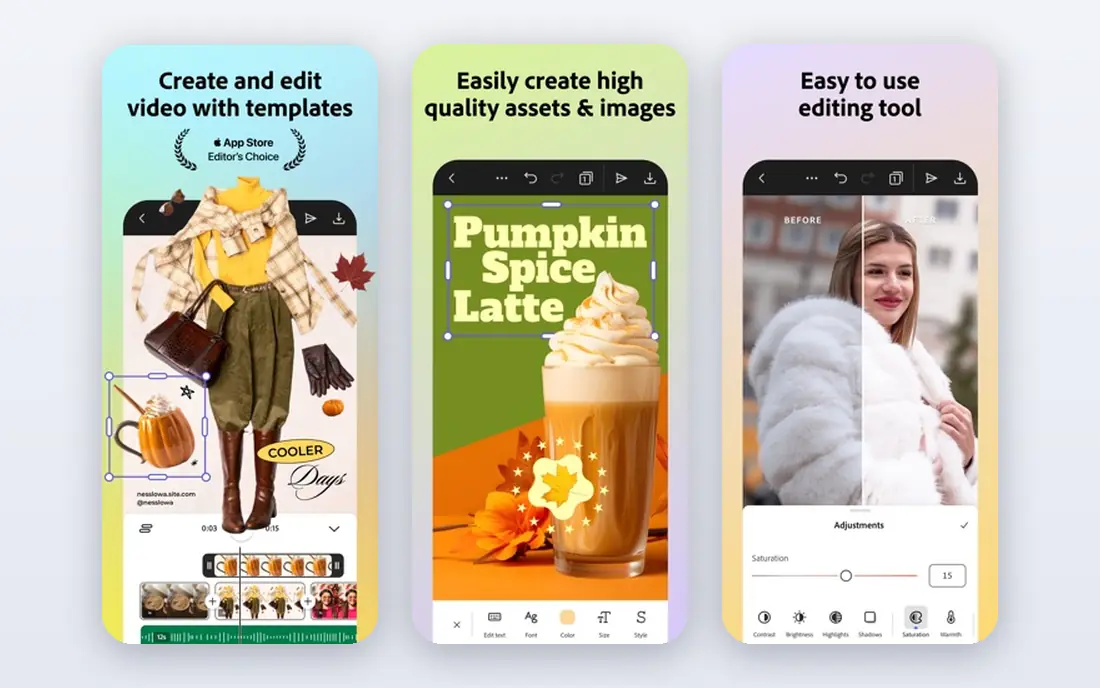
Adobe Express is the best free, cross-platform pick if you are willing to check the rules yourself. Its resize-and-crop flow plus one-tap background remover makes a clean 2 by 2 square, and the free tier exports without a watermark. It comes from a trusted name with no subscription trap at download.
The honest caveat is that Express does not verify compliance. It will not tell you whether your head is the right size or your background is plain enough, and its retouch tools can smooth skin in ways passport offices reject, so keep them closed. For a careful person who reads the requirements, it is an excellent free tool.
- Free tier exports without a watermark
- Background remover
- Runs on iPhone, Android, and web
- Does not verify government compliance
- No head-size guidance
- Retouch tools can ruin compliance
PhotoGov is the cheapest paid compliance option we found, from $4.90 per photo. It processes your photo against document requirements through a simple web flow and delivers a ready file fast. For travelers who need one compliant photo and nothing else, the price is hard to beat.
Extra features are limited, and there is no human review step. If your photo is tricky, like unusual lighting or a child, a service with human review may be worth the extra dollars. For a straightforward adult photo, PhotoGov is the budget winner.
- Very low per-photo price
- Quick compliance processing
- Simple web flow
- Limited extra features
- No human review
- Pay per photo
PassportPic.ai takes a different approach to privacy: processing happens on your device, so your photo is never uploaded to a server. Its AI checks face size, background, expression, head tilt, and lighting against ICAO rules and your country's specification, and you see the report before paying. Pricing is $6.99 one-time per photo, with print layouts and PDF export included.
It is a newer, web-only service with no human review. For privacy-minded users who like the idea that a company technically cannot see their photo, it is the most interesting option here.
- Photo never leaves your device
- AI checks against ICAO rules
- One-time $6.99, no subscription
- Newer service
- Web only
- No human review
IDPhoto4You is the old-school free web tool for print layouts. You crop your photo manually, pick a size format, and get a printable sheet for standard photo paper, which you can print at home or at a store. It costs nothing and covers many formats.
You do all the compliance work yourself, and the interface shows its age. For users who know the rules and just need a free print sheet, it remains a useful, honest tool.
- Free to use
- Print layouts for photo paper
- Many size formats
- Manual cropping
- No compliance verification
- Dated interface
Smartphone iD is a phone-first service for passports, visas, and ID photos, with a guided flow that walks you through taking an acceptable photo. It suits travelers who want to do everything on their phone without learning photo rules.
Pricing varies by document and you pay to download the final file. Verification depth is thinner than PhotoAiD's human review. For a simple phone-first experience, it is a convenient middle option.
- Built for phone photos
- Covers passports, visas, and IDs
- Simple guided flow
- Pay to download
- Pricing varies by document
- Verification depth varies
CompliantPhoto stands out for validation depth. Its AI checks head position, face coverage, eye visibility, expression, lighting, shadows, and background uniformity against published government specifications, and a repair tool fixes common problems automatically. That focus on rejection risk is why it ranks highly in 2026 comparisons.
Pricing is not published as openly as rivals, and it is web only. If your priority is the most thorough automated check available, CompliantPhoto is worth a look before you pay.
- Full AI validation against government specs
- One-click background removal
- Fix-my-photo repair tool
- Pricing not published upfront
- No app, web only
- Newer brand
Persofoto rounds out the paid online options with a simple flow for common passport and ID documents. Upload a photo, get a compliant crop and background, and download the result. It suits users who want a straightforward service without extra features.
It is less well known than PhotoAiD or iVisa, and pricing varies by document. For a basic compliant photo from a simple web tool, it does the job.
- Simple online flow
- Covers common documents
- Quick turnaround
- Less known than PhotoAiD
- Pricing varies
- Fewer standout features
How we picked these
We compared official pricing pages, app store listings, and independent 2026 comparisons of passport photo apps, favoring tools with current availability in October 2026, a real free tier or pay-per-photo model, and a clear job: verified compliance, free DIY editing, or print layouts. We mixed free tools with paid verified services. Prices change often, so confirm on each vendor page before you pay. We did not submit test photos to passport offices hands-on; our comparison rests on published features, pricing, and public reviews.
Getting a photo that gets accepted
Follow the official rules for your document before you open any app. For a US passport, that means a 2 by 2 inch color photo, plain white background, neutral expression or natural smile, both eyes open, no glasses, and no shadows on your face or background. Take the photo in bright, even daylight facing a plain wall, with the camera at eye level.
Avoid retouching that changes how you look. Smoothing skin, slimming faces, or swapping clothes with AI may look better, but altered photos can be rejected, and some countries treat heavy editing as misrepresentation. A compliant photo is boring on purpose: recent, clear, and unmistakably you.
Sources
- https://overchat.ai/ai-hub/best-ai-passport-photo-generators
- https://artistichive.com/best-passport-photo-apps/
- https://techbullion.com/top-6-passport-visa-photo-makers-in-2026-tested-and-ranked/
- https://passportpic.ai/
- https://photoaid.com
- https://www.ivisa.com
- https://www.adobe.com
- https://photogov.com
- https://www.idphoto4you.com
- https://smartphone-id.com
- https://compliantphoto.com
- https://persofoto.com
Frequently asked questions
What is the best passport photo app?
PhotoAiD is the safest paid choice, thanks to AI checks plus human review and a money-back guarantee. iVisa Passport Photo is the best budget paid option from about $5.95. Adobe Express is the best free tool if you will check the rules yourself, since it does not verify compliance.
Can I take my own passport photo with my phone?
Yes, most countries accept phone photos if they meet the rules: correct size, plain background, neutral expression, no glasses, and even lighting. Use a compliance-checking app or service to verify the result, since a rejected photo delays your application.
How much does a passport photo app cost?
Free tools like Adobe Express and IDPhoto4You cost nothing for basic use. Paid verified services range from about $4.90 per photo at PhotoGov to around $11 at PhotoAiD, with PassportPic.ai at $6.99 one-time. Drugstore photos typically cost more than any of these.
What size is a US passport photo?
A US passport photo must be 2 by 2 inches, in color, with your head between 1 and 1 and 3/8 inches from chin to crown. Other countries use different sizes, such as 35 by 45 millimeters in much of Europe, so pick your document and country in the app before cropping.
Can I smile in a passport photo?
The US allows a natural smile with your mouth closed, but a neutral expression is safest. Other countries vary, and some require a fully neutral expression. Check your country's rules, and avoid grins, open mouths, or anything that distorts your face.