Best Platform for Creating Posters in 2026: 8 Platforms Compared
By ToolNimba Editorial Team November 11, 2026 9 min read

- Top pick
 Canva
Most poster makers
Starting price$144 per yearCheck out CanvaRead our review - Runner-up
 Adobe Express
Free poster design
Starting price$9.99 per monthCheck out Adobe ExpressRead our review - Also great
 PosterMyWall
Event and business posters
Starting price$9.95 per monthCheck out PosterMyWallRead our review
How we researched this
We compared official pricing and feature pages, app store listings, privacy policies and public user reviews. Prices change, so check the provider's site before you pay.
Key takeaways
- Canva has the broadest template library for general poster work, while Adobe Express gives strong free tools and Adobe fonts.
- PosterMyWall suits event and small business posters, with built-in social and email publishing alongside the design tools.
- Free plans work for a single poster, but high-resolution downloads without a watermark usually need a paid plan.
- Check the export size and file format before you pay, since print shops often need a PDF or a high-resolution PNG.
Quick comparison
| Name | Best for | Starting price | Free plan | |
|---|---|---|---|---|
| Canva | Most poster makers | $144 per year | Yes | Visit |
| Adobe Express | Free poster design | $9.99 per month | Yes | Visit |
| PosterMyWall | Event and business posters | $9.95 per month | Yes | Visit |
 VistaCreate | Budget poster design | $10 per month | Yes | Visit |
 Visme | Data and report posters | $12.25 per month | Yes | Visit |
 Snappa | Fast simple posters | $10 per month | Yes | Visit |
 Venngage | Infographic posters | See website | Yes | Visit |
 Desygner | Teams and print work | $19 per user per month | Yes | Visit |
The best platforms for creating posters
A good poster platform gives you a solid starting template, readable type, and an export your printer can use. These eight cover that range, from free browser tools to team-friendly editors.

Canva is our pick for most people because it covers the whole poster job in one place. You pick a size, choose a template for an event, sale, or classroom display, swap in your own text and photos, and export or order prints. The free plan is enough to test the editor and make a simple poster, though premium photos and graphics carry a watermark unless you pay.
The catch is that Canva Pro bills as a yearly plan in the price we found, so it suits regular makers better than someone who needs one poster a year. Print ordering is handy if you want Canva to handle delivery, but check the paper size and finish before you order. For a one-off poster, the free plan plus your own photos keeps the cost at zero.
- Huge template library
- Easy drag-and-drop editor
- Print ordering built in
- Some premium elements add cost
- Advanced type control is limited

Adobe Express is the closest free rival to Canva, and in some ways it is the better free choice. The free plan includes a large set of templates, stock assets, and Adobe Fonts, which matter a lot on a poster where type does much of the work. The editor runs in a browser and on mobile, so you can start on a laptop and finish on a phone.
Premium adds resizing, brand kits, and more AI features for $9.99 per month. If you make posters often and want consistent branding, that upgrade is worth it. If you only need one strong poster, the free plan will usually get you there without paying.
- Strong free plan
- Adobe Fonts included
- Good AI design help
- Resize and brand kits need Premium
- Print service varies by region
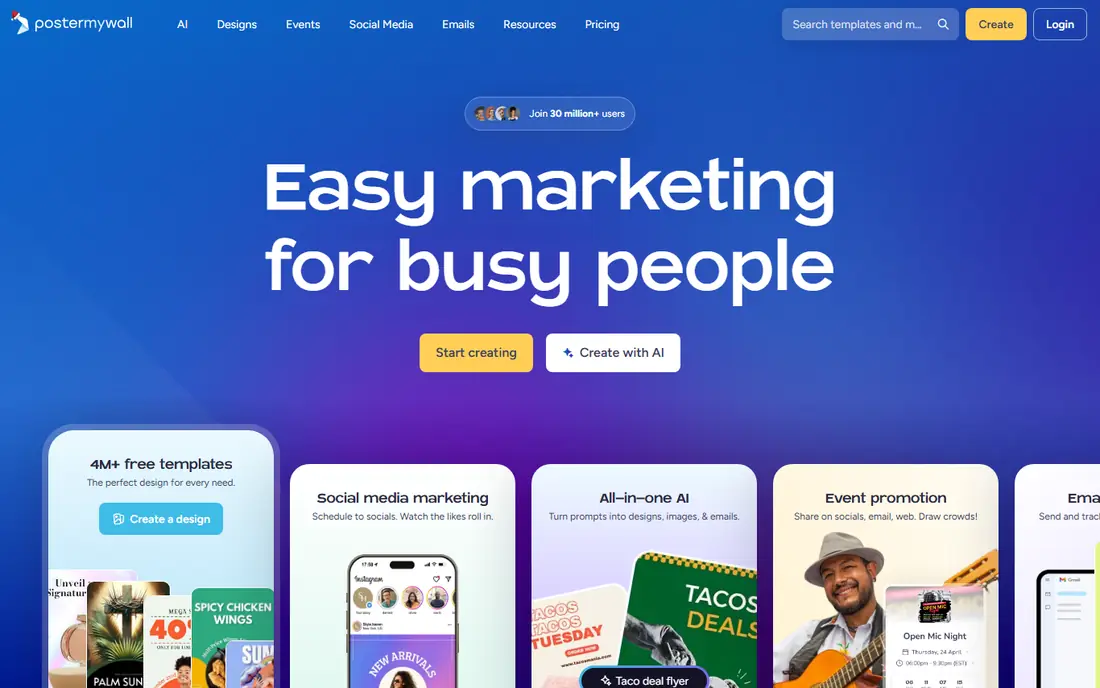
PosterMyWall is built for people promoting something: a gig, a sale, a church event, or a restaurant special. Its templates lean toward that kind of poster, and the paid plans let you publish the same design to social media and email without rebuilding it. That saves real time for a small business that posts every week.
The free plan lets you design and share by link, but downloads at print quality need a paid plan, with Premium listed at $9.95 per month. We confirmed the PosterMyWall homepage loads and describes it as an all-in-one marketing and design platform. Check whether your plan includes the social accounts you use before you commit.
- Templates built for events and promotions
- Social scheduling included
- Email tools on paid plans
- Free downloads are low resolution or watermarked
- Some AI features use credits
VistaCreate is a good budget pick, with a free plan that includes templates, stock files, and a brand kit. The editor feels close to Canva, so most people will find their way around it in minutes. Pro costs $10 per month when billed annually and adds the full stock library, multiple brand kits, and one-click resizing.
The print link to VistaPrint is a practical bonus if you want finished posters delivered rather than printing at home. The main limit is team size on lower plans, so it fits solo makers and small teams better than large groups. For a classroom or club poster, the free plan is often enough.
- Large free template set
- Animation and video options
- Print through VistaPrint
- One seat on the free plan
- Resizing needs Pro
Visme stands out when your poster has to carry numbers. It includes charts, diagrams, and data widgets that most poster tools treat as an afterthought, so a research poster or a school project with statistics looks cleaner here. The editor also handles reports and presentations, which helps if the poster is part of a larger project.
Starter costs $12.25 per month per seat when billed yearly. The free plan is useful for drafting, but downloads are limited, so budget for a paid month if you need a finished print file. If your poster is mostly a photo and a headline, a simpler tool will be faster.
- Charts and data widgets built in
- Strong presentation-style layouts
- Brand kit on paid plans
- Free plan limits downloads
- Poster templates are fewer than Canva
Snappa is for people who want a poster done in minutes, not a design project. The editor is plain and quick, with preset sizes, thousands of templates, and millions of stock photos included. Pro costs $10 per month when billed annually, which matches several rivals while keeping the tool simpler.
The trade-off is scope. Snappa has no mobile app and no video tools, and it cannot export PDF or SVG files, so it is a poor fit if your printer demands a vector file. For a social graphic or a simple printed flyer, though, its speed is hard to beat.
- Very fast editor
- Large stock photo library
- One-click resizing
- No mobile app
- No video or animation tools
- Free plan limits downloads
Venngage is the pick when a poster has to explain something, not just announce it. Its templates cover infographics, timelines, and data posters, and its editor includes charts, maps, and icons that suit that style. Recent updates add AI design help and accessibility checks for contrast and readability.
We list its price as See website because its plans and rates change by tier and billing choice, so check the pricing page before you buy. The free plan lets you design, but finished exports are limited. If your poster is a research summary or a classroom infographic, Venngage earns its place on the shortlist.
- Strong infographic and poster templates
- AI design help
- Accessible PDF export options
- Pricing is not published as a single simple rate
- Free plan has export limits
Desygner suits small teams that need print-ready files and shared brand assets. It offers a large template library, PDF export options, and workspaces where a team can share designs. The free plan covers basic poster making, while paid plans start at $19 per user per month in the listings we found.
That per-user price makes it dearer than Canva or VistaCreate for a solo maker, so it makes most sense when several people design together. If you only need one poster, start free and upgrade only if you hit an export or template limit.
- Very large template library
- Print-oriented exports
- Team workspaces
- Higher per-user price
- Interface feels busier than Canva
How we picked these
We compared official feature pages, pricing pages, and app store listings for poster and design tools, and kept only tools that are live, offer poster sizes or templates, and export a usable file. We favored tools with a free plan or trial, clear pricing, and templates suited to events, business, school, and print use. We did not claim hands-on testing, and we left out tools that only edit photos or only make social posts without poster formats.
What to check before you choose
Start with the end use. A poster for a shop window needs a high-resolution file at the right physical size, while a poster for social media only needs the right pixel size. Check the export options on the free plan first, since watermark and resolution limits are the most common surprise.
Next, look at templates for your exact need. Event, sale, school, and movie-style posters all need different layouts, and a tool with ten good templates in your category beats one with a thousand generic ones. Type matters too, so test a headline in the fonts you plan to use.
Finally, think about print. If you print at home, a PNG works. If a print shop handles it, ask whether it wants PDF, and whether it needs bleed and a CMYK file. Some tools on this list export PDF easily, while others do not, and that single detail can decide the pick.
Sources
- https://www.canva.com
- https://www.adobe.com/express
- https://www.postermywall.com
- https://www.vistacreate.com
- https://www.visme.com
- https://www.snappa.com
- https://www.venngage.com
- https://www.desygner.com
- https://www.guideflow.com/blog/display-ad-design-software
- https://designposterprints.com/best-online-poster-makers/
- https://venngage.com/blog/best-poster-making-software/
Frequently asked questions
What is the best free platform for creating posters?
Adobe Express and Canva both offer strong free plans, and Adobe Express edges ahead for free type options through Adobe Fonts. PosterMyWall and VistaCreate also let you design for free, but high-resolution downloads usually need a paid plan. Try the free plan with your real poster before you pay.
What size should a poster be?
Common print sizes include 11 by 17 inches for a small poster, 18 by 24 inches for a standard poster, and 24 by 36 inches for a large display. Most tools on this list include preset sizes, so pick the preset that matches where the poster will hang. A social media poster uses pixel sizes instead, such as 1080 by 1350 pixels for a portrait post.
Can I print a poster made in Canva or Adobe Express?
Yes, both let you export a file you can print, and Canva also offers its own print ordering in many regions. For a home printer, a high-resolution PNG is fine. For a print shop, export a PDF if the tool offers it and confirm the size and bleed settings with the shop first.
Do I need design experience to make a good poster?
No. All eight tools use templates and drag-and-drop editing, so you can start from a finished layout and change the text, colors, and photos. Keep the headline short, use one strong image, and leave empty space around the text. Those three habits improve most posters more than any advanced feature.
Which platform is best for event posters?
PosterMyWall is built for events, with promotion templates plus social and email publishing. Canva is a close second for its wider template range and print ordering. If the event poster also needs ticket or schedule details, pick the tool whose template already has that layout.