Best Step Tracker App in 2026: 9 Apps Compared
By ToolNimba Editorial Team November 9, 2026 11 min read

- Top pick
 Pacer
Phone-only tracking with challenges
Starting priceFreeCheck out PacerRead our review - Runner-up
 StepsApp
Clean design and wearable sync
Starting priceFreeCheck out StepsAppRead our review - Also great
 Fitbit App
Fitbit and Pixel Watch owners
Starting priceFreeCheck out Fitbit AppRead our review
How we researched this
We compared official pricing and feature pages, app store listings, privacy policies and public user reviews. Prices change, so check the provider's site before you pay.
Key takeaways
- Pacer is our pick for most phone-only users, because it counts steps from your phone, syncs with major wearables, and offers community challenges on its free tier.
- StepsApp is the best-designed pedometer app, with a clean ring view and broad wearable support, though custom goals and extra features sit behind its Pro plan.
- If you already own a Fitbit, Garmin, or Apple Watch, the maker's own app usually gives the most accurate count, since it reads the wearable directly.
- Apple Health and Samsung Health are the best free built-in options, with no extra app to install and no subscription needed for basic step counting.
- Step counts vary by phone placement and device, so compare trends over weeks rather than treating any single day as exact.
Quick comparison
| Name | Best for | Starting price | Free plan | |
|---|---|---|---|---|
| Pacer | Phone-only tracking with challenges | Free | Yes | Visit |
| StepsApp | Clean design and wearable sync | Free | Yes | Visit |
| Fitbit App | Fitbit and Pixel Watch owners | Free | Yes | Visit |
 Apple Health | iPhone owners who want a free hub | Free | Yes | Visit |
 Samsung Health | Android owners who want a free hub | Free | Yes | Visit |
 Garmin Connect | Garmin watch owners | Free | Yes | Visit |
 Pedometer++ | Simple iPhone step counting | Free | Yes | Visit |
 MapMyWalk | Walking routes and distance | Free | Yes | Visit |
 Charity Miles | Steps that raise charity donations | Free | Yes | Visit |
The best step tracker apps
A step tracker app should do one job well: count your steps accurately, show your progress clearly, and stay out of your way. Some apps do that with only your phone. Others work best with a watch or tracker on your wrist. The nine apps below cover both routes, plus a few extras such as routes, challenges, and charity donations, so you can pick by the device you already own and the motivation that actually works for you.

Pacer is the best phone-only step tracker we found. It uses your phone's motion sensors to count steps, so you do not need to buy a wearable to start, and it syncs with Apple Health, Fitbit, and Garmin if you later add a device. The free tier covers step counting, activity trends, and group challenges, which give many users the accountability that a solo counter lacks.
The main limit is that changing your custom step goal is locked behind Premium, which costs about $9.99 per month or $49.99 per year. You can still use the default goal on the free tier, but a personal target such as 6,000 steps needs the paid plan. Pacer also shows ads and premium prompts on the free tier. If you want a free, social, phone-only tracker, those trade-offs are easy to live with.
- Counts steps from your phone without a wearable
- Syncs with Apple Health, Fitbit, and Garmin
- Community challenges on the free tier
- Custom step goals need Premium
- Free version includes ads and upsell prompts
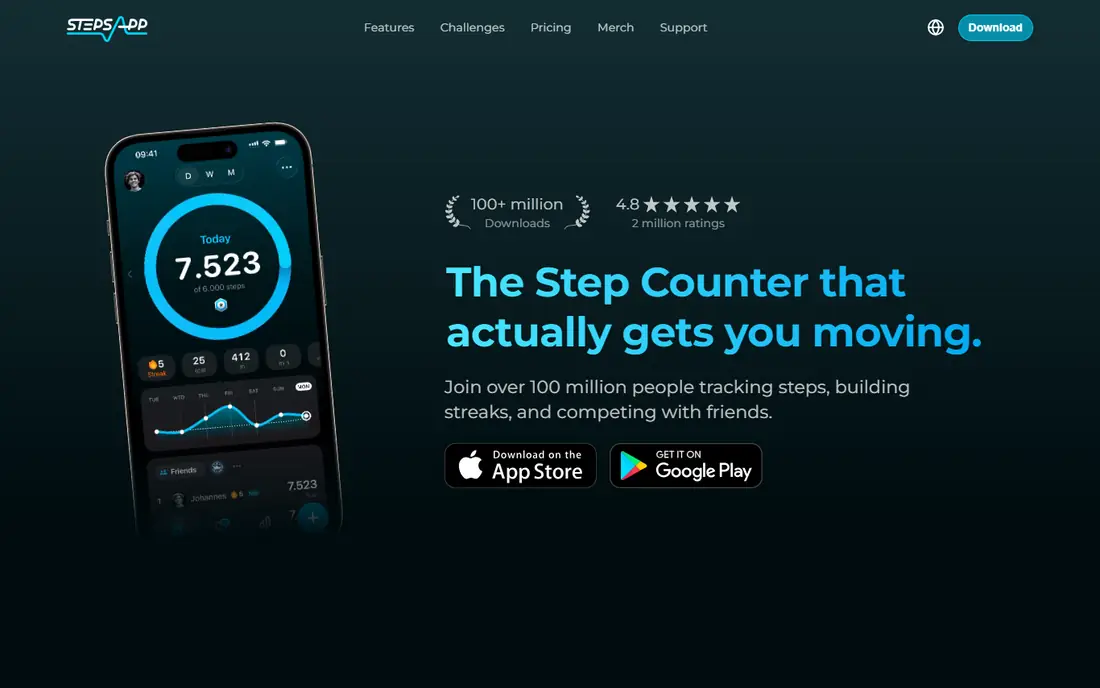
StepsApp is the design-led pick. Its daily view uses a color-coded ring system that makes progress readable in seconds, and its weekly and monthly views are just as clear. It syncs with a broad range of wearables and health platforms, including Apple Health, Google Fit, Garmin, Oura, and Fitbit, so it works as a front end for data your devices already collect.
The free tier is fully usable on iOS, while Android users see ads, and Pro pricing runs about $4.99 to $5.99 per month or about $29.99 to $32.99 per year, depending on platform and region. Pro removes ads and adds customization. If you check your steps often and value a calm, readable design, StepsApp is the app we would install first.
- Very clear daily and weekly views
- Syncs with Apple Health, Google Fit, Garmin, Oura, and Fitbit
- Simple to read at a glance
- Pro features and ad removal need a subscription
- Android free tier includes ads
The Fitbit app is the natural home for Fitbit and Pixel Watch owners, since steps are tracked automatically from the wrist all day. The free app dashboard covers steps, sleep, heart rate, and activity without a subscription, which is enough for most daily tracking. Community challenges add a social layer, though that feature has become less central in recent years.
Phone-only step counting in the Fitbit app is less accurate than wearable counting, and the full experience is designed around owning a device. Fitbit Premium, at about $9.99 per month or $79.99 per year, adds deeper analytics and guided programs. If you already wear a Fitbit, this app is the obvious choice. If you do not, Pacer or StepsApp will serve you better without new hardware.
- Automatic 24-hour tracking from a wearable
- Sleep and heart data in the same app
- Community challenges
- Best experience needs Fitbit hardware
- Phone-only counting is less accurate
- Premium adds cost for deeper analytics
Apple Health is less an app than a store for health data: steps, workouts, sleep, and heart data from other apps and devices land here, making it a neutral record if you ever change tracker. It is free, built into every iPhone, and stores data on device with encryption options for iCloud backup. For step counting alone, it works with your iPhone or Apple Watch and needs no subscription.
What it lacks is motivation. Apple Health offers little coaching, few challenges, and minimal analysis beyond trends and totals. That is why many iPhone users pair it with a prettier front end such as StepsApp or Pedometer++, while letting Health hold the underlying data. If you want a free, private, no-fuss record, Apple Health is the foundation to build on.
- Free and built into every iPhone
- Acts as a hub for other apps and wearables
- Strong privacy model
- IPhone only
- Minimal coaching or challenges of its own
Samsung Health is the best free Android pick for step tracking. It counts steps from your phone's sensors, adds group and global challenges for motivation, and includes sleep, exercise, and weight tracking in the same app. It is free, with no subscription needed for basic step counting, and it works on Android and iOS, though the experience is fullest on Samsung phones and watches.
Some features vary by device and region, and Galaxy Watch owners get the most from it, since the watch feeds richer data into the app. For Android users who do not want to pay or buy a wearable, Samsung Health is the simplest starting point, and it pairs well with a Galaxy Watch if you add one later.
- Free step counting from your phone
- Group and global challenges
- Sleep, exercise, and weight tracking included
- Best experience on Samsung devices
- Some features vary by phone and region
Garmin Connect is free with a Garmin watch or tracker, and it offers some of the deepest free analytics of any wearable app. Steps are tracked from the wrist, with sleep, heart rate, training load, and activity data in the same dashboard, and no subscription is needed for the core features. For walkers who also run, hike, or cycle, that breadth is a real advantage.
The app is dense, and new users may find the menus and charts less polished than Fitbit or Apple Health. It also only makes sense if you own Garmin hardware, since phone-only counting is not its strength. If you already wear a Garmin, Connect is the app to use. If you are choosing a wearable mainly for steps, a Fitbit or Apple Watch may feel simpler day to day.
- Free with a Garmin device
- Accurate wearable step data
- Deep activity, sleep, and training data
- Needs a Garmin device for the best results
- App interface is dense for new users
Pedometer++ is the minimalist iPhone pick. It shows your steps clearly, with a watch app, widgets, and a history view, and it does not assume you own a wearable or want a social feed. That focus suits users who find larger fitness apps noisy and just want to know how far they have walked today.
It is iPhone and Apple Watch only, and it offers fewer challenges, groups, and coaching features than Pacer or Fitbit. For many users, that simplicity is the appeal: open the app, see the number, close it, and keep walking. If you want community motivation, Pacer is better. If you want calm clarity, Pedometer++ is hard to beat.
- Very simple, focused step view
- Apple Watch app and widgets
- No wearable assumption
- IPhone and Apple Watch only
- Fewer social and challenge features
MapMyWalk, from the MapMyFitness family, is the pick for walkers who care about routes as well as steps. It tracks walks by GPS, showing distance, pace, route maps, and estimated calories, and it keeps a history you can compare over time. That route view helps walkers explore new paths and measure progress on a favorite loop, not just a daily total.
GPS tracking uses more battery than a simple phone pedometer, and the most useful training features sit behind a premium subscription. For a daily step count alone, Pacer or StepsApp is lighter. For walkers who plan routes, track distance, and like seeing where they went, MapMyWalk adds a layer the pure pedometers do not.
- GPS routes with distance, pace, and calories
- Step and activity history
- Large route community
- GPS use drains battery faster than a simple pedometer
- Premium features need a subscription
Charity Miles turns movement into donations: you choose a charity, track a walk, run, or ride, and sponsors contribute based on distance covered. That simple idea motivates some users more than any streak or badge, because the walk helps someone else as well as yourself. The app is free, and it works on iOS and Android.
Donation amounts depend on sponsorship and are modest per mile, so Charity Miles is not a fundraising tool in itself. Analytics are also lighter than in Pacer or Fitbit. As a second app alongside your main tracker, or as the main app for a walker who needs a reason to get out the door, it is a genuinely useful twist on step counting.
- Free to use
- Turns walks, runs, and rides into charity donations
- Simple motivation for regular movement
- Donation rates depend on sponsors
- Fewer analytics than dedicated trackers
How we picked these
We compared official app pages, app store listings, pricing pages, and public reviews, and we kept only apps that count steps today on a phone, a watch, or both. We favored a mix of phone-only apps, wearable companion apps, and built-in free options, so readers can start with the device they already own. Prices were taken from vendor and store listings, and where pricing varies by platform or region, we gave the commonly listed figure.
How to get an accurate step count
Wear your phone in a pocket or armband rather than leaving it on a desk, since a phone only counts movement it feels. If you use a watch, wear it consistently on the same wrist and keep its software updated. Compare trends over two or three weeks rather than single days, since any tracker will miss some steps and count a few false ones. A steady upward trend matters more than hitting an exact number on one day.
Do you need 10,000 steps a day
The 10,000-step goal is a useful default, but it is not a medical rule for everyone. Many health guides suggest that moving more than you do now, even by 1,000 or 2,000 extra steps a day, brings real benefit, especially for people starting from a low base. Set a goal you can meet most days, raise it slowly, and talk to a clinician if you have a health condition that affects exercise. This article is general information, not medical advice.
Phone, watch, or both
A phone alone is enough to start, and it costs nothing extra. A watch adds all-day tracking, including steps taken when your phone is charging or left behind, and it usually counts more accurately. If you already own a watch, use its companion app as your main record. If you do not, start with Pacer, StepsApp, or your phone's built-in health app, and only buy hardware if you find yourself tracking every day after a month.
Sources
Frequently asked questions
What is the best step tracker app?
Pacer is our pick for most phone-only users, thanks to free step counting, wearable sync, and community challenges. StepsApp is the best-designed alternative, while Fitbit, Apple Health, and Samsung Health are best if you already own those devices.
What is the best pedometer app for iPhone?
Pedometer++ and StepsApp are both strong iPhone pedometer apps, with Pedometer++ winning on simplicity and StepsApp winning on design and wearable support. Apple Health is already built in and works as a free hub for either app.
Are free step tracker apps accurate?
Phone-only apps are reasonably accurate for trends, though they miss steps when the phone is not carried, and they can count false steps from other movement. Wearable trackers are generally more accurate, since they stay on your wrist all day.
Do step tracker apps need a wearable?
No. Pacer, StepsApp, Samsung Health, and Apple Health all count steps from your phone alone. A wearable improves accuracy and all-day coverage, but it is not required to start tracking.
Which step tracker app is best for challenges?
Pacer offers community and group challenges on its free tier, and Samsung Health offers group and global challenges. Fitbit also offers challenges for Fitbit owners, though that feature is less central than it once was.
Can a step tracker app help me walk more?
For many people, yes, because a visible daily total, a streak, or a group challenge makes progress concrete. The effect works best when you set a realistic goal, check progress daily, and raise the target slowly rather than jumping straight to 10,000 steps.