Best Tool to Colorize Photos Online in 2026: 9 Tools Compared
By ToolNimba Editorial Team November 10, 2026 12 min read

- Top pick
 Palette.fm
Realistic colorization
Starting price$49 one-time for 75 creditsCheck out Palette.fmRead our review - Runner-up
 MyHeritage In Color
Family history photos
Starting priceSee websiteCheck out MyHeritage In ColorRead our review - Also great
 ImageColorizer
Restoration plus color
Starting price$3.90 per monthCheck out ImageColorizerRead our review
How we researched this
We compared official pricing and feature pages, app store listings, privacy policies and public user reviews. Prices change, so check the provider's site before you pay.
Key takeaways
- Palette.fm is our pick for most people, because it focuses on colorization and offers filters plus prompt-based color control.
- Free tiers are useful for a test, but they often limit resolution, add a watermark, or allow only one high-quality download.
- AI color is a prediction, not a recovery of true colors, so historic accuracy needs manual checking and sometimes manual edits.
- Batch tools matter if you have an album to restore, while a single-photo tool is fine for one family portrait.
- Check export size and watermark rules before you pay, because those two limits decide whether the result is usable for print.
Quick comparison
| Name | Best for | Starting price | Free plan | |
|---|---|---|---|---|
| Palette.fm | Realistic colorization | $49 one-time for 75 credits | Yes | Visit |
| MyHeritage In Color | Family history photos | See website | Yes | Visit |
| ImageColorizer | Restoration plus color | $3.90 per month | Yes | Visit |
 VanceAI Photo Colorizer | AI photo enhancement suite | See website | Yes | Visit |
 Hotpot AI Photo Colorizer | Quick web colorization | See website | Yes | Visit |
 PicWish Photo Colorizer | Simple one-click color | See website | Yes | Visit |
 Colorize.cc | Low-cost one-time color | $12 one-time | Yes | Visit |
 AKVIS Coloriage AI | Desktop colorization control | $75 one-time | No | Visit |
 HitPaw Photo Colorizer | Batch colorization | See website | No | Visit |
The best tool to colorize photos online
Colorizing a black and white photo used to take hours of manual painting. These tools use AI to predict plausible colors in seconds, and the best ones let you adjust the result when the first guess is wrong.

Palette.fm is the most focused tool on this list, and that focus shows in the result. You upload a black and white photo, pick a filter, and adjust colors with text prompts when you want a different mood. That control helps when skin tones look too warm or a sky looks too flat, because you can nudge the result instead of accepting the first version.
Pricing is credit-based. The free tier gives a trial credit and watermarked previews, while a one-time pack of 75 credits and an annual subscription with 480 credits are listed in recent reviews. Check how many credits each high-resolution download uses.
The main limit is honesty about color. Palette.fm predicts colors from patterns in its training data, so a dress, a car, or a uniform may get a plausible but wrong color. For family memories that limit is fine, but for a museum caption or a published history piece, you should verify colors from other sources before you present them as fact.
- Focused on colorization only
- Filters and prompt-based color edits
- Batch processing for albums
- Free previews are watermarked and lower resolution
- Color accuracy is still a prediction, not a fact
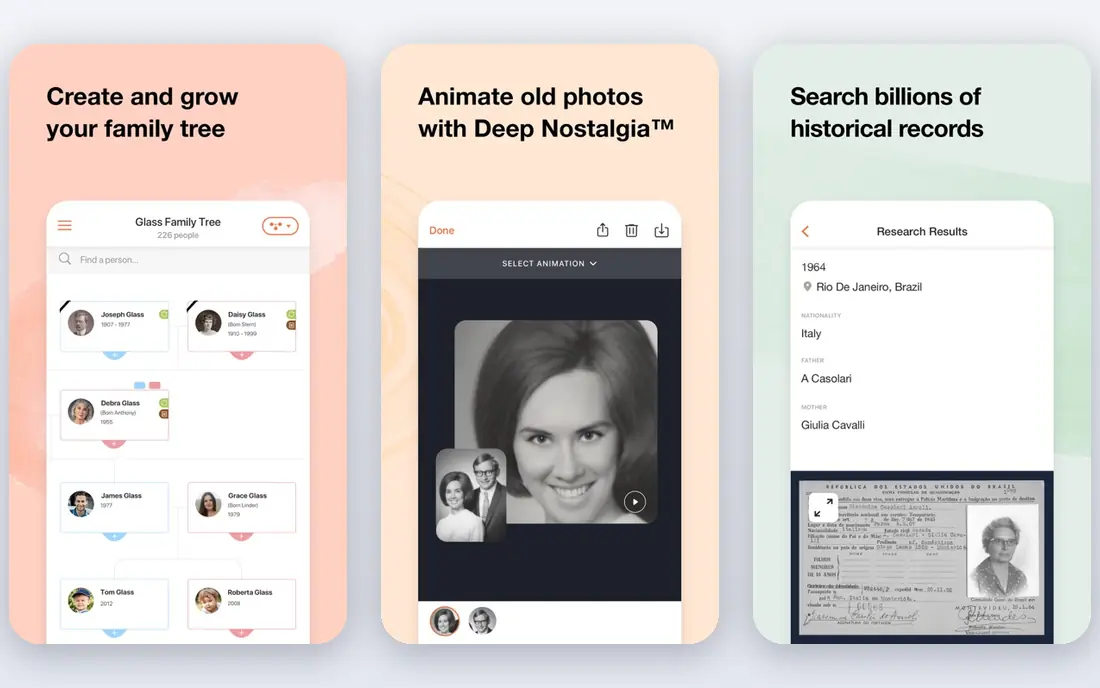
MyHeritage In Color suits people who are already building a family tree. You can colorize old portraits inside the same account where you store names, dates, and records, which keeps the restored photo tied to the person it shows. That workflow matters more than it sounds, because a colorized photo without context is easy to lose in a downloads folder.
The tool itself is simpler than a dedicated color editor. You upload, colorize, and save, with less fine control over individual colors. If you want to change one shirt or one background element, a tool such as Palette.fm or AKVIS will give you more options. MyHeritage also gates some features behind its subscription plans, so check the current plan page before you assume a feature is free.
For genealogy work, the trade is worth it for many users. The photo stays with the tree, it is easy to share with relatives, and the color result is usually natural for portraits. Just keep the original black and white file, and label the color version as colorized, so later family members do not mistake a prediction for an original color photo.
- Built for genealogy users
- Works inside a family tree workflow
- Simple upload and color process
- Best value if you already use MyHeritage
- Less color control than Palette.fm

ImageColorizer combines colorization with old photo repair, which is useful when the scan itself is damaged. Scratches, fading, and blur often matter as much as color, and fixing them in the same tool saves a round trip to another editor. The free plan offers monthly credits with single processing, while paid plans add batch work and remove ads.
That bundle fits family albums where many photos need repair and color. The Starter plan is listed at $3.90 per month, so check credit costs per image before you start, because restoration may use credits separately from colorization.
The free tier is best as a test, not as a way to restore a whole album. Single processing and ads slow the work, and the credit limit will run out quickly on a large set. For a handful of photos, though, it is a fair way to judge quality before you pay.
- Free plan with monthly credits
- Restoration, unblur, and upscaling in one place
- Batch processing on paid plans
- Free plan is single-image and ad-supported
- Paid credits add up for large albums
VanceAI suits users who need more than colorization. If you also want to upscale, sharpen, denoise, or remove a background, having those tools in one account avoids juggling several services. The photo colorizer itself works in the browser, and paid plans use credits that also apply to other VanceAI tools in many cases.
That breadth is also the drawback. A suite tool rarely gives the same color control as a dedicated colorizer, and credit pricing means you need to check how each action is charged. Recent comparison tables list VanceAI paid plans on a yearly basis, but the exact credit bundle changes, so confirm the current pricing page before you buy.
We recommend VanceAI when color is part of a larger photo cleanup job. If color is the only job, Palette.fm or ImageColorizer will feel more direct. Either way, keep the original scan, because AI enhancement can smooth skin texture or alter small details in ways that are hard to undo later.
- Part of a wider AI photo toolkit
- Batch and enhancement options
- Useful when color is one step in a larger edit
- Pricing is credit-based and can be confusing
- Color tool is one of many tools, not the sole focus
Hotpot AI is a quick way to colorize a photo without installing software. You upload in the browser, run the colorizer, and download the result, which suits a one-off social post or a classroom example. The wider Hotpot toolkit also covers image generation and editing, so a colorized photo can be resized or touched up in the same place.
The limit is control. Hotpot gives a fast automatic result, but it does not offer the same filter and prompt editing as Palette.fm. If the first result has an odd skin tone or a wrong background color, you may need another tool to fix it. Free use also comes with limits that change over time, so check the current free terms before you plan a large batch.
- Fast, browser-based colorization
- Part of a wider AI image toolkit
- No install needed
- Free output limits vary
- Less color editing control than dedicated tools
PicWish is built for users who want a result in a few clicks. The photo colorizer accepts common formats, processes the image in the browser, and returns a color version you can download. That simplicity helps when you are working through a set of photos and do not want to learn a full editor for each one.
Batch processing is a plus for small archives, but the same caution applies as with other AI colorizers: the first guess is not always right, especially for clothing, foliage, and indoor lighting. PicWish also sells other photo tools, so check whether colorization credits are shared or separate before you buy a bundle.
- Very simple upload and color flow
- Batch options for photo work
- Supports many common image formats
- Color result can need manual touch-up
- Paid details vary by plan and credits
Colorize.cc appeals to users who want to pay once and be done. Comparison tables list a $12 one-time option, which is far cheaper than a yearly subscription if you only have a few photos to colorize. The web tool is simple, with upload, colorize, and download as the main steps.
That simplicity means fewer controls. You will not get the same prompt-based color editing as Palette.fm, and you should not expect a full restoration suite. For a small batch of family photos where the automatic result looks natural, that trade is fine. For damaged scans or tricky colors, pair it with a restoration tool first.
Check the current pricing and free limits on the vendor site before you buy, because one-time deals can change. If the $12 option still covers your batch size, it is one of the cheapest ways to get clean, watermark-free color downloads without a subscription.
- Low one-time price listed in comparisons
- Simple web colorization
- Good for a small set of photos
- Fewer editing features than larger suites
- Free tier limits apply
AKVIS Coloriage AI is different because it runs on your computer and gives you manual color choices. You can assign colors to areas of the image and let the software blend them, which helps when you know the true color of a uniform, a car, or a house. That control is valuable for history projects where AI guesses are not good enough.
The cost is a one-time license listed at $75 in recent comparisons, with no free plan. You also need to install the software and learn its brush and color tools, so it is not the fastest option for a single casual photo. Batch processing helps once you know the workflow, but the first few photos will take longer than a web colorizer.
We recommend AKVIS when accuracy matters more than speed, or when you do not want to upload sensitive family photos to a web service. Keep the original scan, work on a copy, and save versions as you go, because manual color work is easier to redo in steps than in one pass.
- Desktop software with manual color control
- Batch processing
- Works without a browser upload for sensitive photos
- No free plan listed
- Needs install and learning time
- Higher upfront cost than web tools
HitPaw Photo Colorizer suits users who already use HitPaw tools or who need to process many photos at once. Batch work is the main draw, because coloring one photo at a time gets tedious when you have an album. The tool focuses on automatic color, with less manual control than AKVIS, so it is faster for straightforward portraits and outdoor scenes.
The drawback is price transparency. Recent comparison tables list HitPaw as paid with no free plan, but the exact plan price varies by product bundle and region, so we list See website rather than a stale figure. Check whether you are buying the photo tool alone or a suite, because suite pricing can look very different from a single-tool price.
For a large album where most photos are in good condition, HitPaw is a practical batch pick. For a single damaged or historically important photo, start with a dedicated colorizer or a manual tool, and use HitPaw for the bulk of the set once you know the quality level.
- Batch processing for photo sets
- Desktop and online options in the HitPaw suite
- Clear color results for portraits
- No free plan listed in recent comparisons
- Paid plan needed for full exports
How we picked these
We compared official product pages, pricing pages, and recent comparison tables for colorizers, and we favored tools that work today in a browser or as desktop software, offer a clear export path, and state their free limits. We did not claim hands-on testing of each tool on the same photo set. Instead, we weighed color control, batch support, restoration features, watermark and resolution limits, and whether pricing was a subscription, a credit pack, or a one-time purchase. That mix matters, because a cheap tool with a watermark is not cheap if you cannot use the output.
What to check before you pay
Start with the same test photo on two or three tools, and look closely at skin tones, hands, foliage, and white or gray areas. AI models often struggle with hands and with colors that have no strong clue in the black and white image, and those errors are easier to spot in a test than after you have paid for a batch. Check the export size as well, because a small preview may look fine on a phone but fail in print.
Keep the original scan untouched, and save the color version as a new file with a clear name. Note in the file or caption that the photo was colorized by AI, especially if you share it online or use it in a family history. That note protects the record, and it helps relatives understand why a color may differ from their memory of the original scene.
Sources
Frequently asked questions
What is the best free tool to colorize photos?
Palette.fm and ImageColorizer both offer free tiers that are good for testing, but free downloads are often watermarked or lower resolution. For a clean, print-ready result, expect to pay for credits or a plan, or use a free tier only for a preview.
Is AI colorization historically accurate?
No, AI colorization predicts plausible colors, it does not recover the true colors of the original scene. Skin tones and skies are often close, but clothing, cars, and interiors can be wrong. Use other records or family knowledge to check important colors.
What is the best app to colorize photos?
For a web tool, Palette.fm is our top pick for control and realism. For manual control on a computer, AKVIS Coloriage AI is stronger. For family tree work, MyHeritage In Color keeps the photo with the person record.
Can I colorize photos in bulk?
Yes, Palette.fm, ImageColorizer, PicWish, and HitPaw all offer batch processing on paid plans. Check credit costs per image first, because batch pricing can add up faster than a flat subscription for a large album.
Do I need to install software to colorize a photo?
No, most tools on this list run in a browser. Desktop software such as AKVIS is useful when you want manual control or you prefer not to upload sensitive photos to a web service.
Will colorization damage my original photo?
No, if you work on a copy and keep the original scan untouched. Always download the color version as a new file, and keep the black and white original as the archival record.