Best Google Trends Alternatives in 2026: 9 Tools Compared
By ToolNimba Editorial Team November 9, 2026 11 min read

- Top pick
 Exploding Topics
Finding rising topics early
Starting price$39 per monthCheck out Exploding TopicsRead our review - Runner-up
 Glimpse
Turning a keyword into a forecast
Starting price$71 per monthCheck out GlimpseRead our review - Also great
 Semrush
Market, SEO, and competitor trends
Starting price$139.95 per monthCheck out SemrushRead our review
How we researched this
We compared official pricing and feature pages, app store listings, privacy policies and public user reviews. Prices change, so check the provider's site before you pay.
Key takeaways
- Google Trends is free and useful, but it shows relative interest, not absolute search volume, and it does not surface trends you have not thought to search.
- Exploding Topics is our pick for early trend discovery, since it curates rising topics with growth charts and channel data.
- Glimpse is the best fit when you already have a keyword and want absolute volumes, forecasts, and alerts layered on Google Trends data.
- Free options like Pinterest Trends and TikTok Trends are strong for platform-specific planning, but they do not replace a general trend tool.
- Paid trend tools cost from roughly $39 to $199 per month at entry level, so start with free tiers and trials before committing to a subscription.
Quick comparison
| Name | Best for | Starting price | Free plan | |
|---|---|---|---|---|
| Exploding Topics | Finding rising topics early | $39 per month | Free trial | Visit |
| Glimpse | Turning a keyword into a forecast | $71 per month | Yes | Visit |
| Semrush | Market, SEO, and competitor trends | $139.95 per month | Free trial | Visit |
 BuzzSumo | Viral content and social trends | $199 per month | Free trial | Visit |
 Treendly | Low-cost trend monitoring | See website | Yes | Visit |
 Rising Trends | Affordable trend ideas for founders | See website | Yes | Visit |
 AnswerThePublic | Questions people search | See website | Yes | Visit |
 Pinterest Trends | Visual, seasonal, and shopping trends | Free | Yes | Visit |
 SparkToro | Where your audience spends time | See website | Yes | Visit |
The best Google Trends alternatives
We compared official pricing pages, feature pages, and public reviews for the tools below, focusing on trend discovery, search volume data, alerts, channel coverage, and price.
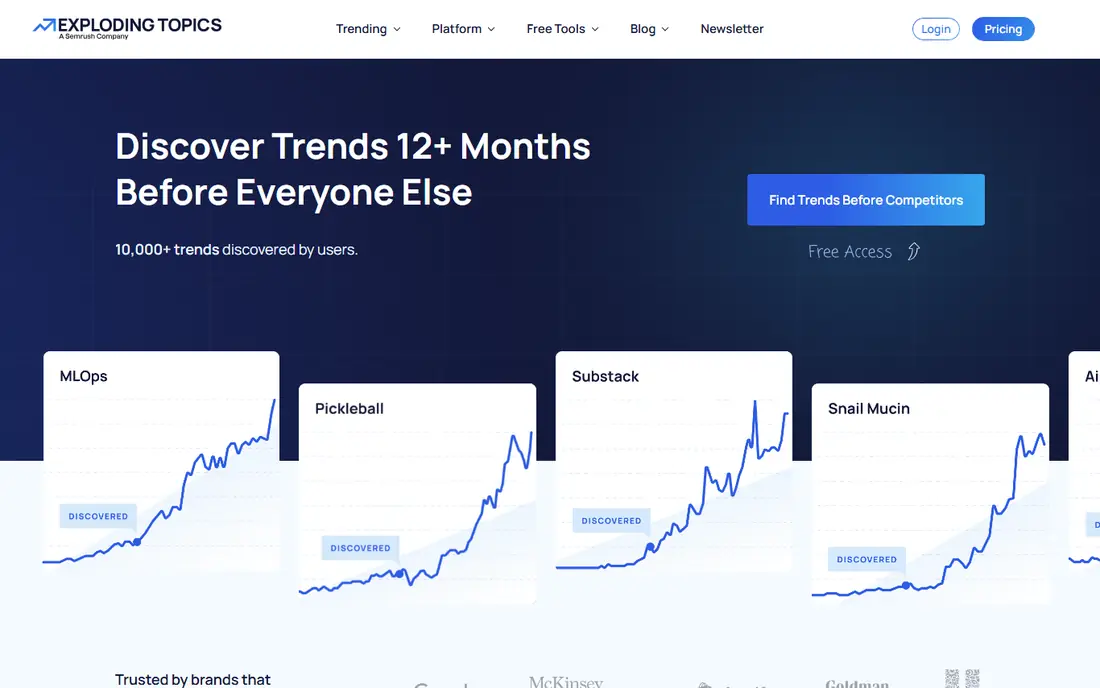
Exploding Topics answers the question Google Trends cannot: what is rising that you have not searched for yet. Its analysts and systems scan search, social, and shopping signals to surface topics before they peak, then show growth charts and channel data for each trend. That makes it useful for founders, content creators, and marketers looking for a next niche, product idea, or article topic. The entry Entrepreneur plan starts at $39 per month on annual billing.
The limits are worth knowing. You can browse some trends free on the site, but full detail pages, product reports, and larger tracking limits require Pro. The entry plan tracks 100 trends, which suits a solo creator but may feel tight for an agency covering many clients. Use the 7-day trial to test whether its curated feed actually surfaces useful ideas in your niche before paying.
- Curated database of rising trends
- Growth charts and channel breakdowns
- Trending products and startup tracking on higher plans
- Full database access requires a paid plan
- Entry plan limits tracked trends and searches
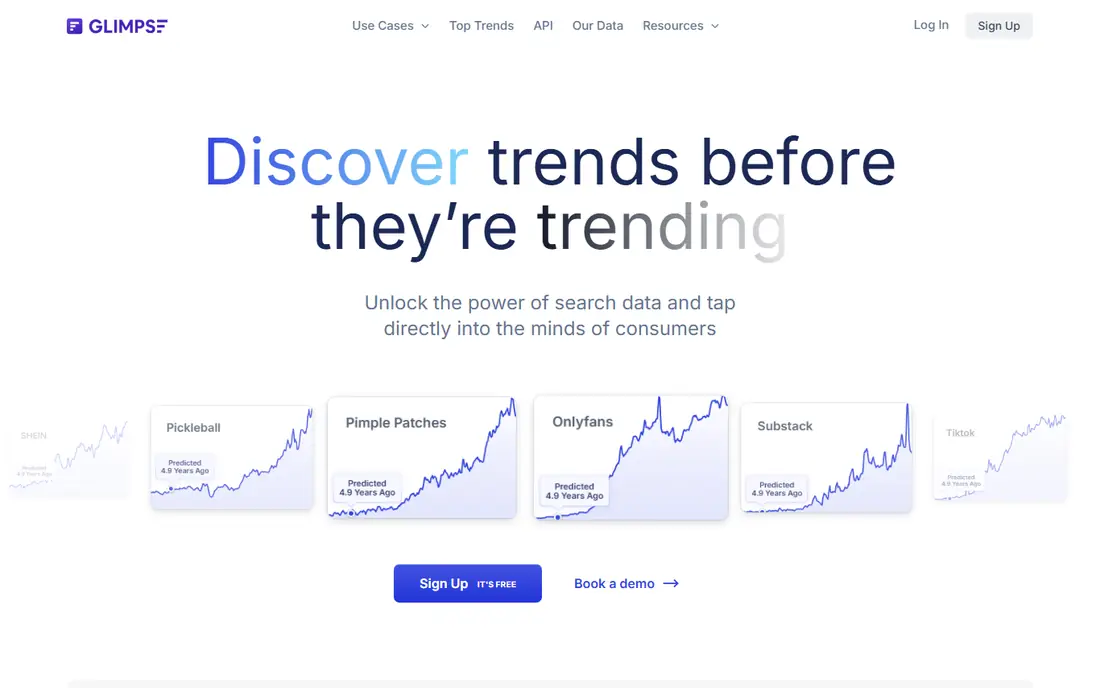
Glimpse is the closest thing to Google Trends with superpowers. It layers absolute search volume, seasonality patterns, forecasts, and alerts onto Google Trends data, so you can judge whether a spike is real demand or a short blip. Its Chrome extension brings those numbers into Google Trends itself, and paid plans add exports and more alerts. If you already have a keyword list and need to validate it, Glimpse is the most direct upgrade.
The free plan is limited, with around 10 lookups per month reported in recent comparisons, and paid plans start around $71 per month on annual billing. Glimpse also depends on Google Trends data at its core, so it will not surface a trend you have never considered in the way Exploding Topics does. Pair the two if you can: one for discovery, one for validation.
- Absolute search volumes on top of Google Trends
- Trend forecasts and alerts
- Chrome extension and Sheets integration
- Paid pricing is shown after sign-up in some flows
- Free plan allows only a limited number of lookups per month

Semrush is the heavyweight option here, and it suits teams that already do SEO or competitor research. Its base plans cover keyword research, site audits, and content tools, while its Traffic and Market toolkit adds traffic trends, market share, and competitor movement. That breadth makes it useful for answering bigger questions, such as whether a whole category is growing or just one brand inside it. The SEO Pro plan starts at $139.95 per month, with the Trends add-on reported around $289 per month extra.
That price puts Semrush out of reach for casual trend watchers. It also takes time to learn, since its dashboards cover far more than trends alone. If you only need trend charts, a cheaper specialist tool will do. If you need SEO, content, and market data in one subscription, Semrush is the most complete option on this list.
- Huge keyword and traffic data
- Market share and competitor tracking
- Trend add-on for deeper market analysis
- High entry price
- Trend features sit in a separate add-on on top of the base plan
BuzzSumo tracks what people are sharing, not just what they are searching. Enter a topic and it shows the most shared articles, the publishers behind them, and how engagement is trending. That makes it valuable for content marketers, PR teams, and journalists who need to spot a story early or find an angle that already resonates. A free trial is available, and paid plans start around $199 per month on annual billing.
BuzzSumo does not replace a search trend tool. It shows social and content engagement, which can spike for reasons unrelated to lasting demand. Use it alongside a search-based tool: BuzzSumo for what is catching fire now, and Exploding Topics or Glimpse for whether interest will last. On its own, it is a content tool first and a trend tool second.
- Finds viral articles, videos, and social posts by topic
- Trending score based on engagement
- Media and influencer discovery
- High entry price
- Focused on content and social, not search volume
Treendly is the budget pick for people who want to watch a handful of trends without paying for a full platform. Its free plan lets you monitor up to three trends, and paid plans have been listed around 99 euros per year. You can follow trends by category, compare interest over time, and get a simple view of whether a topic is rising or fading. For a solo creator or small shop, that is often enough.
Treendly does not offer the curated discovery feed of Exploding Topics or the deep market data of Semrush. Its strength is simple, cheap monitoring of trends you already care about. If you need to discover new trends every week, look elsewhere. If you need to keep an eye on a short list, Treendly is good value.
- Affordable annual pricing
- Monitor trends by category and country
- Simple charts and alerts
- Smaller database than the big platforms
- Fewer channel breakdowns and reports
Rising Trends combines curated trend reports with databases of trending products, apps, and websites, which suits founders hunting for a business idea. Its free weekly newsletter gives you a taste of the feed at no cost, and paid access has been listed around $97 per year. That price makes it one of the cheapest paid trend tools here, and the product and app angles add practical value beyond keyword charts.
It is a smaller operation than Exploding Topics, so its database and analyst coverage are narrower. Teams that need API access, large-scale tracking, or enterprise reporting should look at larger platforms. Founders and solo creators who want affordable, concrete ideas will find Rising Trends a useful, low-risk starting point.
- Curated trends plus products, apps, and websites
- Free weekly newsletter
- Startup-friendly annual price
- Smaller team and database than Exploding Topics
- Fewer enterprise features and integrations
AnswerThePublic answers a different question from most tools here: what are people actually asking about a topic. Enter a keyword and it maps questions, prepositions, and related searches into visual branches you can turn into articles, videos, or product pages. That makes it a strong companion to a trend tool, since it tells you how to talk about a rising topic, not just whether it is rising. A free tier exists, with paid plans for heavier use.
It is not a replacement for Google Trends. AnswerThePublic shows search questions and intent, but it does not chart interest over time or forecast a trend. Use it after you spot a trend, to build content around it. Used that way, it turns a vague rising topic into a concrete list of titles and angles.
- Visual maps of questions and related searches
- Strong for content ideas and search intent
- Simple to use
- Not a trend-over-time tool
- Volume data and limits depend on plan
Pinterest Trends is free, and for visual and seasonal planning it is surprisingly powerful. It shows what people search, save, and shop for on Pinterest, with filters by region, age, and category. That data suits home, fashion, food, beauty, travel, and gift planning, where people plan purchases months ahead. Seasonal spikes show up clearly, which helps content and product calendars.
The limit is scope. Pinterest Trends only reflects Pinterest users, who skew toward planning and shopping rather than general search. A topic can trend on Pinterest and stay flat on Google, or the reverse. Treat it as a platform lens, not a market measure, and pair it with a general tool when a decision involves real money.
- Free with a Pinterest business account
- Search, save, and shopping trends
- Strong seasonal planning data
- Pinterest-only data
- Less useful for topics with little visual or shopping intent
SparkToro helps you find where an audience actually spends time online. Enter a topic, keyword, or audience description, and it shows the social accounts, podcasts, YouTube channels, websites, and publications that audience follows. That is trend research of a different kind: instead of asking what is rising, you ask who cares and where to reach them. A free tier covers basic searches, with paid plans for more depth.
SparkToro will not chart a keyword over time or forecast demand. Its value appears when you already have a trend or niche and need a marketing plan for it. Combine it with Exploding Topics for discovery and Glimpse for validation, and you get a fuller picture: what is rising, whether it will last, and where its audience already gathers.
- Audience research across social, podcasts, and websites
- Shows what an audience reads, watches, and follows
- Free tier for basic searches
- Not a search-volume trend chart
- Paid plans needed for deeper audience data
How we picked these
We compared official feature pages, pricing pages, and public reviews for each tool. We kept only tools that are live in October 2026 and genuinely help with trend research, whether through discovery, search data, social signals, or audience insight. We did not claim hands-on testing we did not do. Instead, we weighed data sources, chart quality, alerts, free options, and price, and we noted where pricing is shown only after sign-up or varies by billing cycle.
How to use a Google Trends alternative well
Start free, and use Google Trends itself as your baseline. Check a trend there first, then use an alternative to answer the question Google Trends leaves open. Exploding Topics finds topics you missed. Glimpse adds volumes and forecasts. Pinterest Trends or TikTok Trends add platform context. BuzzSumo adds social proof. No single tool covers all of those jobs well.
Validate before you invest
A rising chart is not proof of a good business. Check whether interest lasts beyond a season or news spike, whether people search with buying intent or just curiosity, and whether the audience is large enough for your goal. Look at related searches, channel breakdowns, and regional data before you build a product or commit to a content series. A trend that looks strong in one source and flat in two others is a warning sign, not a green light.
Sources
- https://explodingtopics.com
- https://meetglimpse.com
- https://www.semrush.com/pricing
- https://buzzsumo.com/pricing
- https://treendly.com
- https://www.risingtrends.co
- https://answerthepublic.com/pricing
- https://trends.pinterest.com
- https://sparktoro.com/pricing
- https://www.risingtrends.co/blog/google-trends-alternatives
- https://explodingtopics.com/blog/trend-tools
- https://explodingtopics.com/comparison/exploding-topics-vs-glimpse
Frequently asked questions
What are the best alternatives to Google Trends?
Exploding Topics is the best general alternative for discovering rising topics early. Glimpse is the best for adding absolute volumes and forecasts to Google Trends data. Semrush suits teams that also need SEO and market data, while Pinterest Trends and TikTok Trends are the best free platform-specific options.
Is there a free alternative to Google Trends?
Yes. Google Trends itself is free, and Pinterest Trends and TikTok Trends are also free. Treendly, Rising Trends, Glimpse, and SparkToro all offer free tiers or newsletters with limits. Paid tools are worth it only when you need full databases, alerts, exports, or forecasts on a regular basis.
What is the difference between Exploding Topics and Glimpse?
Exploding Topics curates rising topics for you, so it is best for discovery. Glimpse analyzes keywords you already have, adding absolute search volumes, seasonality, and forecasts on top of Google Trends. Many users pair them: Exploding Topics to find ideas, Glimpse to validate them before investing time or money.
Can Google Trends alternatives show absolute search volume?
Some can. Glimpse adds absolute volume estimates to Google Trends data, and Semrush provides volume and traffic estimates from its own data. Exploding Topics focuses on growth trends rather than exact volumes, so treat its charts as relative signals. Always compare volume figures across tools, since each uses different data sources and methods.
Which alternative is best for content creators?
Exploding Topics and AnswerThePublic make a strong pair for creators. Exploding Topics surfaces rising topics early, and AnswerThePublic turns a topic into questions and article angles people actually search. BuzzSumo adds viral content ideas, while Pinterest Trends helps with seasonal and visual content planning.
Do trend tools work for small businesses?
Yes, if you pick the right tier. Treendly and Rising Trends offer low-cost monitoring and discovery, and free tools like Pinterest Trends cover seasonal planning at no cost. Avoid paying for an enterprise platform until a trend tool regularly shapes real decisions, such as product launches or content calendars. Start with a free tier or trial, and upgrade only when the tool pays for itself in saved research time.