Midjourney Alternatives in 2026: 9 Image Tools Compared
By ToolNimba Editorial Team November 11, 2026 8 min read

- Top pick
 DALL-E 3
Conversational prompting
Starting price$20 per monthCheck out DALL-E 3Read our review - Runner-up
 Adobe Firefly
Commercially safe work
Starting price$9.99 per monthCheck out Adobe FireflyRead our review - Also great
 Leonardo AI
Game art and characters
Starting price$12 per monthCheck out Leonardo AIRead our review
How we researched this
We compared official pricing and feature pages, app store listings, privacy policies and public user reviews. Prices change, so check the provider's site before you pay.
Key takeaways
- Adobe Firefly suits client work best, thanks to licensed training data and commercial indemnification on paid plans.
- Ideogram leads for readable text in images, while Leonardo AI suits game art and consistent characters.
- Stable Diffusion and Bing Image Creator offer the lowest-cost routes, with self-hosting or free generation in that order.
- DALL-E 3, Recraft, NightCafe, FLUX, and Canva cover conversational prompting, vectors, multi-model choice, photorealism, and design in one place.
Quick comparison
| Name | Best for | Starting price | Free plan | |
|---|---|---|---|---|
| DALL-E 3 | Conversational prompting | $20 per month | Yes | Visit |
| Adobe Firefly | Commercially safe work | $9.99 per month | Yes | Visit |
| Leonardo AI | Game art and characters | $12 per month | Yes | Visit |
 Ideogram | Readable text in images | See website | Yes | Visit |
 Stable Diffusion | Self-hosted generation | Free | Yes | Visit |
 Recraft | Vector and brand assets | $12 per month | Yes | Visit |
 NightCafe | Multi-model community art | $5.99 per month | Yes | Visit |
 FLUX | Photorealistic images | See website | Yes | Visit |
 Canva Magic Media | Design-ready graphics | $15 per month | Yes | Visit |
The best Midjourney alternatives
These tools generate images from text, but they differ in style, text accuracy, and commercial terms.
DALL-E 3, accessed through ChatGPT or the OpenAI API, suits users who want to describe an image in plain language and refine it by chatting. You can ask for changes in words, rather than learning a complex prompt syntax, which lowers the barrier for beginners. API pricing for images has been listed from about 4 to 12 cents per image in recent comparisons.
The artistic style is cleaner and more literal than Midjourney, which some creators see as a limit for editorial art. For posters, product mockups, and illustrations where the prompt must be followed closely, DALL-E 3 is a strong, practical choice.
- Easy prompting inside ChatGPT
- Good text handling
- API access for developers
- Full access needs ChatGPT Plus at 20 dollars a month
- Style control is less artistic than Midjourney
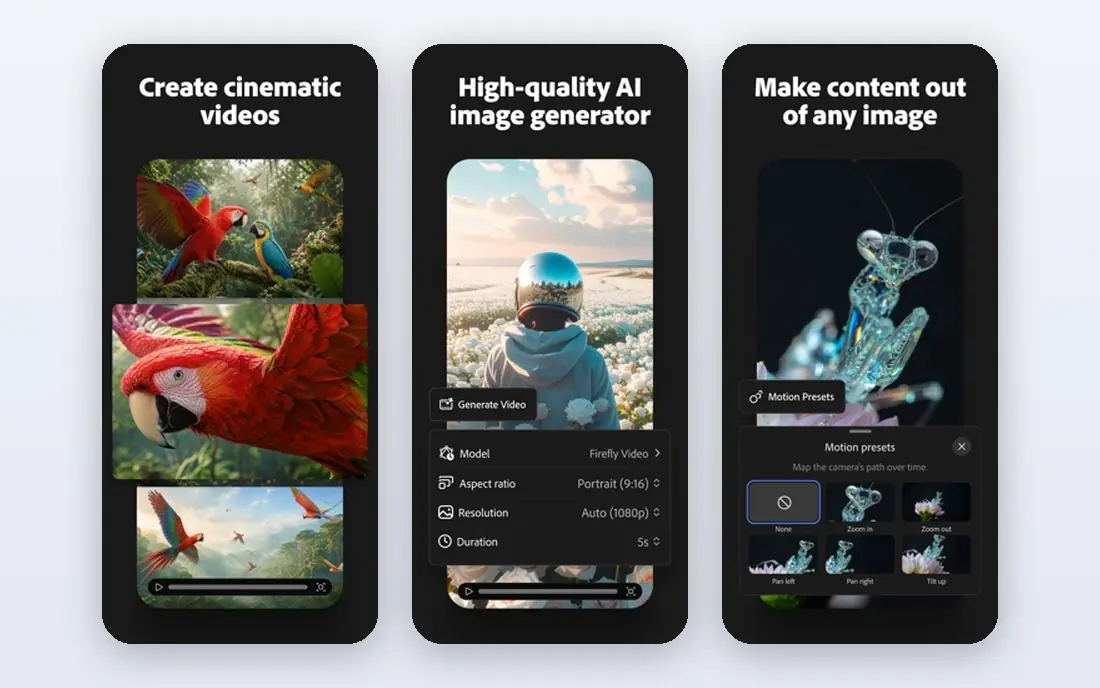
Adobe Firefly is the safest choice for client and commercial work, because Adobe states it is trained on licensed content and offers indemnification on paid plans. It integrates with Photoshop, Illustrator, and Express, so designers can generate, edit, and place images without leaving Adobe tools. Recent comparisons list a free tier with limited credits and paid plans from 9.99 dollars a month.
Free credits run out quickly for heavy use, and Firefly images can look more polished and corporate than artistic. For brand work where legal safety matters, that trade is worth it.
- Trained on licensed content
- Commercial indemnification on paid plans
- Adobe app integration
- Free credits are limited
- Best value comes inside Adobe plans
Leonardo AI suits game developers, illustrators, and creators who need consistent characters and styles. Its free tier offers daily tokens, listed at 150 tokens a day in recent comparisons, and its paid Apprentice plan starts at 12 dollars a month, or 10 dollars a month on annual billing in some comparisons. Community models and fine-tuning help you keep a look across many images.
The token system can be confusing at first, because different models and sizes cost different amounts. Free generations may also be public, so upgrade if you need private work. For game art and series of images, Leonardo is one of the strongest alternatives.
- Free daily tokens
- Game art styles
- Character and style consistency tools
- Free images are public by default in some plans
- Token system takes learning
Ideogram stands out when an image must contain readable words, such as a poster, a logo concept, or a book cover. Recent comparisons note strong text accuracy and a free tier with a slow queue or daily limits, with paid plans reported from about 7 to 8 dollars a month at entry in some sources and higher in others, so confirm the live price. Its models handle typography far better than most rivals.
For pure artistic images without text, Midjourney-style tools may still win on mood. Ideogram fits designers and marketers who need text and image together, without fixing spelling in an editor afterward.
- Best-in-class text rendering for posters and logos
- Free tier for trying it
- Style options
- Paid pricing has changed during 2026, so check the current plan
- Less artistic than Midjourney for some styles
Stable Diffusion, from Stability AI, is the open-weight route to image generation. You can run it locally for free if you have a capable GPU, or use cloud services that charge for compute. Community models cover anime, photorealism, product shots, and many niche styles, giving you more control than a closed service.
That control comes with effort. Setup, model choice, and updates are yours to manage, and out-of-the-box quality may trail a tuned commercial service until you learn prompting and settings. For privacy, cost, and control, Stable Diffusion is unmatched.
- Open weights
- Free local generation
- Thousands of community models
- Needs a good GPU for fast local use
- Setup and upkeep are your job
Recraft suits designers who need scalable brand assets, not just raster images. It can generate vector graphics in SVG format, which scale cleanly for logos, icons, and print, beside normal raster images. Recent comparisons list a free tier with daily credits and paid plans from 12 dollars a month, or 10 dollars a month on annual billing.
Photorealistic art is not its main strength, so choose Recraft for design work and brand assets, and pair it with a photorealistic tool for photos. For a small design team, its vector output alone can justify the plan.
- Native vector SVG output
- Brand style tools
- Raster image generation too
- Free tier images may be public
- Vector focus suits design more than photo art
NightCafe gives you several image models in one studio, with daily free credits, listed at five credits a day in recent comparisons, and paid plans from 5.99 dollars a month. Its community features, challenges, and galleries help beginners learn prompting by seeing what others made. That social layer makes it fun for hobbyists.
The credit model means heavy users will need a paid plan, and model availability can change, as with its DALL-E 3 support ending in 2026 in some reports. NightCafe fits casual creators who want variety and community without committing to one model.
- Multiple models in one place
- Daily free credits
- Active creator community
- Credit system limits heavy use
- Some model integrations change over time
FLUX, from Black Forest Labs, has become a leading choice for photorealistic images. Its Pro model is available through an API at about 4 cents per image in recent comparisons, while its Schnell model is open for local use. That split suits both developers who need API access and hobbyists who want free local generation.
API use needs code and cost tracking, and local use needs a capable machine. For photorealism at a fair per-image price, FLUX is a strong alternative, especially for product and portrait-style images.
- Strong photorealism
- Open Schnell model for local use
- API pricing per image
- API costs add up at volume
- Setup for local use needs technical skill
Canva Magic Media suits non-designers who need a social graphic fast, not a standalone art piece. You generate an image, drop it into a template, add text, and export, all in Canva. Recent comparisons list 50 lifetime free uses and Canva Pro from 15 dollars a month, or 10 dollars a month on annual billing in some reports.
For high-end editorial art, a dedicated generator will give you more control. For quick marketing graphics, Canva wins on speed, because design and generation sit in one workflow.
- Images inside a full design suite
- Easy social graphics
- Templates and editing together
- Free uses are limited to 50 lifetime uses in some reports
- Not for final production art alone
How we picked these
We compared official pricing pages, model pages, and recent 2026 comparisons of image generators. We favored tools active in October 2026, that state a clear free tier or paid plan, and that cover text rendering, commercial safety, game art, vectors, photorealism, and design. We did not claim hands-on testing, and we advise checking commercial terms for your use case.
How to choose the right generator
Start with the job, not the model. If text must be readable, pick Ideogram. If client safety matters, pick Firefly. If you need game characters, pick Leonardo. If cost matters most, try Stable Diffusion locally or Bing Image Creator for free DALL-E access. Test the same prompt on two tools before you pay, because style differences are larger than price differences for most users.
Commercial use and rights
Free tiers often limit commercial use or keep images public, while paid plans usually allow commercial use. Read the current terms for your plan, especially for client work, and keep records of the tool and plan you used for each asset.
Sources
- https://openai.com/index/dall-e-3
- https://www.adobe.com/products/firefly.html
- https://leonardo.ai
- https://ideogram.ai
- https://stability.ai
- https://www.recraft.ai
- https://nightcafe.studio
- https://blackforestlabs.ai
- https://www.canva.com
- https://rankite.com/blog/best-ai-image-generator-software
- https://awesomeagents.ai/tools/best-midjourney-alternatives-2026/
Frequently asked questions
What is the best free Midjourney alternative?
Stable Diffusion locally is fully free if you have a GPU, while Bing Image Creator offers free DALL-E-based generation. Leonardo, Ideogram, and NightCafe also offer free tiers with daily limits.
Which alternative is best for text in images?
Ideogram leads for readable text in posters, logos, and covers. DALL-E 3 also handles short text well, while most artistic models still struggle with longer phrases.
Can I use AI images commercially?
Usually yes on paid plans, but check the terms for your tool and plan. Adobe Firefly is the safest for commercial work, thanks to licensed training data and indemnification on paid plans.
Do I need a subscription to try these tools?
No. Most tools in this list offer a free tier or free credits, so you can test style and text handling before paying. Free tiers may limit resolution, privacy, or commercial use.
Is Stable Diffusion really free?
The open weights are free to use locally, but you pay for hardware or cloud compute. Cloud services that host Stable Diffusion charge for GPU time, so total cost depends on how much you generate.