Sora Alternatives in 2026: 8 AI Video Tools Compared
By ToolNimba Editorial Team November 9, 2026 10 min read

- Top pick
 Runway
Production work and editing
Starting price$15 per monthCheck out RunwayRead our review - Runner-up
 Kling
Quality on a budget
Starting priceSee websiteCheck out KlingRead our review - Also great
 Google Veo
Cinematic clips with audio
Starting price$19.99 per monthCheck out Google VeoRead our review
How we researched this
We compared official pricing and feature pages, app store listings, privacy policies and public user reviews. Prices change, so check the provider's site before you pay.
Key takeaways
- Sora is no longer available: OpenAI closed the Sora app and website on April 26, 2026, and ended the Sora API on September 24, 2026, so new users need a different tool.
- Runway is the closest all-round replacement for production work, while Kling offers strong value and Google Veo offers synced audio with its clips.
- Free tiers are limited by credits, watermarks, and commercial-use rules, so check those limits before you build a project around a free plan.
- Clip length, audio, and character consistency vary widely, so test the same prompt on two or three tools before you commit to a paid plan.
Quick comparison
| Name | Best for | Starting price | Free plan | |
|---|---|---|---|---|
| Runway | Production work and editing | $15 per month | Free trial | Visit |
| Kling | Quality on a budget | See website | Yes | Visit |
| Google Veo | Cinematic clips with audio | $19.99 per month | Free trial | Visit |
 Pika | Fun effects and short clips | $10 per month | Free trial | Visit |
 Luma Dream Machine | Smooth camera motion | See website | Free trial | Visit |
 Hailuo | Fast stylized clips | See website | Yes | Visit |
 Adobe Firefly | Adobe workflows | $9.99 per month | Yes | Visit |
 HeyGen | Avatar and presenter videos | $29 per month | Yes | Visit |
The best Sora alternatives
Sora once set the standard for text-to-video, but it is gone as a consumer product. The tools below are all available now, and they cover different needs, from short social clips to longer production work. We do not list Sora itself as a working product, because you cannot sign up for it anymore.
Runway is the most complete replacement for someone who used Sora for serious creative work rather than casual clips. Its Gen models generate short clips from text or images, and its editing tools let you refine, extend, and combine those clips into longer sequences. That workflow matters, because raw generation is only part of making a finished video.
The cost model needs attention. A free trial gives a limited set of credits, and paid plans start at $15 per month, with higher tiers for heavier use. If you generate many versions of each shot, credits can disappear faster than expected. Start with the trial, test one real project end to end, and only then choose a tier based on how many usable seconds you actually produce.
- Mature editing and generation workflow
- Strong model updates
- Useful for iterative film work
- Free credits run out quickly
- Higher-quality renders use more credits
- Pricing rises with usage
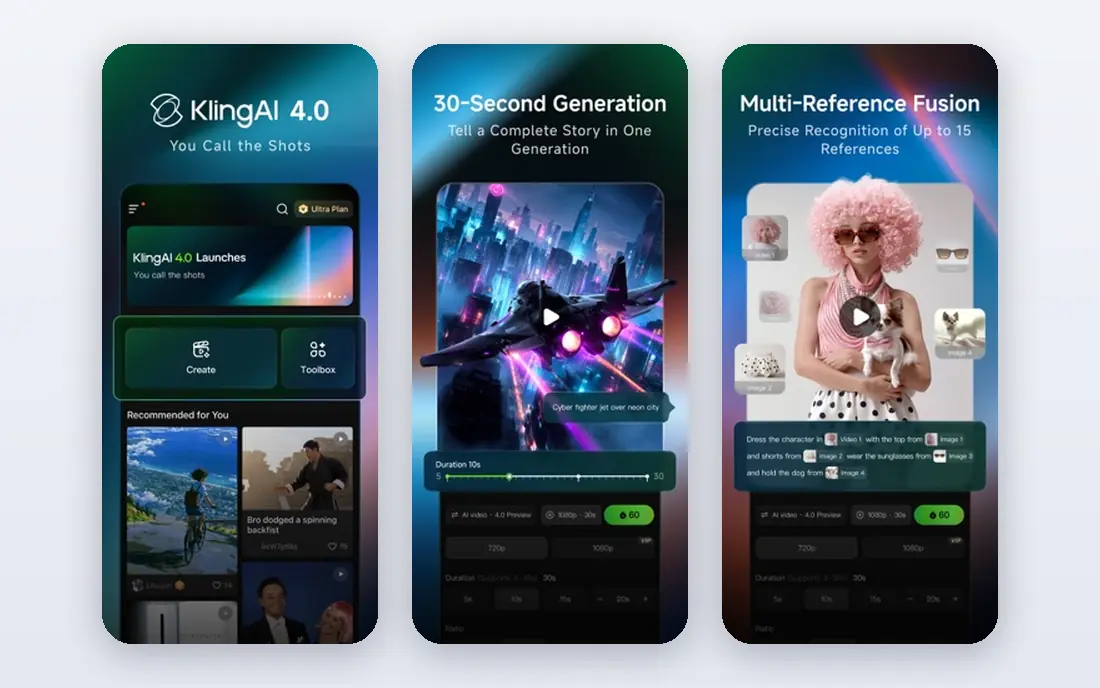
Kling has become a favorite among creators who want high-quality clips without paying the highest prices in this list. Its models handle motion, camera movement, and reference images well, and it supports clips up to about 15 seconds in recent versions. For social content, product shots, and short scenes, that quality-to-price balance is hard to beat.
Check the fine print before you rely on the free tier. Free exports are often watermarked, and commercial use may require a paid plan. Pricing has also shifted as new models arrive, so confirm the current plan and credit allowance on the official site before you budget a project. If the current terms suit you, Kling is a strong first alternative to try after Sora.
- Strong motion and visual quality for the price
- Daily free credits reported
- Image-to-video and reference controls
- Free exports may carry a watermark
- Commercial use rules vary by plan
- Pricing and credit rates change
Google Veo, available through Google AI plans and the Flow tool, is the closest rival to Sora on raw clip quality for many creators. Its standout feature is native audio: dialogue, sound effects, and ambient sound can be generated in sync with the picture, which saves a separate audio step. For short cinematic scenes, ad concepts, and storyboards, that combination is a real advantage.
The main limit is length. Veo clips are typically around 8 seconds per generation, so longer scenes need multiple generations and careful editing. Access also depends on which Google AI plan you hold, and allowances differ by tier. If you want Sora-style realism with sound, Veo deserves a test, but plan your scenes in short shots rather than long takes.
- Synced audio with video
- Strong realism for short cinematic clips
- Access through Google AI plans and Flow
- Clips are short, around 8 seconds
- Access routes and allowances vary by plan
- Costs rise on higher tiers
Pika suits creators who want playful, shareable clips rather than full film production. Its effects, transformations, and image-to-video tools make it easy to turn a photo into a short moving scene, and the interface is friendlier than some production tools. For social posts, memes, and quick experiments, that simplicity is a genuine strength.
The free tier is thinner than it once was, with reports of no monthly credits and a reliance on credit packs. Commercial use also requires a higher plan, so check the license before using Pika clips for client work. At $10 per month for the entry paid plan, Pika is still affordable, but compare its output quality against Kling and Runway on the same prompt before you settle.
- Easy to learn
- Creative effects and transformations
- Lower entry price than some rivals
- No monthly free credits on the free account in recent reports
- Commercial use needs a higher plan
- Clip quality varies by effect
Luma Dream Machine built its reputation on smooth camera motion and clean image-to-video results. A still product photo or scene image can become a gentle push-in, orbit, or tracking shot that looks more polished than a simple pan. That strength makes it useful for product videos, real estate-style shots, and mood pieces where camera movement carries the scene.
Pricing is the reason to check the site directly. Recent listings have shown different entry prices and credit allowances, and some sources report no free plan. Treat any older price you see online as out of date, and confirm the current plan, credit count, and commercial terms before you start a project. For camera-led shots, Luma remains worth testing alongside Runway and Kling.
- Smooth, cinematic camera moves
- Strong image-to-video results
- Useful for product and scene shots
- Pricing has changed over time
- No clear free plan in recent listings
- Higher tiers needed for heavy use
Hailuo, from MiniMax, is a good option when you want fast, eye-catching clips without a steep learning curve. It handles stylized scenes, action, and physics-heavy motion well, and new accounts have historically received welcome credits to try it. For social content and quick concept tests, that speed helps you iterate without waiting long for each render.
The limits are clip length and pricing clarity. Clips are shorter than the longest Kling or Luma outputs, and published prices differ across sources, so we list the starting price as See website. Check the current plan page for credit allowances, watermark rules, and commercial use before you use Hailuo clips in paid work. If you like its style, it pairs well with a second tool for longer or more realistic scenes.
- Fast generation
- Strong for stylized and physics-heavy scenes
- Welcome credits for new accounts
- Clip length is shorter than some rivals
- Pricing varies by source
- Audio and consistency vary by model
Adobe Firefly is the natural Sora alternative for designers and editors who already work in Adobe tools. Its video model generates short clips, and it sits alongside Firefly image, audio, and design tools, so assets can move between projects more easily. For teams that already pay for Creative Cloud, Firefly can be a low-friction way to add AI video to existing work.
Video is not Firefly's strongest area on its own. Clips are short, and the number of generations on lower plans is limited, so heavy video users may need a higher plan or a second tool. If your main need is occasional video alongside design work, Firefly fits well. If video is your main output, compare it directly with Runway, Kling, and Veo first.
- Fits Adobe Creative Cloud workflows
- Limited daily generations on free access
- Partner models add choice
- Video clips are short
- Generation allowances are limited on lower plans
- Best value requires Adobe familiarity
HeyGen answers a different need from the other tools here: presenter-led video without filming a person. You can create an avatar, type a script, and produce a training video, product explainer, or localized marketing clip in multiple languages. For businesses that need many similar videos, that workflow saves filming time and cost.
It is not a direct Sora replacement for cinematic scenes or creative film work, and its entry price at $29 per month is higher than most tools in this list. The free plan allows a few videos per month, which is enough to test avatar quality and voice options. Choose HeyGen when you need a presenter, not when you need a free-form cinematic clip.
- Realistic avatars and voice cloning options
- Good for training and marketing videos
- Templates speed up production
- Higher entry price
- Not a general text-to-video film tool
- Avatar realism varies by plan and script
How we picked these
We checked the current availability of each tool, because several AI video products have changed pricing, models, or access in 2026. We excluded Sora itself, since OpenAI closed the app and website on April 26, 2026, and ended the API on September 24, 2026. We then compared official pricing pages, model descriptions, and public comparisons for clip length, audio, free access, and commercial-use rules, favoring tools that are actually open to new users.
What to check before you pay
Credits are the hidden cost in AI video. A plan price tells you little until you know how many credits a five-second clip uses, whether higher resolution costs more, and whether failed generations still consume credits. Run the same prompt on two tools, count the usable seconds you get, and divide the plan price by that number. That cost per usable second is the fair comparison, not the headline monthly price.
Also check ownership and commercial rights. Some free plans forbid commercial use, watermark exports, or limit redistribution, while paid plans vary on whether you own the output outright. If you make client work, ads, or monetized social content, confirm the license in writing on the vendor's terms page. Finally, keep your source prompts and project files, because models change and a clip that generates well today may look different after the next model update.
Sources
- https://www.runwayml.com
- https://www.klingai.com
- https://deepmind.google/models/veo/
- https://www.pika.art
- https://www.lumalabs.ai
- https://www.hailuo.ai
- https://www.adobe.com/products/firefly.html
- https://www.heygen.com
- https://gizmodo.com/best-vpn/access-sora-uk
- https://www.scriptbyai.com/best-ai-video-generation-tools/
Frequently asked questions
What happened to Sora?
OpenAI closed the Sora app and website on April 26, 2026, and ended the Sora API on September 24, 2026. There is no consumer Sora product to sign up for now, and old Sora pricing guides no longer describe an available service. Former users should export any old work they still need and move to an available tool such as Runway, Kling, or Veo.
What is the best Sora alternative overall?
Runway is the best all-round replacement for production work, because it combines generation with editing tools. Kling is a strong value pick for quality per dollar, and Google Veo is a strong pick for short cinematic clips with synced audio. The best choice depends on whether you need editing, low cost, or audio most.
Is there a free Sora alternative?
Several tools offer free access, including Kling, Hailuo, Adobe Firefly, and HeyGen, but free tiers are limited by credits, watermarks, or commercial-use rules. No free tier matches the old Sora experience without limits. Test the free tier on a real project before you assume it will cover ongoing work.
Can AI video tools make long videos?
Most tools generate short clips, typically 5 to 15 seconds, which you then edit together into a longer video. Some tools support extensions and multi-shot scenes, but a single continuous long take is still rare. Plan projects as a sequence of short shots, and use an editor to join them.
Do I own the videos I generate?
Ownership and commercial-use rights vary by tool and plan. Paid plans usually allow commercial use, while free plans often restrict it or add a watermark. Read the terms page for the plan you buy, especially if the video will appear in ads, client work, or monetized channels.
Which Sora alternative is best for social media?
Pika and Hailuo are good for fast, shareable short clips, while Kling offers higher quality for the same kind of content. If you need a presenter or localized versions, HeyGen is better. Test the same idea on two tools and compare how it looks on a phone, since social viewing hides some quality differences.