Top BI Software in 2026: 10 Tools Compared
By ToolNimba Editorial Team November 11, 2026 11 min read

- Top pick
 Tableau
Visual analysis at scale
Starting price$15 per monthCheck out TableauRead our review - Runner-up
 Microsoft Power BI
Microsoft 365 teams
Starting price$14 per monthCheck out Microsoft Power BIRead our review - Also great
 Looker Studio
Free Google-based reporting
Starting priceFreeCheck out Looker StudioRead our review
How we researched this
We compared official pricing and feature pages, app store listings, privacy policies and public user reviews. Prices change, so check the provider's site before you pay.
Key takeaways
- Power BI is the cheapest route into serious BI for teams that already use Microsoft 365, with Pro at $14 per user per month.
- Tableau still sets the bar for visual analysis, but its per-user pricing adds up fast once a whole company needs access.
- Looker Studio and Metabase cover a lot of reporting needs for free, and both are sensible starting points before paying for an enterprise platform.
- Qlik Sense and ThoughtSpot suit teams that want people to explore data on their own, rather than waiting on an analyst for every question.
- Domo and Sisense are quote-based enterprise tools, so budget for a sales conversation and a longer setup before you commit.
Quick comparison
| Name | Best for | Starting price | Free plan | |
|---|---|---|---|---|
| Tableau | Visual analysis at scale | $15 per month | Free trial | Visit |
| Microsoft Power BI | Microsoft 365 teams | $14 per month | Yes | Visit |
| Looker Studio | Free Google-based reporting | Free | Yes | Visit |
 Qlik Sense | Self-guided data exploration | $30 per month | Free trial | Visit |
 Zoho Analytics | Small business budgets | $24 per month | Yes | Visit |
 Metabase | Open source dashboards | Free | Yes | Visit |
 ThoughtSpot | Search-style analytics | $25 per month | Free trial | Visit |
 Domo | Executive dashboards | See website | Free trial | Visit |
 Sisense | Embedded analytics | See website | No | Visit |
 Apache Superset | Free self-hosted BI | Free | Yes | Visit |
The best BI software
We compared official pricing pages, feature documentation, and public reviews to find BI tools that fit different team sizes and budgets. The list runs from free tools to enterprise platforms, and each one earns its place for a different kind of team.
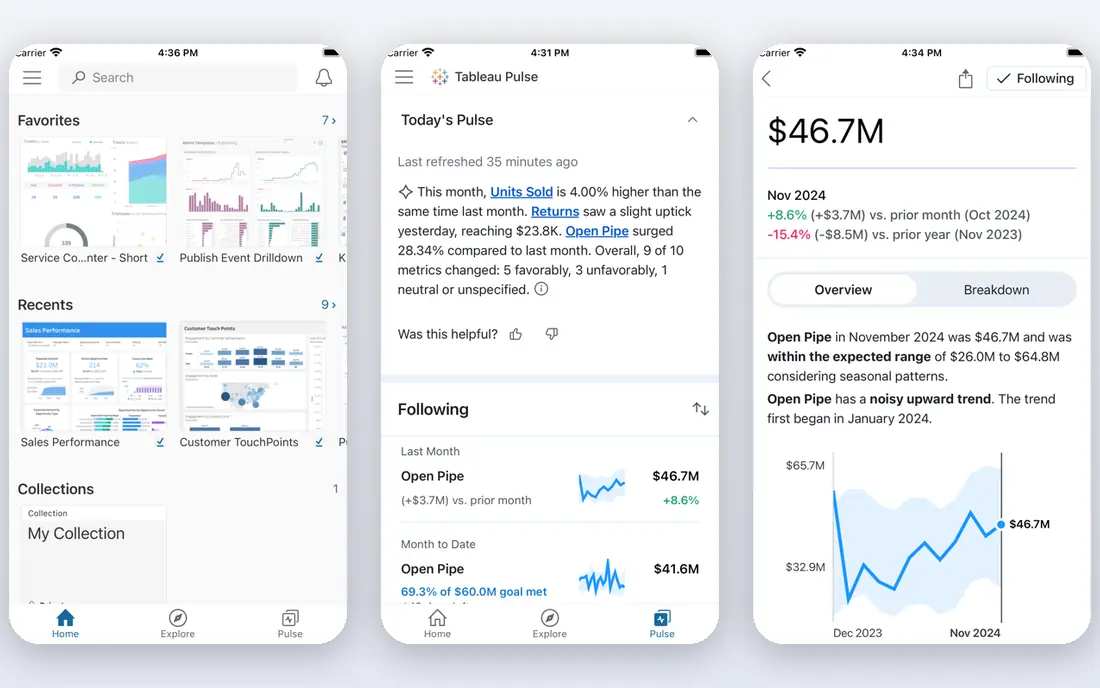
Tableau is our pick for teams that live in dashboards all day. Its drag-and-drop builder makes polished, interactive visuals without code, and the public community means answers to most questions already exist somewhere. The Standard edition starts at $15 per user per month for viewers, with Explorer at $42 and Creator at $75, all billed annually, so the bill depends heavily on how many people need to build versus only view.
The catch is that Tableau rewards commitment. Small teams can feel the cost once creators, explorers, and viewers are all counted, and the AI features in the Cloud+ edition require a sales conversation. If your team already thinks in charts and needs depth more than breadth, it is still hard to beat.
- Strong visual analysis tools
- Large community and learning resources
- Works with a wide range of data sources
- Costs rise quickly with many users
- Advanced governance features sit on higher-priced editions
Power BI is the practical default for companies that already run on Microsoft tools. Desktop is free for building reports on your own machine, Pro costs $14 per user per month billed annually and covers publishing and sharing, and Premium Per User at $24 adds larger models, paginated reports, and AI features. If your data already lives in Excel, SharePoint, or Azure, setup friction is low.
The trade-off is licensing math. Everyone who views a shared report in a Pro workspace needs a Pro license, so costs scale with headcount rather than with the number of analysts. Teams that only need a few shared dashboards should check whether a Fabric capacity plan works out cheaper before buying seats for everyone.
- Low per-user price
- Power BI Desktop is free for building reports
- Deep ties to Excel and Microsoft 365
- Sharing requires paid licenses for viewers too
- Advanced features need Premium Per User or Fabric capacity
Looker Studio is the best free starting point in BI, and it is genuinely free rather than a limited trial. You can build unlimited dashboards from Google Analytics, Google Ads, Sheets, BigQuery, and hundreds of other sources, then share them with anyone at no cost. A Pro tier at $9 per user per project per month adds team workspaces, organization-owned reports, and support.
The limits show up as reporting grows more serious. There is no built-in row-level security, data blending gets fragile beyond a few sources, and heavy BigQuery queries can still cost money on the data side. For marketing reports, client dashboards, and small-company KPIs, though, it is hard to argue with free.
- Free for unlimited reports and viewers
- Strong connectors for Google Analytics, Ads, Sheets, and BigQuery
- Easy sharing
- Limited data modeling and governance
- Performance depends on the underlying data source
Qlik Sense suits analysts who like to poke at data rather than follow a fixed drill path. Its associative engine shows related values as you click, which can surface relationships that filter-based tools miss, and it handles very large datasets well. Qlik Sense Business is listed at $30 per user per month billed annually, while larger cloud plans start with a Starter package priced at $300 per month for 10 users.
The learning curve is real, since serious work often means learning Qlik Script, and advanced visuals can need scripting skill too. Teams that want guided, simple dashboards may find it more tool than they need, but exploration-heavy teams tend to like it a lot.
- Associative engine surfaces connections between data points
- Strong for large, complex datasets
- AI-assisted insight suggestions
- Proprietary scripting language takes time to learn
- Enterprise pricing is quote-based and can climb
Zoho Analytics is the budget pick that still feels like a complete BI tool. The Basic plan starts at $24 per month billed annually for two users, and a free plan covers two users with 10,000 rows, which is enough to test it properly. It connects to common business apps, spreadsheets, and databases, and it sits naturally alongside Zoho CRM and Zoho Books.
The compromise is scale. Row limits and user counts on cheap plans mean growing companies will move up the pricing ladder, and its visuals are solid rather than stunning. For a small business that wants real dashboards without a per-seat enterprise bill, it is a strong fit.
- Low flat monthly price
- Free plan for two users
- Wide connector library including Zoho apps
- Row limits on lower plans
- Less polished than Tableau or Power BI for complex visuals
Metabase is our pick for teams with a database and a bit of technical confidence. The open source edition is free to run on your own server, and its question builder lets non-technical people ask questions of company data without writing SQL. Paid cloud hosting starts at $100 per month for a Starter plan with five users included, and a Pro tier adds row-level permissions and SSO.
The catch is that the free edition keeps some governance features behind the paywall, and teams without anyone comfortable running a server should budget for the cloud version instead. If you have Postgres or MySQL and want dashboards this week, Metabase gets you there with little fuss.
- Free open source version you can self-host
- Friendly question builder for non-technical users
- Paid cloud hosting available
- Advanced permissions and SSO need paid plans
- AI features cost extra on cloud plans
ThoughtSpot is built around a simple idea: type a question, get a chart. Business users who freeze at the sight of a dashboard builder often take to it fast, and its Spotter AI assistant answers follow-up questions in plain language. Pricing starts at $25 per user per month for Essentials billed annually, with Pro at $50, and a 14-day trial lets teams test it first.
The downside is that the bill grows with every seat, and AI query limits on lower plans can frustrate heavy users. It also works best when data is already modeled cleanly in a warehouse. For companies that want self-service analytics without training everyone to be an analyst, it is a compelling choice.
- Search-based interface that business users grasp quickly
- Natural language queries
- Live connections to cloud warehouses
- Per-user pricing scales linearly
- AI query allowances are capped on lower plans
Domo aims to be the one place where data goes in and dashboards come out, with connectors, data prep, and visualization in a single cloud platform. Executives tend to like it because the mobile app is genuinely good and dashboards stay current without analyst babysitting. Pricing is custom and credit-based, with a free trial available, so you will need a sales conversation to get a number.
The honest catch is predictability. Credit consumption depends on data volume and refresh frequency, and renewal pricing is a common complaint in public reviews. If you want one vendor for the whole pipeline and have budget for enterprise software, Domo is worth a demo. If you need a firm price up front, look elsewhere first.
- All-in-one platform covering ingestion, transformation, and visualization
- Strong mobile experience
- Real-time dashboards
- No public pricing
- Credit-based consumption can be hard to forecast
Sisense is the pick for software companies that want to put analytics inside their own product. Its embedded tools, APIs, and white-label options are built for that job, and it handles data preparation and modeling in the same platform rather than bolting on extra tools. Pricing is not published, so expect a quoted annual contract.
The trade-off is effort. Sisense is a platform to implement, not an app to try in an afternoon, and smaller teams may find it more than they need. For product teams shipping analytics to customers, though, its embedding depth is a genuine advantage over general-purpose BI tools.
- Strong embedded analytics for customer-facing products
- Single platform for prep, modeling, and visualization
- Granular security controls
- No public pricing
- Setup can be a project rather than an afternoon
Apache Superset is the free, open source option for teams that would rather host BI themselves than pay per seat. It offers a wide chart library, SQL Lab for analysts, and dashboards that can scale to many viewers without license costs. Companies with data engineering resources use it as a core reporting layer.
The catch is that you are the support team. Setup, upgrades, and security fall to your own staff, and non-technical users may find it less friendly than Metabase or Looker Studio. If your team can run it, the price is hard to argue with.
- Completely free and open source
- Large visualization library
- No per-user fees at any scale
- Needs technical setup and hosting
- No vendor support unless you pay a third party
How we picked these
We compared official pricing pages, product documentation, and public user reviews for each tool, and we favored products that are actively maintained and genuinely fit business intelligence work. We included free and open source options alongside enterprise platforms because BI budgets range from zero to six figures, and the right tool depends on team size, data sources, and how much governance a company needs. Prices quoted here were checked against vendor pages and current pricing roundups in October 2026, and quote-based tools are marked as such rather than given estimated numbers.
What to check before you buy
Start with your data, not the demo. List the sources you actually need connected, then confirm each tool has a native connector or a workable path for them, since custom connections eat time. Next, count viewers, not just builders. Per-user tools like Tableau and Power BI charge for everyone who opens a dashboard, while flat-priced tools like Zoho Analytics and Metabase get cheaper per person as teams grow.
Also test the free tier or trial with your own data before paying. A tool that looks great on sample data can feel slow on your real warehouse, and a trial week will reveal that. Finally, ask about refresh limits, row limits, and AI allowances in writing. Those caps are where surprise costs usually hide, and they matter more than the headline monthly price.
Sources
- https://www.tableau.com/pricing
- https://www.tableau.com/pricing/cloud
- https://www.basedash.com/blog/bi-tool-pricing-plans-seat-limits-and-ai-costs-2026
- https://www.basedash.com/blog/best-dashboard-software-for-small-businesses-compared-2026
- https://www.basedash.com/blog/mobile-bi-tools-compared-2026-offline-alerts-ai
- https://www.itechguides.com/best/self-service-analytics/
- https://beastmetrics.io/blog/looker-studio-pro-pricing/
- https://blog.coupler.io/looker-studio-vs-looker-studio-pro/
Frequently asked questions
What is the best BI software for a small business?
Looker Studio or Zoho Analytics are the usual starting points. Looker Studio is free and covers Google-based reporting well, while Zoho Analytics starts at $24 per month and adds more governance and connectors. Move to Power BI or Tableau when you need deeper analysis or company-wide rollout.
Is there really free BI software?
Yes. Looker Studio is free for unlimited reports and viewers, Metabase and Apache Superset are free open source tools you can self-host, and Power BI Desktop is free for building reports locally. Free tools usually trade away governance features or vendor support, so check those gaps before relying on them.
What is the difference between BI software and a reporting tool?
Reporting tools mostly present data that is already prepared, while BI software also helps explore, model, and analyze it. Tools like Qlik Sense and ThoughtSpot let users ask new questions of data, while simpler reporting tools stick to fixed dashboards. Many products now cover both jobs, so judge them by what your team actually does each week.
How much does BI software cost?
It ranges from free to thousands per month. Per-user tools run roughly $14 to $75 per user per month depending on role, flat plans like Zoho Analytics start at $24 per month, and enterprise platforms like Domo and Sisense are quote-based. Count viewers as well as builders, since that is where most budgets get surprised.
Do I need a data warehouse to use BI software?
Not always. Small teams can connect BI tools straight to spreadsheets, CRM exports, or app databases. A warehouse becomes useful when data grows large, comes from many systems, or needs cleaning before analysis. Tools like ThoughtSpot and Looker assume cleaner data, while Domo and Sisense include more preparation in the platform.
Which BI tool is easiest for non-technical users?
Looker Studio and ThoughtSpot are the friendliest starting points. Looker Studio uses a drag-and-drop builder familiar to anyone who has used Google tools, and ThoughtSpot lets users type questions in plain language. Metabase is also friendly for basic questions, while Tableau and Qlik reward users who invest more learning time.