Best Bitcoin Mining Software in 2026: 9 Tools Compared
By ToolNimba Editorial Team October 28, 2026 11 min read

- Top pick
 CGMiner
Advanced ASIC miners
Starting priceFreeCheck out CGMinerRead our review - Runner-up
 BFGMiner
Modular ASIC and FPGA control
Starting priceFreeCheck out BFGMinerRead our review - Also great
 Awesome Miner
Managing many rigs
Starting priceFreeCheck out Awesome MinerRead our review
How we researched this
We compared official pricing and feature pages, app store listings, privacy policies and public user reviews. Prices change, so check the provider's site before you pay.
Key takeaways
- Bitcoin mining in 2026 runs on ASIC hardware, not phones or ordinary PCs, so software choice matters only after you have the right hardware and power price.
- CGMiner and BFGMiner remain the leading free, open-source ASIC tools, while Awesome Miner and Hive OS suit farms that need remote management.
- NiceHash is the simplest marketplace route, letting you sell hashrate and get paid in Bitcoin without running your own pool.
- Cloud mining contracts and phone mining apps rarely match the returns they advertise, so read fees, contract length, and withdrawal rules before paying.
- This is not financial advice. Mining returns depend on Bitcoin price, network difficulty, electricity cost, and hardware wear, and losses are possible.
Quick comparison
| Name | Best for | Starting price | Free plan | |
|---|---|---|---|---|
| CGMiner | Advanced ASIC miners | Free | Yes | Visit |
| BFGMiner | Modular ASIC and FPGA control | Free | Yes | Visit |
| Awesome Miner | Managing many rigs | Free | Yes | Visit |
 Hive OS | Farm management and monitoring | Free | Yes | Visit |
 NiceHash | Selling hashrate easily | Free | Yes | Visit |
 EasyMiner | Beginners on Windows | Free | Yes | Visit |
 MultiMiner | Simple multi-coin mining | Free | Yes | Visit |
 Braiins OS+ | ASIC tuning and efficiency | See website | No | Visit |
 ECOS | Cloud mining contracts | See website | No | Visit |
The best bitcoin mining software
Mining software does not create Bitcoin by itself. It connects your hardware to a pool or to the network, monitors temperature and hashrate, and helps you switch pools or coins. The nine tools below cover home ASIC miners, larger farms, and people who want exposure without owning hardware.
CGMiner is the reference tool for many ASIC miners, and it has stayed relevant because it does one job well. It is multi-threaded, supports multiple pools, and lets advanced users tune devices, set failover pools, and monitor output from a terminal. It supports ASIC and FPGA hardware, and its open-source code means the community can audit it and keep it alive.
The drawback is usability. There is no polished graphical interface, so a beginner who expects a dashboard will struggle with commands and config files. CGMiner also suits older and USB-style ASIC setups more than the newest large farm hardware, where a management platform may be better. If you are comfortable with a terminal and want full control at zero software cost, CGMiner is still the benchmark.
- Free and open source
- Multi-pool support
- Runs on Windows and Linux
- Command-line interface with no simple GUI
- Setup is hard for beginners
BFGMiner grew from similar roots to CGMiner but adds a modular driver system, which helps with FPGA and varied ASIC hardware. It supports dynamic clocking, remote interface access, and multi-pool mining, and it runs on Windows, Linux, and macOS. For a miner with mixed hardware, that flexibility can save time compared with juggling several single-device tools.
Like CGMiner, BFGMiner is command-line only, and its guides assume you know how mining pools, stratum, and device drivers work. New miners should start with a GUI tool and move to BFGMiner when they need finer control. For a technical miner who wants a free, auditable tool, it remains a strong second choice.
- Free and open source
- Modular drivers for many devices
- Dynamic clocking and remote monitoring
- Command-line only
- Documentation assumes technical knowledge
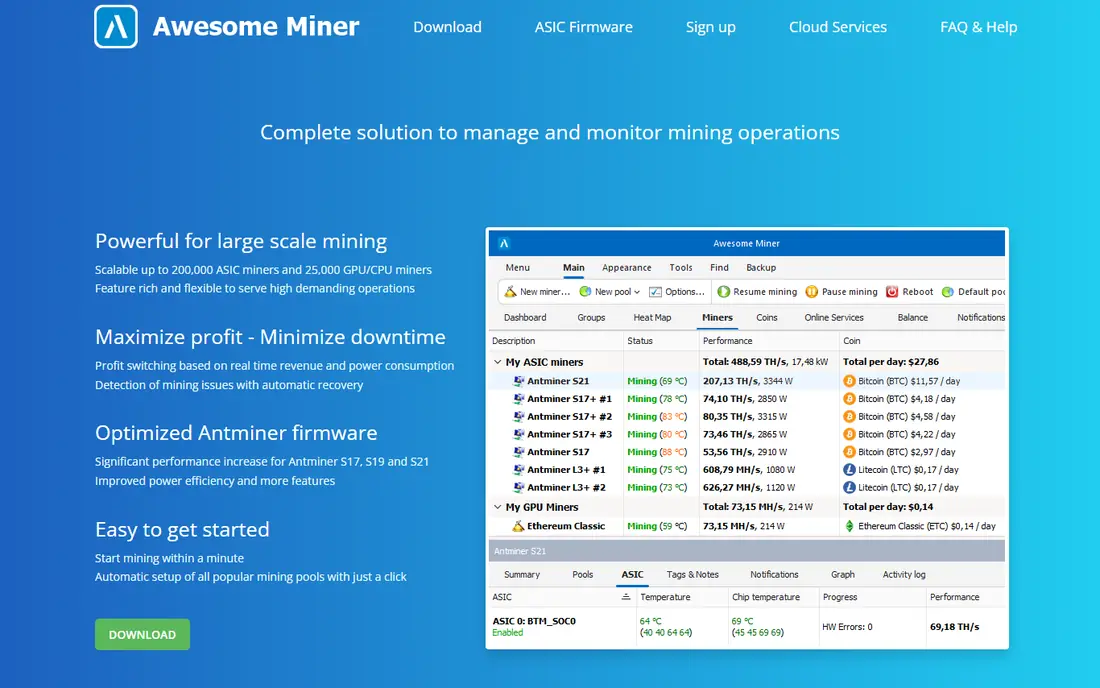
Awesome Miner is a management layer, not a miner by itself. It finds rigs on your network, shows hashrate, temperature, and pool status in one dashboard, and can switch coins or pools based on profitability rules you set. The free tier covers up to 2 miners, which is enough to test it on a small setup, while paid tiers scale to hundreds of devices.
The main cost is scale. A farm with dozens of rigs will need a paid plan, with published roundups putting paid tiers from around $40 per month for larger device counts. The main application is also Windows-focused, though web access helps for remote checks. If you run more than a couple of rigs, Awesome Miner pays for itself in time saved on monitoring.
- Central dashboard for ASIC, GPU, and FPGA rigs
- Profit switching
- Free tier for up to 2 miners
- Paid tiers needed for larger farms
- Windows-focused for the main app
Hive OS is built for farms. You install its OS on rigs, manage them from a web dashboard, and apply overclock settings, flight sheets for pools and wallets, and alerts from one place. Published guides note a free allowance for one rig, with charges of about $3 per month per additional rig, which makes pricing easy to forecast as a fleet grows.
Setup takes care. Flight sheets, wallet addresses, and pool settings must be correct before a rig earns, and a mistake can idle hardware. Hive OS also suits GPU and ASIC fleets, not just Bitcoin ASICs, so altcoin miners get value too. For a serious small farm, it is one of the most complete management options.
- Web dashboard for large fleets
- Remote overclocking and reboot
- One free rig on the basic tier
- Paid per rig beyond the free allowance
- Learning curve for farm setup
NiceHash takes a different route. Instead of joining a pool yourself, you sell your hashrate to buyers on its marketplace and get paid in Bitcoin. The NiceHash Miner app handles device detection and algorithm switching, and the mobile app lets you monitor earnings. That simplicity makes it the easiest entry point for a GPU owner who wants Bitcoin payouts without pool setup.
Fees are the catch. Published comparisons put NiceHash service fees in the 1 to 4 percent range depending on the service, and marketplace prices move with demand, so earnings are not fixed. NiceHash also does not change the basic math: without cheap power and suitable hardware, returns stay thin. For a first taste of mining with existing hardware, it is the lowest-friction option.
- No pool management needed
- Paid in Bitcoin
- Marketplace for buyers and sellers of hashrate
- Service fees of 1 to 4 percent in published comparisons
- Returns depend on marketplace demand
EasyMiner wraps a mining engine in a graphical interface, which is exactly what a beginner needs. A wizard helps with pool, wallet, and device settings, charts show hashrate, and you can start mining without learning terminal commands. It is free and runs on Windows, with support for ASIC, GPU, and CPU hardware in its design.
The limits are platform and depth. There is no macOS or Linux version in its main build, and advanced tuning options are thinner than in CGMiner. EasyMiner is also a learning tool, not a profit guarantee, and CPU mining in particular will not earn meaningful Bitcoin in 2026. Use it to learn pool mining safely, then graduate to a command-line tool if you buy ASIC hardware.
- Graphical interface with a setup wizard
- Free
- Supports ASIC, GPU, and CPU mining
- Windows only
- Less control than CGMiner or BFGMiner
MultiMiner aims at the middle ground between EasyMiner and CGMiner. It gives you a graphical front end, works on Windows, Linux, and macOS, and can help you mine different coins with ASIC, GPU, or FPGA hardware. Automatic detection of devices and simple pool setup make it a good second step after EasyMiner.
Its age shows. Updates are less frequent than for Hive OS or Awesome Miner, and the interface feels dated next to a modern web dashboard. For a hobby miner with one or two rigs who wants a free GUI without a farm platform, MultiMiner still works. For a commercial farm, Hive OS or Awesome Miner will serve you better.
- Free and open source
- Simple interface across Windows, Linux, and macOS
- Automatic coin switching features
- Less actively updated than major farm tools
- Interface feels dated
Braiins OS+ is firmware, not just an app, and it replaces the stock software on supported Antminer models. Auto-tuning adjusts each chip for efficiency, Stratum V2 improves pool communication and security, and dynamic power scaling can respond to power limits. For an owner of S19 or S21 machines, those gains can matter more than a small fee saving elsewhere.
The fee is the trade-off. Published comparisons put Braiins OS+ at a 2 to 2.5 percent dev fee, though using Braiins Pool can rebate the separate pool fee to 0 percent in some setups. Support is also limited to specific Antminer series, so owners of other hardware should not buy it expecting it to work. If you own supported Antminers and pay high power prices, efficiency tuning is where real savings live.
- Auto-tuning for Antminer S19 and S21 series
- Stratum V2 support
- Dynamic power scaling
- Dev fee of about 2 to 2.5 percent
- Limited to supported Antminer models
ECOS is a cloud mining service, which means you rent hashrate from a remote facility instead of running hardware at home. That removes noise, heat, and maintenance, and the mobile app lets you track contract performance. Published app roundups list ECOS among the better-known cloud options, with contract-based pricing rather than a free tier.
Cloud mining carries extra risk. Returns depend on Bitcoin price and difficulty over the contract term, fees are baked into the contract, and you do not own hardware at the end. Many cloud products in this sector have disappointed buyers, so treat ECOS as a high-risk exposure, not a savings product. Read the full contract, check withdrawal rules, and only commit money you can afford to lose.
- No hardware to buy or maintain
- Mobile app for monitoring
- Bitcoin-focused contracts
- Contract-based returns are not guaranteed
- Fees and contract terms need careful reading
How we picked these
We compared official project pages, GitHub repositories, vendor pricing, and 2026 guides from Koinly, Mudrex, and other mining roundups. We favored tools that are still available, support current ASIC or farm workflows, and publish fees or open-source terms clearly. We excluded phone apps that claim to mine Bitcoin on a phone processor, since that cannot earn meaningful Bitcoin in 2026, and cloud products whose terms could not be verified.
How to choose mining software
Start with your hardware and power price, not with an app store ranking. A home ASIC owner needs a miner and a pool, a farm owner needs a management platform, and a person without hardware needs to decide if cloud exposure is worth the risk at all. Run the numbers before you buy anything.
Check power cost first
Find your electricity price per kilowatt-hour, your miner's power draw in watts, and the current network difficulty and Bitcoin price. If daily power cost exceeds expected daily earnings after pool fees, no software will fix that gap. Cheap power, usually under about 10 cents per kilowatt-hour for home miners, is the single biggest factor.
Pick a pool, then a miner
Choose a reputable pool with clear fees and payout rules, then pick software that supports that pool's stratum setup. CGMiner and BFGMiner suit technical users, EasyMiner and MultiMiner suit beginners, and Hive OS or Awesome Miner suit fleets. Test on one rig for a week before rolling settings out to a whole farm.