Best Receipt Tracker App in 2026: 9 Apps Compared
By ToolNimba Editorial Team November 13, 2026 9 min read

- Top pick
 Expensify
Teams and SmartScan capture
Starting price$5 per monthCheck out ExpensifyRead our review - Runner-up
 Dext
Accountant-led bookkeeping
Starting priceSee websiteCheck out DextRead our review - Also great
 Shoeboxed
Paper receipts and tax prep
Starting price$18 per monthCheck out ShoeboxedRead our review
How we researched this
We compared official pricing and feature pages, app store listings, privacy policies and public user reviews. Prices change, so check the provider's site before you pay.
Key takeaways
- Expensify is the best all-round receipt tracker for teams, with SmartScan and a free tier for individuals.
- Shoeboxed suits solo owners who want paper receipts digitized and checked by a human.
- Zoho Expense gives the best value for tiny teams, with a free plan for up to three users.
- Dext is the pick when an accountant runs your books and needs clean data flowing into accounting software.
Quick comparison
| Name | Best for | Starting price | Free plan | |
|---|---|---|---|---|
| Expensify | Teams and SmartScan capture | $5 per month | Yes | Visit |
| Dext | Accountant-led bookkeeping | See website | No | Visit |
| Shoeboxed | Paper receipts and tax prep | $18 per month | No | Visit |
 Everlance | Mileage plus receipts | $8 per month | Yes | Visit |
 Zoho Expense | Tiny teams on a budget | $4 per month | Yes | Visit |
 Smart Receipts | Simple free receipt scanning | Free | Yes | Visit |
 Foreceipt | Solo owners and simple reports | See website | Yes | Visit |
 Wave Receipts | Wave bookkeeping users | See website | No | Visit |
 QuickBooks Online | Receipts inside QuickBooks | See website | No | Visit |
The best receipt tracker app
A receipt tracker app turns paper and emailed receipts into searchable, categorized records for taxes and expenses. The apps below differ in whether they serve solo owners, teams, or accountants, so pick by who uses the data, not just by scanning speed.

Expensify is the best-known receipt and expense app for teams, and SmartScan is the reason: photograph a receipt and it pulls out merchant, date, total, and currency, then matches it to a card transaction where possible. The Collect plan costs $5 per unique member per month, while a free tier covers individuals who only need capture. Approvals, policies, and accounting syncs make it a full expense system, not just a scanner.
The pricing structure takes care to follow, since Control plan costs vary with annual terms and card usage. Solo owners may also find the team machinery heavier than they need. For a business with staff submitting expenses, Expensify remains our first pick.
- SmartScan reads receipts fast
- Free tier for individuals
- Syncs with QuickBooks and Xero
- Pricing tiers and card conditions can confuse
- Advanced controls need higher plans

Dext, formerly Receipt Bank, is a data-capture tool that extracts receipts, invoices, and supplier statements and publishes them into accounting software. Its accuracy on documents is why bookkeepers and accounting firms favor it, and it sells practice plans for firms plus business plans priced by users and document volume. If your accountant already works in Dext, using it removes a whole round of manual entry.
It is less suited to a solo owner who just wants a tidy receipt folder, since pricing and design lean toward practices. It is also a capture layer, not a place to see overall profit. When an accountant runs the books, Dext is the right tool for the capture job.
- Strong document extraction
- Built for accountants and bookkeepers
- Publishes to accounting software
- Pricing leans toward practices
- Not a full view of profit and income by itself
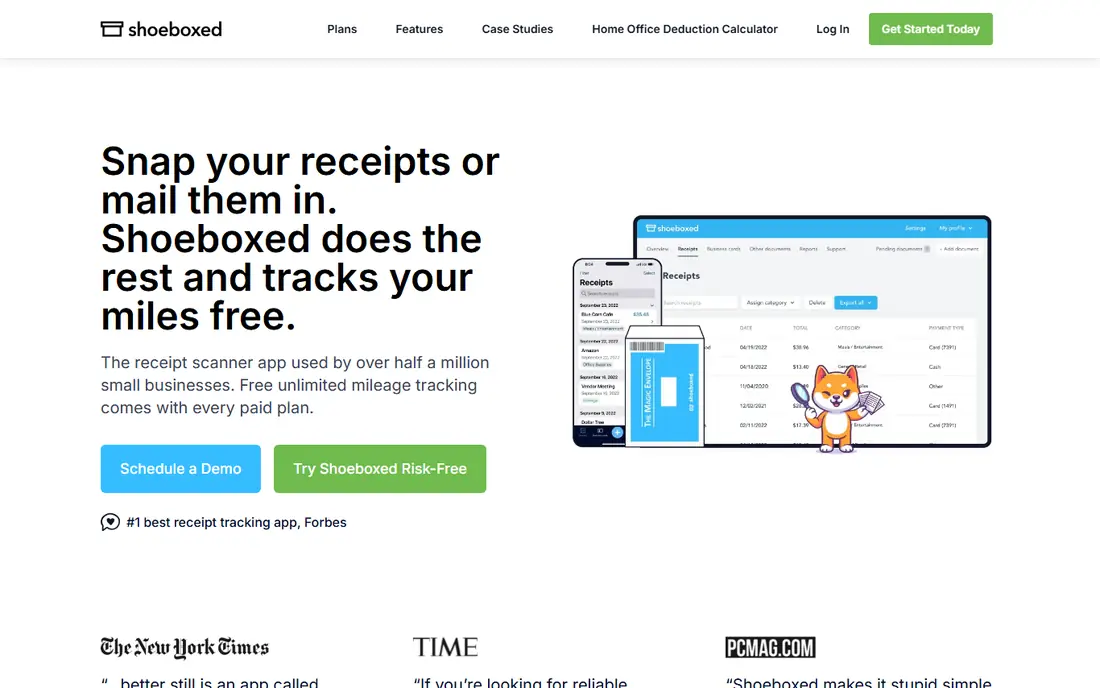
Shoeboxed is built for owners drowning in paper. Scan receipts with the app, or mail them in prepaid envelopes, and human-verified entry checks the data before it lands in your account. Plans start at $18 per month for the Startup tier, with digital and physical document allowances and unlimited storage. Mileage tracking and Gmail receipt import help freelancers build a tax-ready record.
The flat price can feel steep if you only scan a handful of receipts a month, and reporting is simpler than a full expense platform. If paper is your problem and accuracy at tax time is the goal, Shoeboxed is the most reassuring option here.
- Human-verified data entry
- Mail-in envelopes for paper
- Mileage tracking included
- Flat monthly price can feel high for low volume
- Reporting is simpler than Expensify
Everlance pairs mileage tracking with receipt capture, which suits drivers, realtors, and field workers who need both for deductions. The free tier covers 30 automatic trips a month plus receipt uploads, while Premium costs $8 per month, or less on annual billing, for unlimited automatic trips, bank integration, and custom reports. Business plans add team approvals and admin tools.
Receipt-only users may find the capture and reporting thinner than Expensify or Dext, and the free trip cap matters for heavy drivers. If mileage is half your expense story, Everlance is the best combined tracker here.
- Automatic mileage tracking
- Receipt capture in the same app
- IRS-compliant reports
- Receipt features are thinner than Dext
- Premium needed for unlimited automatic trips
Zoho Expense is a focused expense app with receipt scanning, mileage, approvals, and accounting integrations, free for up to three users. Paid plans start near $4 per active user per month on the Standard tier, with Premium higher, and annual billing lowers the rate. For a tiny team that wants proper expense reports around scanning, without paying Expensify prices, it is excellent value.
The free plan caps receipt autoscans at 20 per user per month, so heavy scanners need a paid tier, and Zoho Expense is not a full bookkeeping system. Pair it with Zoho Books or another ledger for complete books. For budget teams, it is hard to beat.
- Free for up to three users
- Receipt autoscan
- Mileage and multi-currency expenses
- Free scan cap is 20 per user per month
- Not full accounting by itself
Smart Receipts is a simple, free receipt scanner for people who want a searchable record without a subscription or a team system. Scan receipts, tag them, generate PDF and CSV reports, and store them locally or in your own folders. It suits students, solo freelancers, and anyone who mainly needs proof of spending at tax time.
It has no approval workflows, card matching, or deep accounting sync, and the interface is plain next to commercial rivals. If you want a free, no-fuss tracker and you handle bookkeeping elsewhere, Smart Receipts does the core job well.
- Free and open-source based
- Simple scanning and reports
- No account needed for basics
- No team approvals or accounting sync depth
- Interface is plain
Foreceipt is a straightforward receipt and expense app for solo owners and small shops. Snap receipts, categorize spending, and pull simple reports for taxes, without learning a full expense platform. A free tier covers light use, with paid plans for higher volume and extra features, so we list pricing as See website where the current tier details vary.
Its integration list and team features are thinner than Expensify or Zoho Expense, and it suits one person better than a staff team. For a solo owner who wants receipts tidy and reports simple, Foreceipt is a calm, low-cost option.
- Simple receipt and expense tracking
- Reports for taxes
- Free tier for light use
- Smaller company with fewer integrations
- Team features are limited
Wave Receipts, part of Wave's bookkeeping suite, lets Wave users capture receipts with OCR and attach them to transactions in their books. That link is the whole appeal: a receipt scanned in the app shows up where the bookkeeping lives, without exporting files between systems. Pricing depends on the Wave plan and receipt features in use, so we list it as See website.
Outside Wave, there is little reason to choose it over a standalone scanner. Inside Wave, though, it removes friction for freelancers and small firms that already run invoices and books there.
- Receipts flow into Wave bookkeeping
- Familiar for Wave users
- OCR capture
- Best value only inside Wave
- Receipt features depend on Wave plan
QuickBooks Online includes receipt capture that feeds directly into accounting: photograph a receipt, review the extracted details, and match it to a transaction. That integration suits firms already using QuickBooks, where an accountant can review receipts and books in one place. Pricing depends on the QuickBooks plan, so we list it as See website.
Buying QuickBooks only for receipt scanning would be wasteful, since standalone scanners cost far less. But if QuickBooks is already your ledger, using its built-in capture is simpler than adding another app and another sync to maintain.
- Receipt capture inside the books
- Accountant familiarity
- Expense categorization
- Full QuickBooks subscription needed
- Receipt capture alone does not justify the price
How we picked these
We compared official pricing pages, plan descriptions, and reviewer comparisons of scanning, mileage, and accounting sync. We favored apps that work in the US, offer real receipt capture, and cover distinct users: teams, accountants, solo owners, and drivers. We did not claim hands-on testing; our notes reflect vendor pages and reviewer findings.
How to choose a receipt tracker
Start with who uses the data. Teams need approvals and card matching, accountants need clean publishing into ledgers, and solo owners need simple capture and tax reports. Next, check scan limits: free tiers often cap monthly scans, and that cap decides whether free stays free.
Then test accuracy on your worst receipts: faded, crumpled, and long restaurant bills reveal more than clean retail receipts. Finally, confirm export: you should be able to download your receipts and reports even if you cancel, since tax records must outlive any app.
Sources
- https://www.expensify.com
- https://www.dext.com
- https://www.shoeboxed.com
- https://www.everlance.com
- https://www.zoho.com/expense/
- https://smartreceipts.co
- https://foreceipt.com
- https://www.waveapps.com
- https://quickbooks.intuit.com
- https://rankite.com/blog/best-corporate-expense-tracking-software
- https://www.selecthub.com/expense-management-software/expensify-vs-shoeboxed/
Frequently asked questions
What is the best receipt tracking app for a small business?
For most small businesses with staff, Expensify is the best all-round pick, while Zoho Expense suits tiny teams on a budget. Solo owners focused on taxes should look at Shoeboxed or Everlance. Match the app to team size and to whether mileage matters.
Is there a free receipt tracking app?
Yes. Expensify, Zoho Expense, Everlance, Smart Receipts, and Foreceipt all offer free tiers, though each caps scans, trips, or users. Smart Receipts is free for basic scanning, while the others limit free use and charge for higher volume or team features.
How do receipt scanner apps read receipts?
Most use optical character recognition to pull merchant, date, total, and tax from a photo, sometimes with human verification, as Shoeboxed offers. Accuracy is high on clean receipts and lower on faded or damaged ones, so always review extracted totals before filing taxes.
Should I keep paper receipts after scanning?
Keep paper for high-value or disputed items until your tax filing is settled, and follow your accountant's advice for your situation. A good scan with a clear backup is usually enough for routine expenses, but originals help if a deduction is ever questioned.
Can a receipt app replace my accountant?
No. A receipt tracker organizes evidence, but it does not give tax advice, close books, or file returns. Share your app's reports with your accountant or bookkeeper, and let them judge deductions and filing. The app saves time; it does not replace professional judgment.