Best Weather App in 2026: 9 Apps Compared
By ToolNimba Editorial Team October 28, 2026 10 min read
- Top pick
 AccuWeather
Minute-by-minute rain forecasts
Starting priceFreeCheck out AccuWeatherRead our review - Runner-up
 CARROT Weather
Custom layouts and data sources
Starting price$4.99 per monthCheck out CARROT WeatherRead our review - Also great
 Windy
Wind, waves, and forecast models
Starting priceFreeCheck out WindyRead our review
How we researched this
We compared official pricing and feature pages, app store listings, privacy policies and public user reviews. Prices change, so check the provider's site before you pay.
Key takeaways
- Most people do not need a paid weather app, because free apps cover hourly forecasts, radar, and severe alerts well.
- CARROT Weather is the best paid choice for custom layouts and switching between forecast sources.
- AccuWeather stands out for minute-by-minute rain timing, while Windy suits people who want detailed wind and model data.
- RadarScope and MyRadar are best for storm watchers who want detailed radar, not just a daily forecast.
- Free apps often show ads and collect location data, so check privacy settings if that matters to you.
Quick comparison
| Name | Best for | Starting price | Free plan | |
|---|---|---|---|---|
| AccuWeather | Minute-by-minute rain forecasts | Free | Yes | Visit |
| CARROT Weather | Custom layouts and data sources | $4.99 per month | Yes | Visit |
| Windy | Wind, waves, and forecast models | Free | Yes | Visit |
 Weather Underground | Hyperlocal station data | Free | Yes | Visit |
 The Weather Channel | Everyday forecasts and radar | Free | Yes | Visit |
 RadarScope | Detailed storm radar | See website | No | Visit |
 Tomorrow.io | Minute-level forecasts and alerts | See website | Yes | Visit |
 MyRadar | Simple, fast radar | See website | Yes | Visit |
 Weather & Radar | Free radar and rain alerts | Free | Yes | Visit |
The best weather apps
We compared official app pages, pricing pages, app store listings, and public reviews for each app. We focused on forecast quality, radar, alerts, and whether the free tier is usable without constant ads.
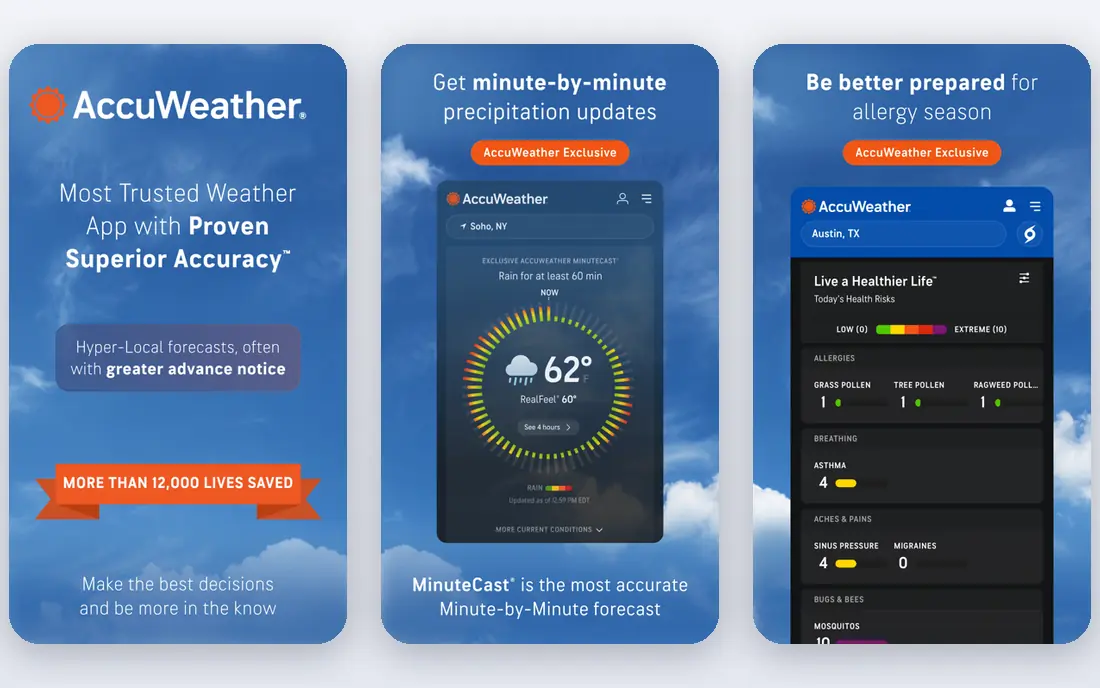
AccuWeather is a solid default for most users. Its MinuteCast feature gives street-level timing for rain in the next few hours, which is useful when you are deciding whether to walk, cycle, or wait ten minutes. Hourly forecasts, daily outlooks, and severe alerts cover the everyday needs most people have.
The free app is ad-supported, and recent reviews note that removing ads now requires the higher Premium+ tier. If you check the weather several times a day and dislike ads, that cost matters. For short-term rain timing alone, though, AccuWeather remains hard to beat.
- MinuteCast for short-term precipitation timing
- Wide global coverage
- Hourly, daily, and severe weather alerts
- Free version shows ads
- Ad-free pricing has risen in recent summaries to $29.99 per year for Premium+
CARROT Weather started as a joke app with a sarcastic personality, but it is now a serious tool for people who want control. Premium lets you switch between sources such as Apple Weather, AccuWeather, and Foreca, and compare forecasts side by side. You can also rebuild the layout, choose widgets, and set detailed notifications.
You can set the personality to professional if the jokes are not for you. Pricing in recent summaries is $4.99 per month or $19.99 per year for Premium, with a higher Ultra tier for maps and storm features. If you just want a quick daily forecast, CARROT is more app than you need, but power users will use the customisation.
- Switch between forecast sources on Premium
- Highly custom layouts and widgets
- Strong Apple Watch support
- Best features need Premium
- Android version lags behind iOS in some features
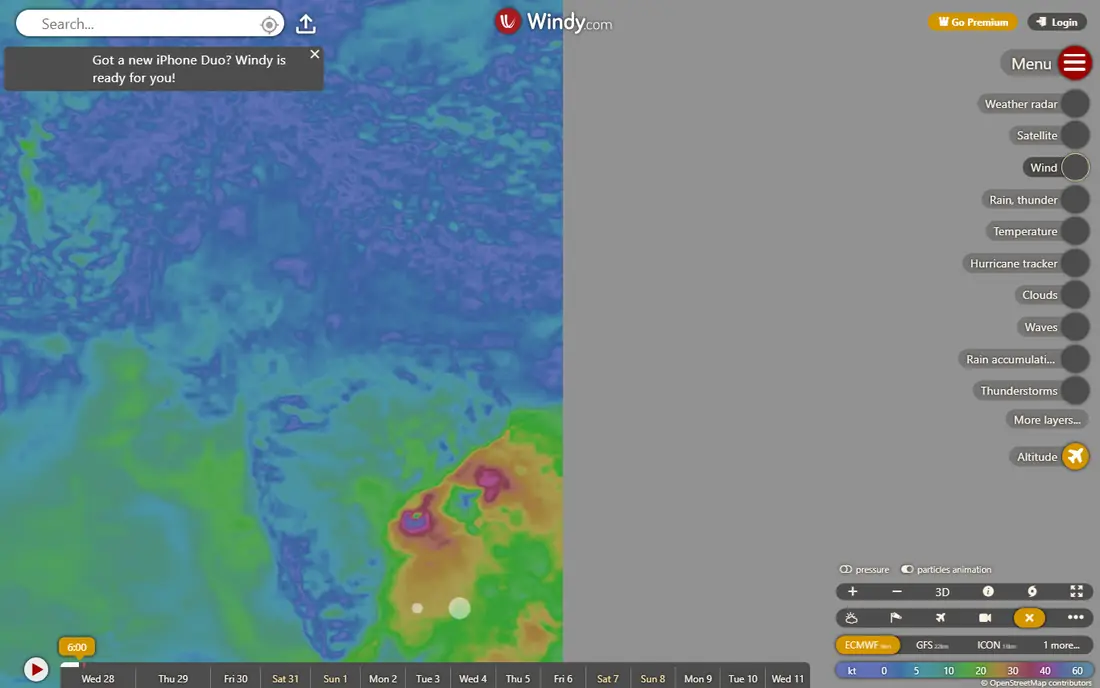
Windy is the pick for outdoor users who care about wind, not just temperature. Sailors, surfers, pilots, hikers, and cyclists can compare forecast models, check wind gusts, and view rain and cloud layers on detailed maps. That model comparison helps you judge uncertainty instead of trusting one number.
Casual users may find Windy busy at first. It is a map tool first and a simple daily forecast second, so it suits people who already know what layers they want. For a weekend walk, a simpler app is faster, but for wind-dependent plans, Windy is the most informative free option here.
- Detailed wind, rain, and wave maps
- Compare multiple forecast models
- No ads in the free web and app experience for core maps
- Interface can overwhelm casual users
- Daily forecast presentation is less simple than mainstream apps
Weather Underground stands out because its data can come from a personal station near your home, not just an airport miles away. In areas with dense station coverage, that can make current temperature and wind feel more accurate for your street. The app also offers radar, hourly forecasts, and severe weather information.
The design is less polished than AccuWeather or CARROT, and the free version includes ads. Recent summaries list an ad-free option at $1.99 per year, but check the current in-app price before you buy. If hyperlocal accuracy matters to you, the station network is a real advantage.
- Data from a large network of personal weather stations
- Hyperlocal current conditions
- Radar and forecast maps
- Free app shows ads
- Interface is functional rather than polished
The Weather Channel app is the familiar choice for many US users. It offers hourly and 10-day forecasts, radar maps, severe weather alerts, and extra layers such as pollen and air quality in some areas. If you want one app that does the basics without learning a new interface, it works.
The downside is the ad experience and data collection. Its app store privacy label lists location, identifiers, and usage data linked to advertising, which is common for free weather apps but worth knowing. If you dislike ads, a paid app or a built-in phone app may feel cleaner.
- Familiar forecasts, radar, and video content
- Wide US coverage
- Severe weather alerts and allergy and flu-related data in some views
- Free app is ad-heavy
- Privacy label lists broad data collection for advertising
RadarScope is not for checking whether you need a jacket. It is for storm watchers, spotters, and weather enthusiasts who want detailed radar, velocity data, and storm cell information. The app shows high-resolution radar and tools that mainstream apps hide or simplify.
That depth comes with a learning curve and a paid price, so check the current app store listing for your platform. Pair RadarScope with a daily forecast app such as AccuWeather or CARROT, and use RadarScope when storms are actually in your area.
- High-resolution radar with storm tracking tools
- Dual-polarisation data for serious storm watchers
- Fast updates
- Paid app with a learning curve
- Not a simple daily forecast app
Tomorrow.io, formerly known for its minute-level weather data, offers precise short-term forecasts and a clean timeline view. You can see when rain starts and stops, check air quality, and set alerts for conditions that affect travel or outdoor work. That precision suits commuters and people planning outdoor events.
The company also serves business customers, so its website can feel less consumer-focused than other apps here. Check the app store listing for current consumer pricing and free tier limits. For minute-level timing without AccuWeather, Tomorrow.io is a strong alternative.
- Minute-by-minute precipitation forecasts
- Hyperlocal weather timelines
- Air quality and pollen data
- Some advanced features are aimed at business users
- Full consumer pricing varies by platform
MyRadar does one job well: radar. Open it, see rain moving across the map, and judge whether a storm will reach you. The animation is fast, the interface is simple, and optional layers add warnings without cluttering the main view. That focus makes it a good companion app, even if you use another app for daily forecasts.
It is not a replacement for a full forecast app. Daily highs, hourly detail, and long-range outlooks are thinner here. Use MyRadar alongside AccuWeather, The Weather Channel, or your phone's built-in app when radar is what you actually need.
- Fast, clear radar animation
- Simple interface
- Optional layers for warnings and fronts
- Limited forecast detail compared with full weather apps
- Some features need a paid upgrade
Weather & Radar, from WetterOnline, is a good free option for people who want radar without a complex interface. It offers forecasts, rain radar, and alerts, with a layout that is easy to scan in seconds. Recent reviews highlight it as a strong free radar choice, with a paid tier listed at $8.99 per year to remove ads in some summaries.
US coverage is solid, but the app is better known in Europe, so local features may vary by region. Check the app store listing for current pricing in your country. If you want a free, simple radar app that is not ad-heavy at its core, Weather & Radar deserves a try.
- Clear rain radar and forecasts
- Rain alerts for your location
- Simple layout for everyday use
- Smaller brand presence in the US than AccuWeather
- Premium features need a paid plan
How we picked these
We compared official app pages, pricing pages, app store listings, and public reviews for each app. We looked for current availability on iPhone or Android, usable free tiers or clear paid pricing, and a distinct strength, such as radar depth, hyperlocal data, or minute-level rain timing. We left out apps with broken widgets, unclear pricing, or no real forecast value in recent reviews.
We did not claim hands-on testing. Our notes rest on vendor pages, app store listings, and reviewer reports about features, ads, and pricing. Weather apps change data sources and prices often, so check the app store listing for your device before you subscribe.
How to choose the right weather app
Start with how you use weather data. If you check once in the morning, a free app such as AccuWeather, The Weather Channel, or Weather & Radar is enough. If you plan outdoor activities, Windy or RadarScope will give you more useful detail than a simple daily forecast.
Check accuracy where you live
Forecast accuracy varies by region and data source, so try two apps for a week and compare them with what actually happens. CARROT Weather helps here, because Premium lets you switch sources and see which one is most accurate for your area. A single app may be best in one city and weaker in another.
Decide what ads and privacy are worth to you
Free weather apps often fund themselves with ads and location data. If you check weather often, paying $20 to $30 per year for an ad-free app can be worth it for a cleaner experience. Also check location permissions: set them to only while using the app if you do not need background rain alerts.
Set alerts, then trust them
Severe weather alerts, rain alerts, and lightning alerts are more useful than opening an app every hour. Turn on alerts for your home and any travel locations, and keep one radar app on your phone for storm days. That way, you get warned without needing to watch the forecast all day.