Best Workout Apps in 2026: 9 Apps Compared
By ToolNimba Editorial Team October 28, 2026 11 min read

- Top pick
 Nike Training Club
Free guided workouts
Starting priceFreeCheck out Nike Training ClubRead our review - Runner-up
 Fitbod
Adaptive gym programming
Starting price$12.99 per monthCheck out FitbodRead our review - Also great
 Strong
Fast strength logging
Starting priceSee websiteCheck out StrongRead our review
How we researched this
We compared official pricing and feature pages, app store listings, privacy policies and public user reviews. Prices change, so check the provider's site before you pay.
Key takeaways
- Nike Training Club is the best free workout app overall, with guided strength, cardio, yoga, and mobility workouts at no cost.
- Fitbod is our pick for gym lifters who want the app to plan each session, adjusting weights and exercises based on recovery and available equipment.
- Strong and Hevy are the best simple trackers for lifters who already know their program and just want fast, clean logging.
- Apple Fitness+ and Peloton suit people who like instructor-led classes, while Strava is the best choice for runners and cyclists who value community.
- Free apps cover the basics well, so pay only when you need adaptive programming, deeper analytics, or live coaching.
Quick comparison
| Name | Best for | Starting price | Free plan | |
|---|---|---|---|---|
| Nike Training Club | Free guided workouts | Free | Yes | Visit |
| Fitbod | Adaptive gym programming | $12.99 per month | Free trial | Visit |
| Strong | Fast strength logging | See website | Yes | Visit |
 Hevy | Free gym logging | See website | Yes | Visit |
 JEFIT | Large exercise library | $12.99 per month | Yes | Visit |
 FitOn | Free video classes | Free | Yes | Visit |
 Apple Fitness+ | Apple Watch classes | $9.99 per month | Free trial | Visit |
 Peloton | Live and on-demand classes | $15.99 per month | Free trial | Visit |
 Strava | Running and cycling | $11.99 per month | Yes | Visit |
The best workout apps
Workout apps split into three kinds: guided class libraries, gym loggers, and programs that plan sessions for you. The right one depends on how you train, not on which app has the longest feature list. We compared official feature pages, pricing, app store listings, and public reviews to build this list.
This article is general fitness information, not medical advice. If you have an injury, a heart condition, or another health concern, check with a clinician before starting a new training program.
Nike Training Club is the rare fitness app with no paywall at all. Every workout and training program is free, with coaching cues and video guidance across strength, cardio, yoga, and mobility. For beginners, or for anyone who wants guided sessions without a monthly bill, that makes it the obvious first download.
The limit is tracking. Nike Training Club does not log your weights over time or build a progressive strength plan around your personal records, so serious lifters will outgrow it as a sole tool. Use it for guided home workouts, cross-training, and mobility, and pair it with a logger such as Strong or Hevy if you want to track strength progress properly.
- Completely free with no subscription
- Guided workouts across strength, cardio, yoga, and mobility
- Programs for beginners through advanced users
- No progressive overload tracking or lifting log
- No adaptive programming based on your lifts
- Workout library is smaller than paid class apps
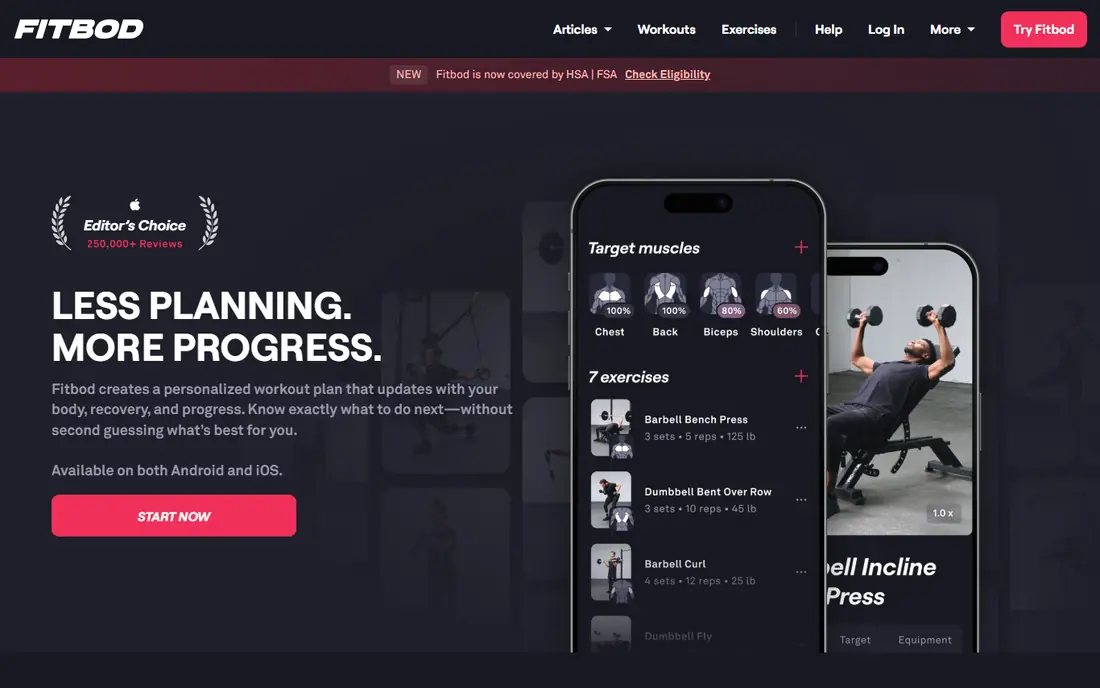
Fitbod does the thinking for gym lifters. You tell it what equipment you have, which muscles are recovered, and how hard you want to train, and it generates a session with exercises, sets, reps, and weights. As you log workouts, it adjusts future sessions based on your performance, which removes the guesswork of planning progression yourself.
That convenience costs more than a basic logger, and the free access is limited to a trial period rather than a lasting free tier. Fitbod also suits gym training far better than home classes or running plans. If you train with weights three or more times a week and you do not want to write your own programs, Fitbod is worth the trial. If you already follow a set program, a cheaper logger will do.
- Builds each session from your equipment, goals, and muscle recovery
- Adjusts weights automatically
- Tracks strength progress over time
- No permanent free plan, only a trial
- Price is high compared with simple loggers
- Less useful for pure class-based training
Strong is the classic gym logger, and its appeal is speed. You build a routine once, then record sets, reps, and weight with a few taps between sets. It calculates your estimated one-rep max, charts volume and strength over time, and helps with plate math and warm-up weights, all without clutter getting in the way.
Strong does not plan your training. If you need a program, you must bring one from a coach, a book, or another app. The free plan also limits how many custom routines you can save, with the paid plan raising that cap and adding deeper charts and export options. For lifters who know what they are doing and value a fast logbook, Strong remains hard to beat.
- Clean, fast set-by-set logging
- One-rep max and volume charts
- Plate calculator and warm-up estimates
- Free plan limits custom routines
- Does not build programs for you
- Advanced charts require a paid plan
Hevy gives you the most for free among serious gym loggers. The free plan covers core logging, an exercise library with instructions, rest timers, and social features, with limits mainly on saved routines and long chart history. That makes it a strong starting point for lifters who want to track workouts without paying from day one.
Pro adds unlimited routines, fuller chart history, and advanced analytics, at a lower price than many rivals. Hevy does not generate full adaptive programs in the way Fitbod does, so you still need to know your routine or follow a plan from elsewhere. If you want a clean, social, genuinely usable free tracker, start with Hevy.
- Generous free plan with unlimited logging
- Exercise library with videos
- Social features for following friends and sharing workouts
- Free plan limits saved routines and chart history
- Advanced analytics require Pro
- No full adaptive program builder
JEFIT suits lifters who like data and variety. Its exercise library is one of the largest among workout apps, with animated guides and detailed muscle group tracking, and community plans give you ready-made routines to try. Progress graphs break down volume by muscle group, which helps you spot gaps such as neglecting back or leg work.
The free plan is ad-supported, and the interface packs in more features than a minimal logger, which some users find busy. Elite removes ads and adds advanced analytics, but many casual lifters will not need everything it opens. Choose JEFIT if you want the biggest exercise library and community programs in one place, and choose Strong or Hevy if you prefer a simpler log.
- Very large exercise database with guides
- Community workout plans
- Detailed muscle group tracking and progress graphs
- Free plan includes ads
- Interface feels busy compared with Strong
- Elite features overlap with cheaper loggers for many users
FitOn is built around free video classes, with hundreds of guided sessions across cardio, strength, yoga, Pilates, and dance. Many classes are short, which suits home training in a spare half hour, and the app includes programs and challenges to keep you moving week to week. The base tier is free, which makes it easy to try without commitment.
Programming is looser than Nike Training Club, and FitOn does not track barbell progression or build adaptive strength plans. Pro adds offline downloads, extra classes, and meal plans, but the free library already covers most home workout needs. If you want follow-along classes at home for free, FitOn and Nike Training Club are the two apps to compare first.
- Large library of free guided video classes
- Covers cardio, strength, yoga, and Pilates
- Short classes suit busy schedules
- Less structured programming than Nike Training Club
- Paid Pro adds features many users may not need
- No serious strength tracking
Apple Fitness+ turns an Apple Watch into a class studio. Workouts stream to an iPhone, iPad, or Apple TV, with your heart rate and calories shown on screen alongside the instructor. Classes cover strength, high-intensity interval training, yoga, dance, rowing, cycling, and meditation, with new sessions added regularly.
The catch is the ecosystem. You need Apple devices to get the full experience, and there is no Android version. Training is class-led rather than built around your personal lifting numbers, so it suits general fitness and guided sessions more than powerlifting progression. If you already own an Apple Watch, the one-month free trial makes it easy to judge.
- High-quality studio classes with live Apple Watch metrics on screen
- Covers strength, HIIT, yoga, dance, and meditation
- Family sharing available
- Requires an Apple Watch for full metrics
- No Android app
- Strength programming is class-based rather than personalized
Peloton started with bikes, but its app now covers far more than cycling. The App One plan gives access to thousands of live and on-demand classes in running, strength, yoga, meditation, and more, with instructors whose energy and music choices keep many users coming back. Leaderboards and high fives add a community feel that solo apps lack.
Price is the main drawback for app-only users, since the monthly rate sits above most rivals here, and cycling classes are best with Peloton hardware. A trial period lets you test whether instructor-led classes motivate you more than self-guided workouts. If group energy keeps you consistent, Peloton may be worth it. If you train alone and prefer a simple plan, a cheaper app will serve you better.
- Large live and on-demand class library
- Motivating instructors and community features
- Covers cycling, running, strength, yoga, and meditation
- Monthly price is high for app-only access
- Works best with Peloton equipment for cycling classes
- Social features may feel intrusive for solo trainers
Strava is less a workout planner and more a training community for outdoor athletes. Runners and cyclists log GPS activities, follow friends, join clubs, and compete on local segments, which turns solo miles into a shared activity. It pairs with most GPS watches and bike computers, so tracking is automatic once you set it up.
The free plan covers activity tracking and social features, while a subscription adds route planning, deeper training analysis, and segment leaderboards. Strava does not plan gym sessions or track barbell lifts well, so lifters should pair it with a gym logger. For runners and cyclists who stay motivated through community and routes, Strava is the standard choice.
- Best social layer for runners and cyclists
- Route planning and segment tracking
- Works with most GPS watches and bike computers
- Paid features are needed for full route and training analysis
- Less useful for gym strength training
- Social feed can distract from training
How we picked these
We compared official feature pages, pricing pages, app store listings, and public reviews, and we kept apps that are active in 2026, serve a distinct training style, and offer a usable free plan or trial. We included free guided apps, gym loggers, adaptive planners, and class platforms, so runners, lifters, and home trainers can each find a fit. We did not claim hands-on testing, and prices here can vary by store, region, and plan length.
How to choose the best fitness app for you
Start with how you actually train. Gym lifters who want a plan should try Fitbod, while lifters who already have a plan should try Strong or Hevy. Home trainers who follow videos should compare Nike Training Club and FitOn first, since both are free. Runners and cyclists should start with Strava, and class lovers should trial Apple Fitness+ or Peloton.
Use trials to test real workouts
A trial tells you more than a feature list. Log three or four real sessions, including one on a busy day when motivation is low, and see whether the app makes training easier or adds friction. Check whether it works with your watch, your equipment, and your schedule. If logging feels slow or classes feel wrong, switch early rather than paying for a year.
Watch the subscription math
Monthly rates look small, but a year of a paid app can cost as much as basic gym gear or several months of a gym membership. Start with free plans, use trials, and only upgrade when a paid feature solves a specific problem, such as adaptive programming or offline classes. Cancel through the same store where you subscribed, and set a reminder before any annual renewal.
Sources
- https://www.nike.com/ntc-app
- https://fitbod.me
- https://strong.app
- https://www.hevyapp.com
- https://www.jefit.com
- https://fitonapp.com
- https://www.apple.com/apple-fitness-plus/
- https://www.onepeloton.com
- https://www.strava.com
- https://www.sensai.fit/blog/best-home-workout-app
- https://techilu.com/best-workout-planning-apps/
- https://home-gym-reviews.com/best-free-workout-apps/