Top Rated PDF Scanner Software in 2026: 8 Apps Compared
By ToolNimba Editorial Team November 12, 2026 9 min read

- Top pick
 Adobe Scan
Best free third party scanner
Starting priceFreeCheck out Adobe ScanRead our review - Runner-up
 Apple Notes
iPhone users wanting a free scanner
Starting priceFreeCheck out Apple NotesRead our review - Also great
 Google Drive
Android users and Drive storage
Starting priceFreeCheck out Google DriveRead our review
How we researched this
We compared official pricing and feature pages, app store listings, privacy policies and public user reviews. Prices change, so check the provider's site before you pay.
Key takeaways
- Apple Notes and Google Drive are the best free scanners for most people, since they are already on your phone.
- Adobe Scan offers the cleanest free third party scans, with strong OCR and no watermark.
- Scanner Pro and SwiftScan suit frequent scanners who want workflows, cloud sync and polished output.
- Check where scans are stored and whether OCR runs on device or in the cloud before scanning sensitive documents.
Quick comparison
| Name | Best for | Starting price | Free plan | |
|---|---|---|---|---|
| Adobe Scan | Best free third party scanner | Free | Yes | Visit |
| Apple Notes | iPhone users wanting a free scanner | Free | Yes | Visit |
| Google Drive | Android users and Drive storage | Free | Yes | Visit |
 Scanner Pro | Best paid all rounder on Apple devices | See website | Yes | Visit |
 SwiftScan | Fast workflows and cloud sync | See website | Yes | Visit |
 Genius Scan | Fast scans with no watermark | See website | Yes | Visit |
 CamScanner | Feature depth for difficult documents | $9.99 per month | Yes | Visit |
 iScanner | AI cleanup and extra features | $9.99 per month | Yes | Visit |
The best PDF scanner software
A PDF scanner app turns paper into a clean, searchable PDF with your phone camera. The best choice depends on your phone, how often you scan, whether you need text recognition, and where you want the files to live.
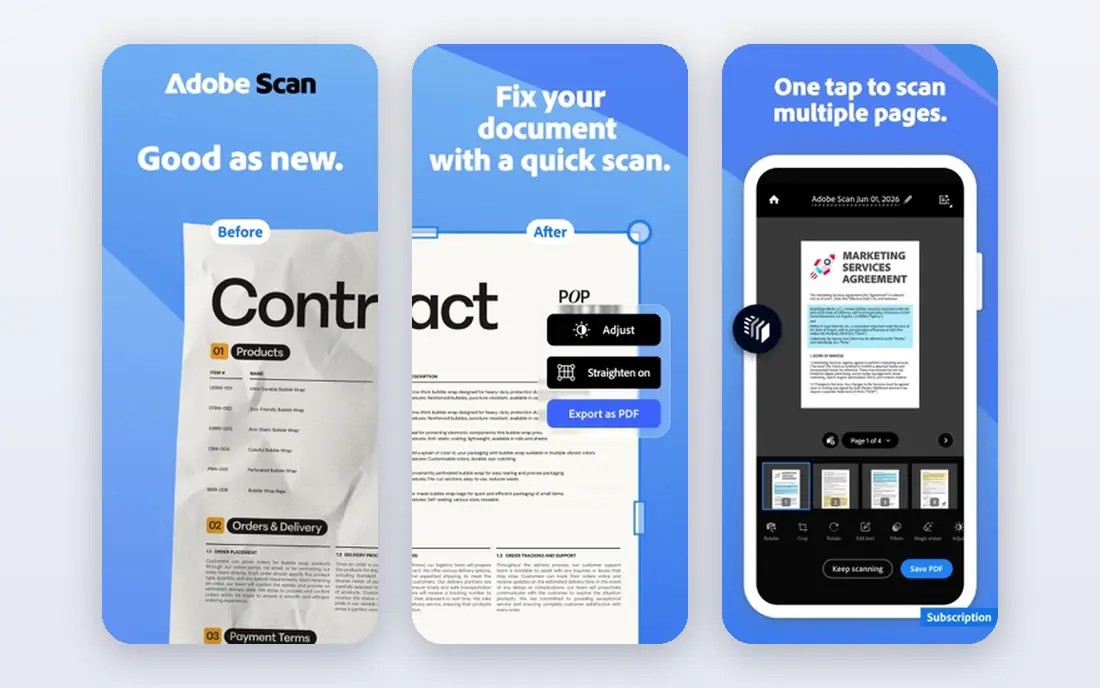
Adobe Scan is our top third party pick because the free version is genuinely useful. It auto detects pages, cleans up edges and shadows, and runs text recognition so PDFs are searchable. There is no watermark on free scans, which is not true of every rival.
Premium, listed near $9.99 per month, adds extra storage and Acrobat features most casual users do not need. The main trade off is cloud storage: scans go to Adobe cloud unless you move them. If you already use Adobe products, or you want the most polished free scans, Adobe Scan is the place to start.
- Free unlimited scans with no watermark
- Strong OCR
- Clean auto cleanup
- Scans live in Adobe cloud by default
- Premium features need a paid plan
Apple Notes includes a document scanner that is easy to miss and hard to beat for everyday use. Open a note, tap the camera, choose Scan Documents, and the phone captures, crops and saves a PDF. Live Text makes text inside the scan selectable and searchable on device, with no subscription and no watermark.
The limits are platform and workflow. Apple Notes is Apple only, and it lacks the batch naming, cloud routing and advanced export of SwiftScan or Scanner Pro. For quick receipts, forms and notes on an iPhone or iPad, it is the simplest free scanner available.
- Built into iPhone and iPad
- No extra app or account
- On device text recognition
- Apple only
- Fewer batch and workflow features than paid scanners
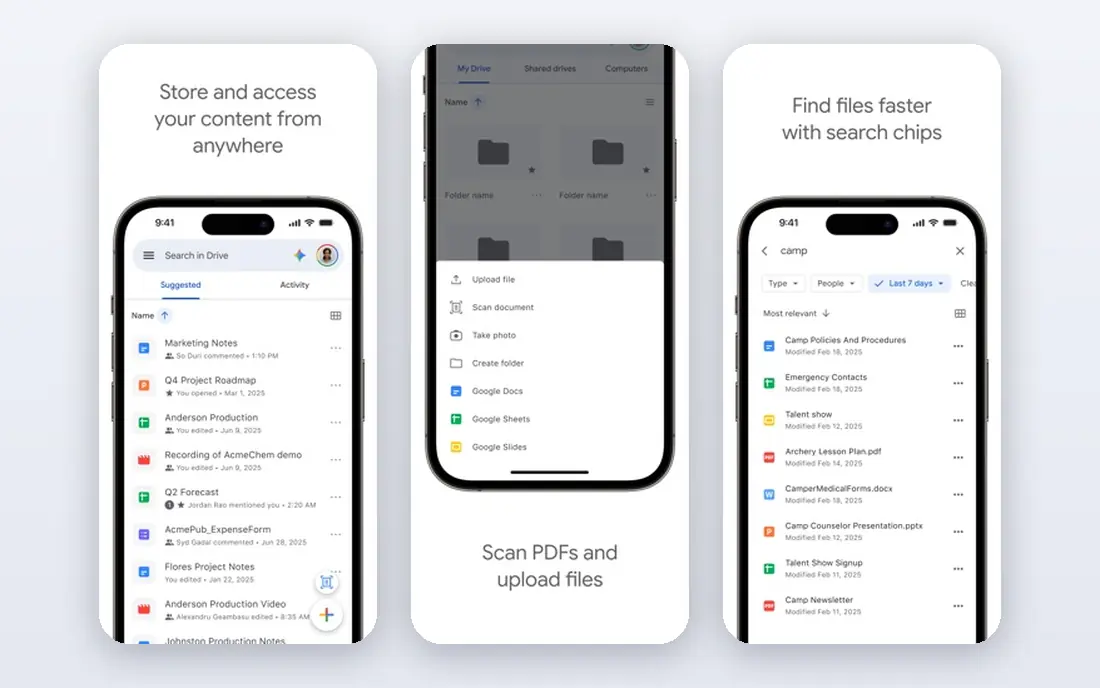
Google Drive includes a scan feature on Android and in the Drive mobile app, which turns your phone into a free scanner with no extra install. Scans save as PDFs in Drive, where text recognition makes them searchable after upload. For Android users and Google Workspace teams, that workflow is hard to beat.
Dedicated apps offer better edge cleanup, batch naming and workflow routing. Drive also counts scans toward your Google storage, so heavy scanners should check their plan. For everyday scanning tied to Drive, the built in tool is free, simple and reliable.
- Built into Android and the Drive app
- Free
- Scans save straight to Drive
- Fewer scan controls than dedicated apps
- Storage counts toward your Google account limit
Scanner Pro from Readdle is the best paid all rounder for Apple users. It scans fast, cleans up pages well, and runs OCR on device, which is better for privacy than cloud OCR. Workflows can rename files, send them to cloud storage and automate routine steps, which helps frequent scanners.
The app is free to download, with paid features behind a Scanner Pro Plus subscription, and prices vary by monthly or yearly offer, so we list See website. Scanner Pro is Apple only, so Android users should look at SwiftScan or Adobe Scan instead. For iPhone and iPad users who scan daily, it is worth the subscription.
- Private on device OCR
- Polished scans
- Good workflow and export options
- Apple only
- Full features need a paid Plus subscription
- Pricing varies by offer
SwiftScan, formerly Scanbot, is built for speed and for people who scan on the move. Capture is quick, edge detection is reliable, and automatic file naming plus cloud uploads save time for travelers and freelancers. The interface stays clean even with a large scan library.
The free version watermarks scans and limits OCR and advanced features to paid plans, with prices that vary by app store offer, so we list See website. If you scan often and value a fast, polished workflow over a free tier, SwiftScan is a strong pick on both iPhone and Android.
- Fast capture and auto naming
- Flexible cloud destinations
- Clean interface
- Free scans carry a watermark
- Full OCR and features need a paid plan
- Prices vary by store
Genius Scan is a quiet workhorse: fast capture, good edge detection, easy PDF export and no watermark even on the free tier. Scans stay local by default, with optional cloud destinations, which suits users who want control over where files go. It is a good fit for receipts, forms and everyday documents.
OCR and advanced features require a paid tier, with pricing that varies by monthly, yearly or one time offers in different stores, so we list See website. For users who hate subscriptions, Genius Scan has historically offered a one time purchase in some stores, but check the current store listing before buying.
- Fast scans
- No watermark on free tier
- Local storage by default
- Easy PDF export
- OCR sits behind a paid tier
- Pricing varies by plan and store
CamScanner offers the deepest feature set in this list, with batch scanning, OCR in dozens of languages, ID card modes, Office export and cloud sync. That depth helps with difficult documents, long forms and office workflows where other apps feel thin. Premium is listed near $9.99 per month, with yearly and lifetime options in some stores.
The free tier watermarks scans and limits OCR, and files live in CamScanner cloud by default. Users should also read the current privacy policy, since CamScanner has faced scrutiny in the past. For feature depth, it remains popular, but privacy conscious users may prefer Adobe Scan, Genius Scan or Scanner Pro.
- Very wide feature set
- OCR in many languages
- Batch scanning and Office export
- Free scans carry watermarks
- Cloud storage by default
- Privacy history needs a careful read
iScanner stands out for AI powered cleanup, which sharpens edges, removes shadows and improves readability on imperfect photos. It also covers counting, measuring and document tools beyond basic scanning, which suits users who want one app for many document jobs. Paid plans are listed near $9.99 per month, with a lower yearly rate in some stores.
The free tier is limited, and the full feature set needs a subscription. For users who scan wrinkled receipts, whiteboards or pages in poor light, the AI cleanup is a real advantage. For clean documents in good light, a free scanner such as Adobe Scan or Apple Notes may be enough.
- AI edge cleanup and polish
- Wide feature set
- OCR included on paid plans
- Paid plan needed for full features
- Price varies by monthly and yearly offers
How we picked these
We compared official app store listings, vendor pages, OCR availability, watermark rules, storage location and paid plan terms. We favored apps that are actively available in US app stores in 2026 and that produce clean PDFs. We left out Microsoft Lens, which Microsoft retired in early 2026, and we note OneDrive scanning as its replacement where relevant.
How to choose a PDF scanner app
Start with what you already have. iPhone users should try Apple Notes first, and Android users should try Google Drive, since both are free and need no new account. If you need better cleanup, batch work or OCR export, move to Adobe Scan for free, then to Scanner Pro, SwiftScan or Genius Scan for paid workflows.
Next, check privacy and storage. On device OCR and local storage suit sensitive documents, while cloud OCR and cloud storage suit teams that share files widely. Read the app privacy policy for retention, sharing and account deletion, especially before scanning IDs, medical forms or financial documents. Good light and a flat surface still matter more than any AI feature for scan quality.
Free versus paid scanner apps
Every major scanner app is now free to download, so free versus paid really means free to start versus paid for full features. OCR export, batch processing, cloud sync and watermark removal usually sit behind a subscription. Pay when you scan daily, need OCR for search, or need workflows that save time every week. For occasional scans, a built in or free third party scanner is enough.
Tips for better scans
Use natural light or a bright lamp, keep the page flat, and hold the phone steady above the document. Scan in small batches and check the first page before scanning twenty more. Name files by date and topic at scan time, since a folder of Scan 001 files is useless later. Finally, back up important scans to a second location, not just inside the scanner app.
Sources
- https://www.adobe.com
- https://www.apple.com
- https://www.google.com
- https://www.readdle.com
- https://www.swiftscan.app
- https://www.geniusscan.com
- https://www.camscanner.com
- https://www.iscanner.app
- https://www.technbrains.com/blog/best-scanner-apps/
- https://thedolceway.com/blog/document-scanner-apps-free-vs-paid
Frequently asked questions
What is the best PDF scanner app for iPhone?
Apple Notes is the best free scanner for iPhone, with on device text recognition and no watermark. Adobe Scan is the best free third party option, and Scanner Pro is the best paid all rounder for frequent Apple users. Choose by how often you scan and whether you need workflows.
What is the best PDF scanner app for Android?
Google Drive is the best free starting point on Android, since scanning is built in and files save to Drive. Adobe Scan is the best free third party scanner, with strong OCR and no watermark. SwiftScan, Genius Scan and CamScanner suit frequent Android scanners who need more features.
What is the best free PDF scanner software?
Adobe Scan, Apple Notes and Google Drive are the best free options, with no watermark on basic scans. Genius Scan also offers free scans without a watermark, though OCR needs a paid tier. Avoid free apps that watermark every page unless you plan to pay.
Does a PDF scanner app need OCR?
OCR makes scanned text searchable and copyable, which matters for receipts, contracts and research. For a simple photo of a page you only need to read, OCR is less important. If you search scans later or copy text from them, choose an app with OCR on the plan you will actually use.
Is Microsoft Lens still available as a scanner app?
No. Microsoft retired Microsoft Lens, removing it from app stores in February 2026 and stopping new scans in March 2026. Microsoft now points users to the scan feature inside OneDrive. Do not build a new workflow on Lens.